Keyboard Shortcuts to Clear Cell Output in Jupyter Notebook (original) (raw)
Last Updated : 23 Jul, 2025
In this article, we will cover How to clear the output of a cell in Jupyter Notebook we will discuss various methods to do the same. First, we look at what is Jupyter Notebook and why we use it, we discuss different methods to clear cell output in Jupyter Notebook in this article.
Jupyter Notebook
The Jupyter Notebook is the original web application for creating and sharing computational documents that contain live code, equations, visualizations, and narrative text. It offers a simple, streamlined, document-centric experience. Jupyter supports more than 40 programming languages, including Python.
Before moving ahead****,** look **at why we need to clear cell output. There are multiple reasons to clear cell output:
- Improves readability of notebook
- Reduce disk space if the notebook contains large plots or data
- Helps focus on code logic
- Improves Reproducibility
How to Clear Cell Output in Jupyter Notebook
In a Jupyter Notebook we can clear cell output using various methods, including using the Jupyter Notebook toolbar, keyboard shortcuts, or code execution:
Keyboard Shortcut to Clear Cell Output
Follow the steps to clear a cell output using keyboard shortcut:
- Select the cell you want to clear the output
- Press "**Esc" to enter in **Command mode if you are in editing mode
- Press the key "O" to clear the output, **Note it is letter "O" not the zero "0"
**Note: In command mode, the cell border is blue or depending on your Jupyter theme and the cell content is not highlighted for editing.
You can edit you keyboard shortcuts also by selecting **Help -> Edit Keyboard Shortcuts then select **clear cell output and add new shortcut key, refer to below screenshots,
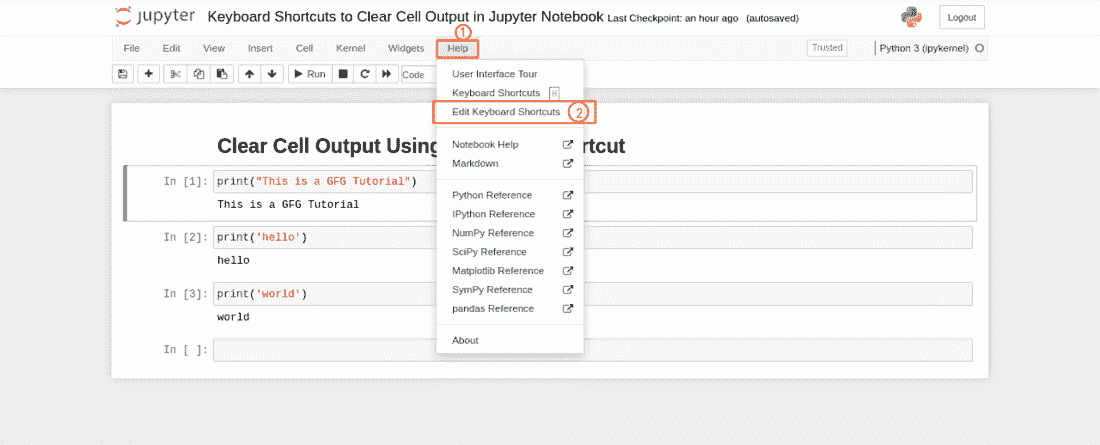
Editing shortcut keys
.png)
select new key
Clear Current Cell Output
- Select the cell you want to clear the output and use the keyboard shortcut described above or
- Click on **Cells Menu Button
- Click on Current Outputs
- Click on Clear to clear the output of the selected cell
.png)
Clear output of a single cell
Clearing Output of All Cells
- To clear the outputs of all the cells click on **Cells button in Menu bar
- Click on **All Outputs button
- Click on **Clear button to clear all the output
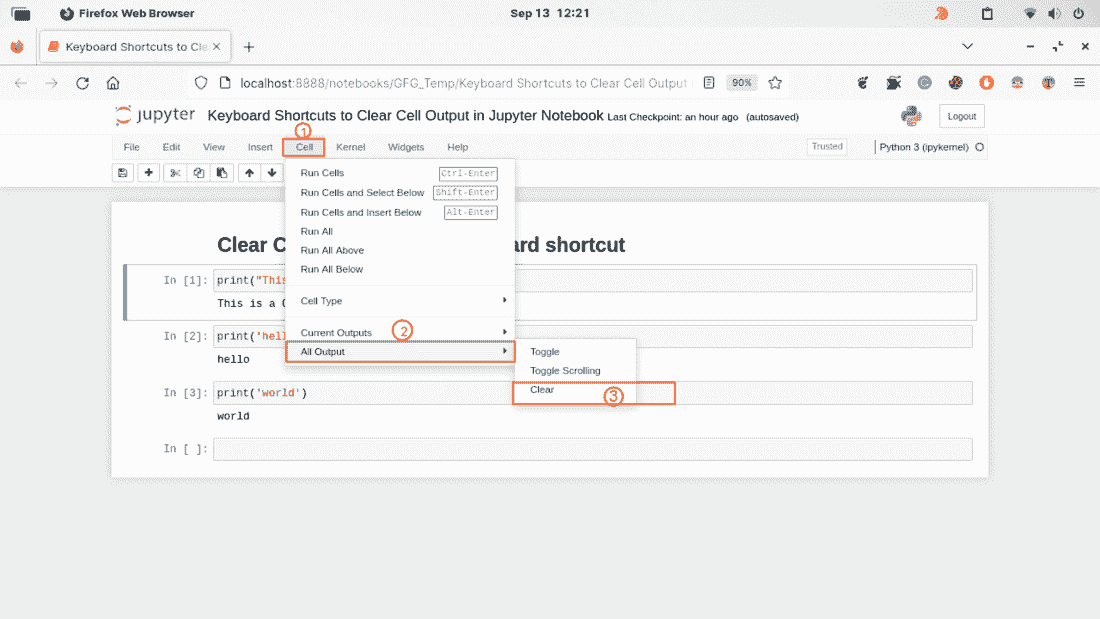
Clear the outputs of all the cells
Other Keyboard Shortcuts for Jupyter Notebook
Speaking of keyboard shortcuts, Jupyter Notebook offers numerous other shortcuts that can increase your productivity. Here are some of the most frequently used shortcuts:
- **Shift + Enter - Run the current cell and move to the next cell.
- **Ctrl + Enter - Run the current cell and stay on the same cell.
- **M - Change the current cell to a Markdown cell.
- **Y - Change the current cell to a code cell.
- **A - Insert a new cell above the current cell.
- **B - Insert a new cell below the current cell.
- **D, D - Delete the current cell.
- **H - Show keyboard shortcuts dialog
Learn these shortcuts to save time and be more efficient in Jupyter Notebook.