Loops in Python For, While and Nested Loops (original) (raw)
Last Updated : 04 Oct, 2025
Loops in Python are used to repeat actions efficiently. The main types are For loops (counting through items) and While loops (based on conditions).
For Loop
For loops is used to iterate over a sequence such as a list, tuple, string or range. It allow to execute a block of code repeatedly, once for each item in the sequence.
Python `
n = 4 for i in range(0, n): print(i)
`
**Explanation: This code prints the numbers from 0 to 3 (inclusive) using a for loop that iterates over a range from 0 to n-1 (where n = 4).
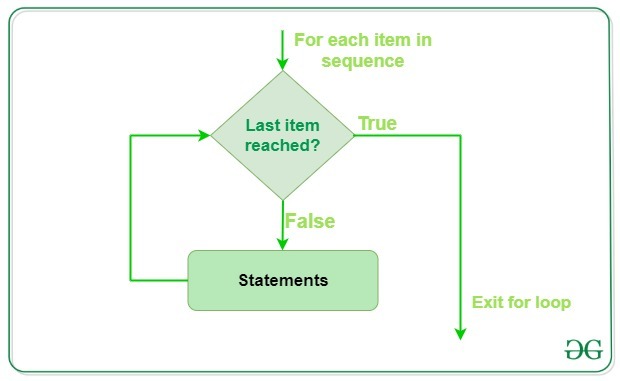
Example:
Iterating Over List, Tuple, String and Dictionary Using for Loops in Python
Python `
li = ["geeks", "for", "geeks"] for x in li: print(x)
tup = ("geeks", "for", "geeks") for x in tup: print(x)
s = "abc" for x in s: print(x)
d = dict({'x':123, 'y':354}) for x in d: print("%s %d" % (x, d[x]))
set1 = {10, 30, 20} for x in set1: print(x),
`
Output
geeks for geeks geeks for geeks a b c x 123 y 354 10 20 30
Iterating by Index of Sequences
We can also use the index of elements in the sequence to iterate. The key idea is to first calculate the length of the list and then iterate over the sequence within the range of this length.
Python `
li = ["geeks", "for", "geeks"] for index in range(len(li)): print(li[index])
`
**Explanation: This code iterates through each element of the list using its index and prints each element one by one. The **range(len(list)) generates indices from 0 to the length of the list minus 1.
While Loop
In Python, a while loop is used to execute a block of statements repeatedly until a given condition is satisfied. When the condition becomes false, the line immediately after the loop in the program is executed.
In below code, loop runs as long as the condition cnt < 3 is true. It increments the counter by 1 on each iteration and prints "Hello Geek" three times.
Python `
cnt = 0 while (cnt < 3): cnt = cnt + 1 print("Hello Geek")
`
Output
Hello Geek Hello Geek Hello Geek
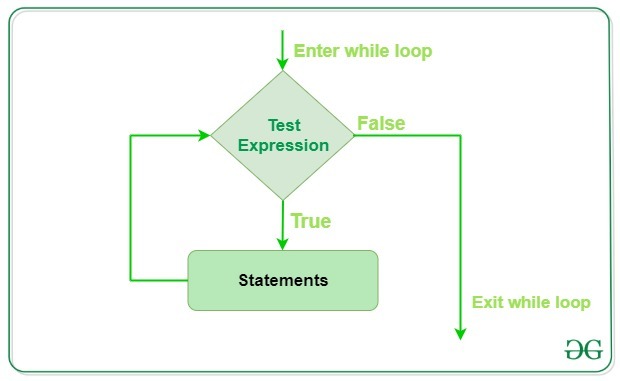
Infinite While Loop
If we want a block of code to execute infinite number of times then we can use the while loop in Python to do so.
Code given below uses a 'while' loop with the condition "**True", which means that the loop will run infinitely until we break out of it using "**break" keyword or some other logic.
Python `
while (True): print("Hello Geek")
`
**Note: It is suggested not to use this type of loop as it is a never-ending infinite loop where the condition is always true and we have to forcefully terminate the compiler.
Nested Loops
Python programming language allows to use one loop inside another loop which is called nested loop. Following example illustrates the concept.
Python `
from future import print_function for i in range(1, 5): for j in range(i): print(i, end=' ') print()
`
Output
1 2 2 3 3 3 4 4 4 4
**Explanation: In the above code we use nested loops to print the value of i multiple times in each row, where the number of times it prints i increases with each iteration of the outer loop. The print() function prints the value of i and moves to the next line after each row.
A final note on loop nesting is that we can put any type of loop inside of any other type of loops in Python. For example, a for loop can be inside a while loop or vice versa.
Loop Control Statements
Loop control statements change execution from their normal sequence. When execution leaves a scope, all automatic objects that were created in that scope are destroyed. Python supports the following control statements.
Continue Statement
The continue statement in Python returns the control to the beginning of the loop.
Python `
for letter in 'geeksforgeeks': if letter == 'e' or letter == 's': continue print('Current Letter :', letter)
`
Output
Current Letter : g Current Letter : k Current Letter : f Current Letter : o Current Letter : r Current Letter : g Current Letter : k
**Explanation: The continue statement is used to skip the current iteration of a loop and move to the next iteration. It is useful when we want to bypass certain conditions without terminating the loop.
Break Statement
The break statement in Python brings control out of the loop.
Python `
for letter in 'geeksforgeeks': if letter == 'e' or letter == 's': break
print('Current Letter :', letter)
`
**Explanation: break statement is used to exit the loop prematurely when a specified condition is met. In this example, the loop breaks when the letter is either 'e' or 's', stopping further iteration.
Pass Statement
We use pass statement in Python to write empty loops. Pass is also used for empty control statements, functions and classes.
Python `
for letter in 'geeksforgeeks': pass print('Last Letter :', letter)
`
**Explanation: In this example, the loop iterates over each letter in 'geeksforgeeks' but doesn't perform any operation, and after the loop finishes, the last letter ('s') is printed.
- Python Loops Quiz
- Python Do While Loops
- Using else with Loops
- Difference between for loop and while loop
- Use for Loop That Loops Over a Sequence
- Eliminating Loop from Python Code