Merge two Pandas DataFrames on certain columns (original) (raw)
Let's learn how to merge two Pandas DataFrames on certain columns using merge function.
The merge function in Pandas is used to combine two DataFrames based on a common column or index.
**merge Function Syntax: DataFrame.merge(right, how='inner', on=None, left_on=None, right_on=None, left_index=False, right_index=False, sort=False, copy=True, indicator=False, validate=None)
The merge function returns a new DataFrame containing the merged data.
Merge Two Pandas DataFrames with Inner Join
An inner join combines only the rows that have matching values in both DataFrames. In this example, we will merge df1 and df2 on the 'Name' column using an inner join:
Python `
import pandas as pd
Creating DataFrame 1
df1 = pd.DataFrame({ 'Name': ['Raju', 'Rani', 'Geeta', 'Sita', 'Sohit'], 'Marks': [80, 90, 75, 88, 59] })
Creating DataFrame 2
df2 = pd.DataFrame({ 'Name': ['Raju', 'Divya', 'Geeta', 'Sita'], 'Grade': ['A', 'A', 'B', 'A'], 'Rank': [3, 1, 4, 2], 'Gender': ['Male', 'Female', 'Female', 'Female'] })
Display DataFrames
print("DataFrame 1:") print(df1) print("\nDataFrame 2:") print(df2)
Merging with inner join
df_merged = df1.merge(df2[['Name', 'Grade', 'Rank']], on='Name') print("\nMerged DataFrame:") print(df_merged)
`
**Output:
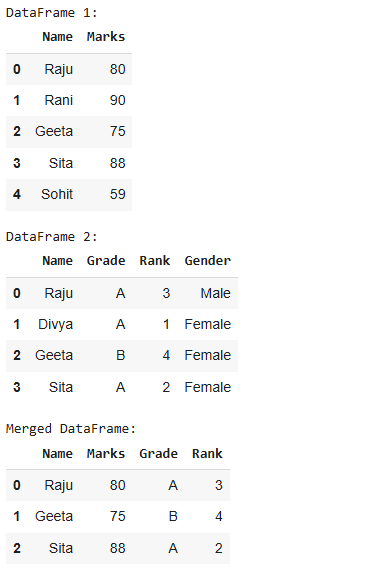
Merge Two Pandas DataFrames with an Inner Join
Merge Two DataFrames with Left Join
A left join retains all rows from the left DataFrame and includes matching rows from the right DataFrame. If there’s no match, it fills with NaN:
Python `
Merging with left join
df_merged = df1.merge(df2[['Name', 'Grade']], on='Name', how='left') display(df_merged)
`
**Output:
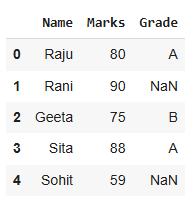
Merge Two DataFrames with a Left Join
Merge Two DataFrames with Right Join
A right join includes all rows from the right DataFrame and the matching rows from the left DataFrame. Non-matching rows from the left DataFrame will be filled with NaN:
Python `
Merging with right join
df_merged = df1.merge(df2, on='Name', how='right') print(df_merged)
`
**Output:
Name Marks Grade Rank Gender 0 Raju 80.0 A 3 Male
1 Divya NaN A 1 Female
2 Geeta 75.0 B 4 Female
3 Sita 88.0 A 2 Female
Merge Two DataFrames with Outer Join
An outer join combines all rows from both DataFrames, filling in NaN where there’s no match:
Python `
Merging with outer join
df_merged = df1.merge(df2, on='Name', how='outer') print(df_merged)
`
**Output:
Name Marks Grade Rank Gender 0 Divya NaN A 1.0 Female
1 Geeta 75.0 B 4.0 Female
2 Raju 80.0 A 3.0 Male
3 Rani 90.0 NaN NaN NaN
4 Sita 88.0 A 2.0 Female
5 Sohit 59.0 NaN NaN NaN
Merge Two DataFrames Using Concatenation
Concatenation combines two DataFrames along a particular axis. In this case, we'll combine df1 and df2 horizontally (side by side):
Python `
Concatenating DataFrames horizontally
df_concatenated = pd.concat([df1, df2], axis=1) print(df_concatenated)
`
**Output:
Name Marks Name Grade Rank Gender 0 Raju 80 Raju A 3.0 Male
1 Rani 90 Divya A 1.0 Female
2 Geeta 75 Geeta B 4.0 Female
3 Sita 88 Sita A 2.0 Female
4 Sohit 59 NaN NaN NaN NaN
Merge Two DataFrames Using a Column Subset
You can merge a specific subset of columns from one DataFrame with another using the merge function. Here's an example where we merge the 'Marks' column of df1 with df2:
Python `
Merging using a column subset
df_merged = df2.merge(df1[['Marks', 'Name']], on='Name') display(df_merged)
`