MongoDB and Python (original) (raw)
MongoDB is an open-source NoSQL database that stores data in flexible, JSON-like documents (BSON format).
- Handles large, unstructured or semi-structured data efficiently
- Adapts easily to changing data models
- Supports fast read/write operations for real-time applications and APIs
- Integrates seamlessly with Python using libraries like pymongo
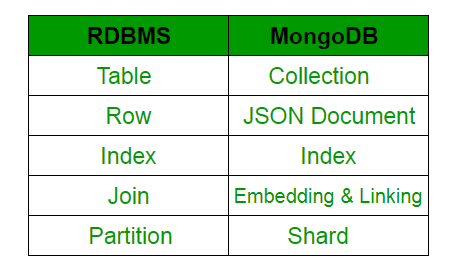
MongoDB vs RDBMS
Connecting MongoDB with Python Using PyMongo
Step 1: Start MongoDB
Start MongoDB from the command prompt using the following command:
If starting with default settings:
mongod
When running directly with custom data directory:
mongod --dbpath "C:\data"
If MongoDB is installed as a Windows service:
net start MongoDB

Snapshot of terminal to show Mongodb runs on port 27017
See port number by default is set 27017 (last 2-3 lines in above image).
Step 2: Install and Import PyMongo
PyMongo is the native Python library for MongoDB. To install PyMongo, open Command Prompt and run:
pip install pymongo
After installation, open a Python environment and import the library:
from pymongo import MongoClient
Step 3: Connect to MongoDB Server Locally
To connect to a local MongoDB server, create a MongoClient object:
client = MongoClient()
Connect to the default MongoDB host and port (localhost:27017) using the following command to create a MongoClient explicitly.
client = MongoClient("mongodb://localhost:27017/")
Step 4: Connect to MongoDB Atlas (Cloud Database)
To connect to a cloud-based MongoDB database like MongoDB Atlas, follow these steps:
**1. Create a MongoDB Atlas Account: Go to MongoDB Atlas and create an account if you don't already have one. Once logged in, create a new project, cluster, and database.
**2. Get the Connection String: After creating the cluster, navigate to the Clusters tab, click Connect, and choose Connect your application. Select Python and copy the provided connection string.
**3. Connection string typically looks like this:
mongodb+srv://:@cluster0.mongodb.net/test?retryWrites=true&w=majority
**4. Use the Connection String: Replace and with your MongoDB Atlas credentials.
client = MongoClient("mongodb+srv://:@cluster0.mongodb.net/test?retryWrites=true&w=majority")
This will connect your Python application to the cloud-based MongoDB cluster.
Step 5: Access/Create a Database
To create a database or switch to an existing database use:
mydatabase = client["my_database"]
Or:
mydatabase = client.my_database
**Note: Database names should not contain dashes (-). The names like my-Table will raise an error. Use **underscores (_) instead.
Step 6: Access/Create a Collection
Collections are equivalent to Tables in Relational Database Management Systems (RDBMS). A collection in PyMongo is accessed similarly to how tables are accessed in RDBMS.
To access the table, table name "myTable" of the database "mydatabase".
mycollection = mydatabase["myTable"]
MongoDB store the database in the form of dictionaries as shown:
record = {
"title": "MongoDB and Python",
"description": "MongoDB is no SQL database",
"tags": ["mongodb", "database", "NoSQL"],
"viewers": 104
}
'_id' is a 12 bytes hexadecimal number. A special key which uniquely identifies each document in a collection and automatically added when not added explicitly.

Step 7: Inserting data inside collection
Methods used:
insert_one() or insert_many()
Insert the document into a collection:
rec = mycollection.insert_one(record)
The complete code looks like this when implemented:
Python `
from pymongo import MongoClient client=MongoClient()
client = MongoClient("mongodb://localhost:27017/")
mydb = client["my_database"] mycollection = mydb["myTable"]
record = { "title": "MongoDB and Python", "description": "MongoDB is no SQL database", "tags": ["mongodb", "database", "NoSQL"], "viewers": 104 }
rec = mycollection.insert_one(record)
`
Step 8: Querying the Database
Certain query functions are used to filter data in a MongoDB database. Among them, the two most commonly used are:
**find(): used to retrieve multiple documents from a collection that match a given query.
Python `
for i in mycollection.find({"title": "MongoDB and Python"}): print(i)
`
**count_documents(): used to count the number of documents in a collection that match a specific query.
Python `
count = mycollection.count_documents({"title": "MongoDB and Python"}) print(count)
`
To print all the documents/entries inside 'myTable' of database 'mydatabase':
Python `
from pymongo import MongoClient
try: conn = MongoClient("localhost", 27017) print("Connected successfully!") except Exception as e: print("Could not connect to MongoDB:", e)
db = conn["mydatabase"]
collection = db["myTable"] for record in collection.find(): print(record)
`