NLTK NLP (original) (raw)
Natural Language Processing (NLP) plays an important role in enabling machines to understand and generate human language. Natural Language Toolkit (NLTK) stands out as one of the most widely used libraries. It provides a combination linguistic resources, including text processing libraries and pre-trained models, which makes it ideal for both academic research and practical applications.
NLTK is a Python's API library and it can perform a variety of operations on textual data such as classification, tokenization, stemming, tagging, semantic reasoning, etc.
Installation
NLTK can be installed simply using pip or by running the following code.
! pip install nltk
**Accessing Additional Resources: For the usage of additional resources such as recourses of languages other than English - we can run the following in a python script. It has to be done only once when you are running it for the first time in your system.
Python `
import nltk nltk.download('all')
`
Now, having installed NLTK successfully in our system we can perform some basic operations on text data using NLTK.
1. Tokenization
Tokenization refers to break down the text into smaller units. It splits paragraphs into sentences and sentences into words. It is one of the initial steps of any NLP pipeline. Let us have a look at the two major kinds of tokenization that NLTK provides:
**1.1 Word Tokenization
It involves breaking down the text into words.
"I study Machine Learning on GeeksforGeeks."
will be word-tokenized as:['I', 'study', 'Machine', 'Learning', 'on', 'GeeksforGeeks', '.'].
**1.2 Sentence Tokenization
It involves breaking down the text into individual sentences.
"I study Machine Learning on GeeksforGeeks. Currently, I'm studying NLP"
will be sentence-tokenized as :['I study Machine Learning on GeeksforGeeks.', 'Currently, I'm studying NLP.']
In Python, both these tokenizations can be implemented in NLTK as follows:
Python `
Tokenization using NLTK
from nltk import word_tokenize, sent_tokenize
sent = "GeeksforGeeks is a great learning platform.
It is one of the best for Computer Science students."
print(word_tokenize(sent))
print(sent_tokenize(sent))
`
**Output:

Tokenization Output
**2. Stemming and Lemmatization
When working with natural language, our focus is on understanding the intended meaning behind words. To achieve this, it is essential to reduce words to their root or base form. This process is known as **canonicalization.
For example, words like "play", "plays", "played" and "playing" all refer to the same action and can therefore be mapped to the common base form _"play."
There are two commonly used techniques for canonicalization: **stemming and **lemmatization.
2.1 Stemming
Stemming generates the base word from the given word by removing the affixes of the word. It has a set of pre-defined rules that guide the dropping of these affixes. It must be noted that stemmers might not always result in semantically meaningful base words. Stemmers are faster and computationally less expensive than lemmatizers.
In the following code, we will be stemming words using Porter Stemmer:
Python `
from nltk.stem import PorterStemmer
create an object of class PorterStemmer
porter = PorterStemmer() print(porter.stem("play")) print(porter.stem("playing")) print(porter.stem("plays")) print(porter.stem("played"))
`
**Output:
play
play
play
play
We can see that all the variations of the word 'play' have been reduced to the same word, 'play'. In this case, the output is a meaningful word 'play'. However, this is not always the case.
Let us take an example:
Python `
from nltk.stem import PorterStemmer
create an object of class PorterStemmer
porter = PorterStemmer() print(porter.stem("Communication"))
`
**Output:
Commun
The stemmer reduces the word 'communication' to a base word 'commun' which is meaningless in itself.
2.2 Lemmatization
Lemmatization involves grouping together the inflected forms of the same word. This way, we can reach out to the base form of any word which will be meaningful in nature. The base from here is called the Lemma.
Lemmatizers are slower and computationally more expensive than stemmers.
**Example: 'play', 'plays', 'played', and 'playing' have 'play' as the lemma.
In Python, both these tokenizations can be implemented in NLTK as follows:
Python `
from nltk.stem import WordNetLemmatizer
create an object of class WordNetLemmatizer
lemmatizer = WordNetLemmatizer() print(lemmatizer.lemmatize("plays", 'v')) print(lemmatizer.lemmatize("played", 'v')) print(lemmatizer.lemmatize("play", 'v')) print(lemmatizer.lemmatize("playing", 'v'))
`
**Output:
play
play
play
play
- Note that in lemmatizers, we need to pass the Part of Speech of the word along with the word as a function argument.
- Also, lemmatizers always result in meaningful base words.
Let us take the same example as we took in the case for stemmers.
Python `
create an object of class WordNetLemmatizer
lemmatizer = WordNetLemmatizer() print(lemmatizer.lemmatize("Communication", 'v'))
`
**Output:
Communication
3. Part of Speech Tagging
Part of Speech (POS) tagging refers to assigning each word of a sentence to its part of speech. It is significant as it helps to give a better syntactic overview of a sentence.
**Example: "GeeksforGeeks is a Computer Science platform."
Let's see how NLTK's POS tagger will tag this sentence.
Python `
from nltk import pos_tag from nltk import word_tokenize
text = "GeeksforGeeks is a Computer Science platform." tokenized_text = word_tokenize(text) tags = tokens_tag = pos_tag(tokenized_text) tags
`
**Output:
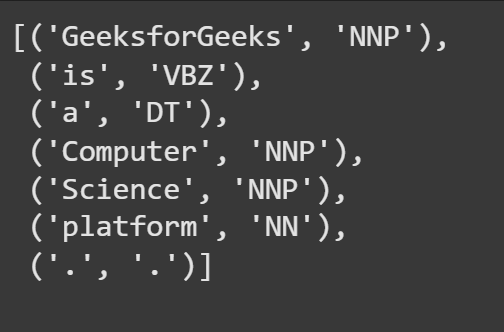
POS output
**4. Named Entity Recognition (NER)
Named Entity Recognition (NER) is another important task in Natural Language Processing (NLP) and NLTK provides built-in capabilities to perform it. NER involves identifying and classifying key information in a text such as names of people, places , organizations and more. It’s an important step for information extraction and understanding the meaning of text at a deeper level.
**Example: "Barack Obama was born in Hawaii in 1961."
Let’s see how NLTK’s NER module identifies entities in this sentence.
C++ `
from nltk import word_tokenize, pos_tag, ne_chunk
Download the required resource for NER
nltk.download('maxent_ne_chunker_tab') nltk.download('words') # This resource is also needed for the chunker
Sample text
text = "Barack Obama was born in Hawaii in 1961."
Tokenize and POS tag the sentence
tokens = word_tokenize(text) tags = pos_tag(tokens)
Apply Named Entity Recognition
entities = ne_chunk(tags) print(entities)
`
**Output:
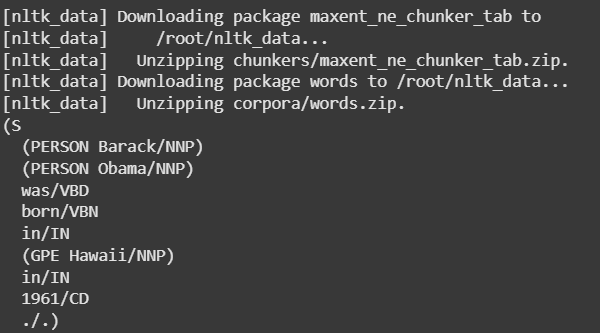
POS using NER
NLTK provides tools for wide range of tasks like text pre-processing to more advanced operations such as semantic reasoning.