Pandas Dataframe rank() | Rank DataFrame Entries (original) (raw)
Last Updated : 11 Jul, 2025
Python is a great language for data analysis, primarily because of the fantastic ecosystem of data-centric Python packages. Pandasis one of those packages and makes importing and analyzing data much easier.
Pandas DataFrame rank() method returns a rank of every respective entry (1 through n) along an axis of the DataFrame passed. The rank is returned based on position after sorting.
Example:
Python3 `
import pandas as pd df = pd.DataFrame({ 'A': [1, 2, 2, 3, 4], 'B': [5, 6, 7, 8, 9], 'C': [1, 1, 1, 1, 1] }) df['A_rank'] = df['A'].rank() print(df)
`
Output:
A B C A_rank 0 1 5 1 1.0 1 2 6 1 2.5 2 2 7 1 2.5 3 3 8 1 4.0 4 4 9 1 5.0
Syntax
Syntax: DataFrame.rank(axis=0, method='average', numeric_only=None, na_option='keep', ascending=True, pct=False)
Parameters:
- axis: 0 or ‘index’ for rows and 1 or ‘columns’ for Column. method: Takes a string input(‘average’, ‘min’, ‘max’, ‘first’, ‘dense’) which tells pandas what to do with same values. Default is average which means assign average of ranks to the similar values.
- numeric_only: Takes a boolean value and the rank function works on non-numeric value only if it's False.
- na_option: Takes 3 string input(‘keep’, ‘top’, ‘bottom’) to set position of Null values if any in the passed Series.
- ascending: Boolean value which ranks in ascending order if True. pct: Boolean value which ranks percentage wise if True.
Return type: Series with Rank of every index of caller series.
For link to CSV file Used in Code, click here.
Examples
Let's see some examples of how to check the rank of DataFrame data using dataframe.rank() method of the Pandas library.
Example 1
Ranking Column with Unique values In the following example, a new rank column is created which ranks the Name of every Player. All the values in the Namecolumn are unique and hence there is no need to describe a method.
Python `
importing pandas package
import pandas as pd
making data frame from csv file
data = pd.read_csv("nba.csv")
creating a rank column and passing the returned rank series
data["Rank"] = data["Name"].rank()
display
data
sorting w.r.t name column
data.sort_values("Name", inplace = True)
display after sorting w.r.t Name column
data
`
Output:
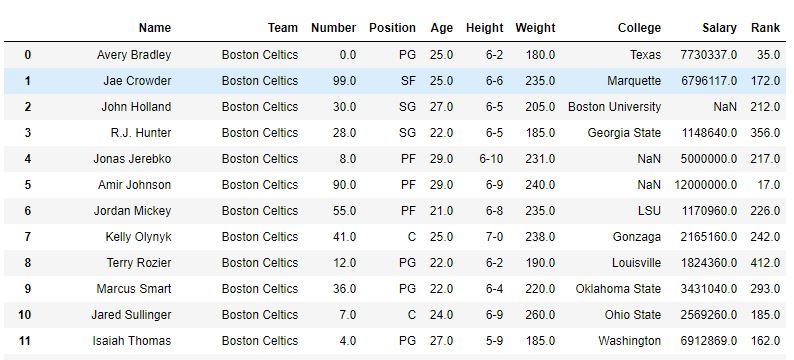
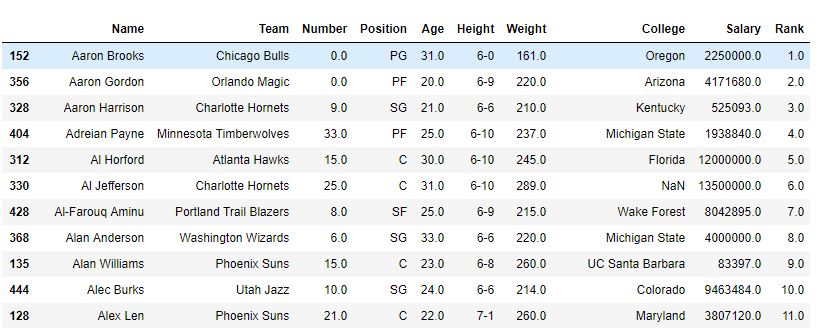
As shown in the image, a column 'rank' was created with the rank of every Name. After the sort_value function sorted the DataFrame for names, it can be seen that the rank was also sorted since those were ranking of Names only.
Before Sorting-
After Sorting-
Example 2:
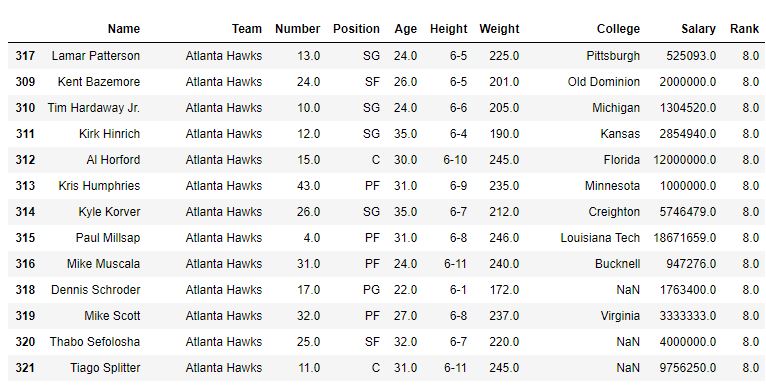
Sorting Column with some similar values in the following example, DataFrame is first sorted for 'team name' and first the method is the default (i.e. average), and hence the rank of same Team players is average. After that min method is also used to see the output.
Python3 `
importing pandas package
import pandas as pd
making data frame from csv file
data = pd.read_csv("nba.csv")
sorting w.r.t team name
data.sort_values("Team", inplace = True)
creating a rank column and passing the returned rank series
change method to 'min' to rank by minimum
data["Rank"] = data["Team"].rank(method ='average')
display
data
`
Output:
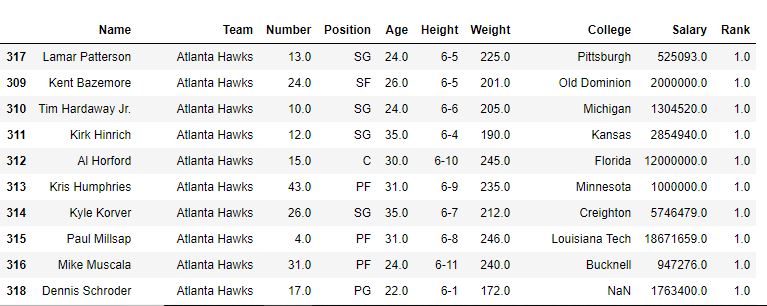
With method='average'
With method='min'