Basic of Time Series Manipulation Using Pandas (original) (raw)
Last Updated : 11 Jul, 2025
Although the time series is also available in the **Scikit-learn library****,** data science professionals use the **Pandas library as it has compiled more features to work on the DateTime series. We can include the date and time for every record and can fetch the records of DataFrame. We can find out the data within a certain range of dates and times by using the DateTime moduleof Pandas library. Let's discuss some major objectives of time series analysis using Pandas library.
Create DateTime Values with Pandas
To create a DateTime series using Pandas we need the DateTime module and then we can create a DateTime range with the date_range method. Example:
Python `
import pandas as pd from datetime import datetime import numpy as np
range_date
rd = pd.date_range(start ='1/1/2019', end ='1/08/2019', freq ='Min') print(rd)
`
**Output:

Here in this code we have created the timestamp based on minutes for date ranges from 1/1/2019 to 8/1/2019. We can vary the frequency by hours to minutes or seconds. This function will help us to track the record of data stored per minute. As we can see in the output the length of the datetime stamp is 10081.
Note: Remember pandas use data type as **datetime64[ns].
Determine the Data Type of an Element in the DateTime Range
To determine the type of an element in the DateTime range we use indexing to fetch the element and then use the type function to know its data type.
Python `
import pandas as pd from datetime import datetime import numpy as np
range_date
rd = pd.date_range(start ='1/1/2019', end ='1/08/2019', freq ='Min') print(type(rd[110]))
`
**Output:

We are checking the type of our object named range_date.
Create DataFrame with DateTime Index
To create a DataFrame with a DateTime index, we first need to create a DateTime range and then pass it to pandas.DataFrame method.
Python `
import pandas as pd from datetime import datetime import numpy as np
range_date
rd = pd.date_range(start ='1/1/2019', end ='1/08/2019',freq ='Min') df = pd.DataFrame(rd, columns =['date']) df['data'] = np.random.randint(0, 100, size =(len(rd)))
print(df.head(10))
`
**Output:
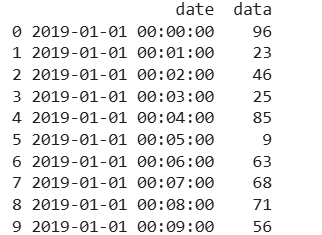
We first created a time series then converted this data into DataFrame and used the random function to generate the random data and map over the dataframe. Then to check the result we use the print function. To do time series manipulation, we need to have a DateTime index so that DataFrame is indexed on the timestamp. Here, we are adding one more new column in the Pandas DataFrame.
Convert DateTime elements to String format
The below example demonstrates how we can convert the DateTime elements of DateTime object to string format.
Python `
import pandas as pd from datetime import datetime import numpy as np
range_Date
rd = pd.date_range(start ='1/1/2019', end ='1/08/2019',freq ='Min')
df = pd.DataFrame(rd, columns =['date']) df['data'] = np.random.randint(0, 100, size =(len(rd)))
string_data
s = [str(x) for x in rd] print(s[1:11])
`
**Output:
['2019-01-01 00:01:00', '2019-01-01 00:02:00', '2019-01-01 00:03:00', '2019-01-01 00:04:00', '2019-01-01 00:05:00', '2019-01-01 00:06:00', '2019-01-01 00:07:00', '2019-01-01 00:08:00', '2019-01-01 00:09:00', '2019-01-01 00:10:00']
**Explanation:
- **Generate a Date Range: Creates timestamps from Jan 1, 2019, to Jan 8, 2019, with minute-level frequency (10,081 timestamps).
- **Create DataFrame: Stores these timestamps in a DataFrame with a column named 'date'.
- **Add Random Data: A new column 'data' is added with random integers between 0 and 99.
- **Convert Dates to Strings: The timestamps are converted into strings and stored in a list, with the first 10 printed.
**Accessing Specific DateTime Element
The below example demonstrates how we access specific DateTime element of DateTime object. This method is useful for filtering data based on specific time intervals.
Python `
import pandas as pd import numpy as np
range_data = pd.date_range(start='1/1/2019', end='1/08/2019', freq='Min')
df = pd.DataFrame(range_data, columns=['datetime']) df['data'] = np.random.randint(0, 100, size=(len(range_data)))
df.set_index('datetime', inplace=True)
filtered_df = df.loc['2019-01-05']
print(filtered_df.iloc[1:11])
`
**Output:
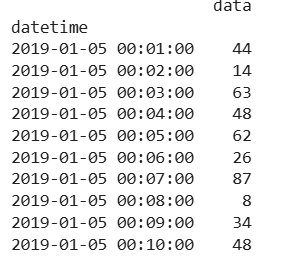
**Explanation: df.loc['2019-01-05'] extracts all records for January 5, 2019 and iloc[1:11] selects a subset of rows to display.