Pathlib Module in Python (original) (raw)
Pathlib (introduced in version 3.4) provides an object-oriented way to work with filesystem paths. Unlike traditional os.path which treats paths as plain strings, pathlib represents them as objects, making operations like path joining, file reading/writing and checking existence much cleaner and cross-platform.
Path class in pathlib module is the main class used to represent and interact with file and directory paths on the actual file system.
**Example:
from pathlib import Path
# Create a path object
file_path = Path("documents") / "notes.txt"
print(file_path)
Need for Pathlib module
- **Cross-platform compatibility: same code works on Windows, Linux, macOS.
- **Safer operations: avoids manual string concatenation by offering methods and operator overloading (/).
Importing Path Class
To begin using pathlib, import the Path class:
from pathlib import Path
File and Directory Operations
Pathlib module simplifies everyday tasks like listing folders, checking file details and reading or writing files. Let's explore some examples.
Listing Subdirectories
To view all subdirectories within a given directory, use iterdir() method and filter results using .is_dir(). This helps you easily identify folders without scanning files.
**Example: This code lists all subdirectories inside root (/ on Linux or C:/ on Windows).
Python `
from pathlib import Path p = Path('/') for subdir in p.iterdir(): if subdir.is_dir(): print(subdir)
`
Output
/media /root /run /home /sbin /var /bin /mnt /opt /lib64 /sys /tmp /usr /etc /boot /proc /dev /srv /lib
**Explanation:
- **Path('/'): Creates a Path object pointing to root directory (/ in Unix/Linux or C:/ in Windows).
- **iterdir(): Returns all immediate entries (files and directories) in path p.
- **is_dir(): Checks if the current entry is a directory (ignores files).
Listing Python Files in a Directory Tree
To find all Python files (.py) within a folder and its subfolders, use rglob() method from pathlib. It performs a recursive search, making it easy to scan entire directory trees for specific file types.
**Example: This code recursively searches for all .py files in the root directory.
Python `
from pathlib import Path p = Path.cwd() files = p.rglob('*.py') for f in files: print(f)
`
**Output
\ProgramFiles\WindowsApps\PythonSoftwareFoundation.Python.3.12_3.12.2288.0_x64__qbz5n2kfra8p0\Lib\abc.py
\ProgramFiles\WindowsApps\PythonSoftwareFoundation.Python.3.12_3.12.2288.0_x64__qbz5n2kfra8p0\Lib\aifc.py
\ProgramFiles\WindowsApps\PythonSoftwareFoundation.Python.3.12_3.12.2288.0_x64__qbz5n2kfra8p0\Lib\antigravity.py
\ProgramFiles\WindowsApps\PythonSoftwareFoundation.Python.3.12_3.12.2288.0_x64__qbz5n2kfra8p0\Lib\argparse.py
**Explanation: Here, unlike iterdir() which lists only immediate contents, rglob(*.py) recursively finds all .py files under the directory tree.
Navigating Inside a Directory Tree
pathlib makes directory navigation simple by overloading / operator. This allows users to join paths cleanly and create new Path objects without using manual string concatenation.
**Example: This code joins an existing path with "example.txt" to create a new path object.
Python `
sp = p / 'example.txt' print(sp)
`
**Output
\example.txt
**Explanation:
- ****/ operator:** Overloaded by pathlib to join paths in an object-oriented way.
- **p / 'example.txt': Creates a new Path object by joining p (a directory) with 'example.txt'
**Note: The exact output depends on your operating system (/example.txt on Linux/macOS, \example.txt on Windows).
Querying Path Properties
Pathlib module makes it easy to inspect various properties of a file or directory path, such as whether it's absolute, its name, extension, parent directory, etc all using simple methods.
**Example: This code checks whether the path is absolute, retrieves the file name, extension and parent directory.
Python `
Check if the path is absolute
print("Is absolute:", sp.is_absolute())
Get the file name
print("File name:", sp.name)
Get the extension
print("Extension:", sp.suffix)
Get the parent directory
print("Parent directory:", sp.parent)
`
**Output
Is absolute: False
File name: example.txt
Extension: .txt
Parent directory: \
Reading and Writing to a File
pathlib makes file handling easy by allowing you to open, read and write files directly through Path objects no need for manual path strings or separate functions.
**Example: This code reads content from example.txt and writes "Hello, GFG!" into output.txt.
Python `
Reading from a file
with (p / 'example.txt').open('r') as file: content = file.read() print(content)
Writing to a file
with (p / 'output.txt').open('w') as file: file.write("Hello, GFG!")
`
**Output
First line of text.
Second line of text.
Third line of text.
**Explanation:
- **open('r') opens file in read mode and open('w') opens file in write mode (creates or overwrites).
- **read() reads file's content and write() writes text to file.
Hierarchy of Path Classes
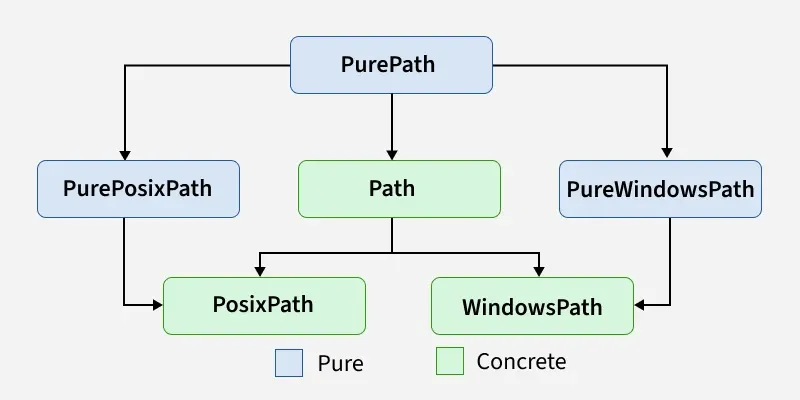
Representation of relation between various classes of pathlib module
Types of Pathlib module
Path classes in pathlib module are divided into Pure paths and Concrete paths. Let's discuss it clearly with examples.
Pure Paths
Pure path classes perform only path manipulations without touching the file system. They are useful for cross-platform string-based path handling (join, split, normalize). PurePaths can be instantiated in following ways using:
**1. PurePath class: It allows to work with and manipulate path strings. When instantiated, it automatically returns a PurePosixPath or PureWindowsPath based on operating system, making it ideal for cross-platform path handling.
**Example: This code imports PurePath class and creates a path object using PurePath('foo/bar') which represents path as a string. Then print() function displays resulting path object.
Python `
from pathlib import PurePath obj = PurePath('foo/bar') # Instantiate PurePath class print(obj)
`
**2. PurePosixPath class: This class represents POSIX-style paths commonly used in Linux and macOS systems. It is designed for path manipulation only and does not interact with the actual filesystem, allowing it to be used on any operating system.
**Example: This code imports PurePosixPath class and creates a UNIX-style path object using PurePosixPath('foo/bar'), which represents given path purely as a string.
Python `
from pathlib import PurePosixPath obj = PurePosixPath('foo/bar') # Instantiate PurePosixPath class print(obj)
`
**3. PureWindowsPath class:
This class is used to handle Windows-style file system paths. PureWindowsPath understands Windows path conventions (like backslashes and drive letters), making it useful for creating or manipulating Windows paths even on non-Windows systems. WindowsPath can only be instantiated on Windows systems.
**Example: This code imports PureWindowsPath class and creates a path object using PureWindowsPath('foo/bar'), print() function displays resulting path object using backslashes (\) as per Windows path conventions.
Python `
from pathlib import PureWindowsPath obj = PureWindowsPath('foo/bar') # Instantiate PureWindowsPath class print(obj)
`
Concrete Paths
It interacts with actual file system and support both path manipulations and file I/O operations. They provide methods for reading, writing, checking file existence, creating directories, etc. Concrete path can instantiate in following ways:
**1. Path class: It represents a path and allows for a variety of methods that interact directly with the filesystem. Depending on system Python is running on, Path will behave like either PosixPath or WindowsPath.
**Example: This code imports Path and creates a concrete path object using Path('/usr/local/bin'), which represents a real path in file system. The print() function displays resulting Path object.
Python `
from pathlib import Path obj = Path('/usr/local/bin') # Instantiate Path class print(obj)
`
**2. PosixPath class: This class is used specifically in UNIX-like systems (Linux, macOS). It inherits all methods from Path and PurePosixPath. It provides methods for UNIX-specific filesystem interaction.
**Example: This code imports PosixPath class and creates a concrete path object using PosixPath('/usr/local/bin') which represents a Unix-style file system path.
Python `
from pathlib import PosixPath obj = PosixPath('/usr/local/bin') # Instantiate PosixPath class print(obj)
`
**3. WindowsPath class: This class is used on Windows systems and interacts with the actual Windows filesystem. It inherits from Path and PureWindowsPath, supporting Windows path conventions such as drive letters and backslashes.
**Note: WindowsPath can only be instantiated on Windows systems.
**Example: This code imports WindowsPath class and creates a concrete path object using WindowsPath('C:/Program Files/') which represents a Windows-style file system path.
Python `
from pathlib import WindowsPath obj = WindowsPath('C:/Program Files/') # Instantiate WindowsPath class print(obj)
`
**Output
C:\Program Files
Methods in Path class
**1. cwd() method: returns a new path object which represents current working directory. For instance, calling Path.cwd() will give us path from where your Python script is executed.
**Example: This code gets the current working directory where the Python script is executed.
Python `
from pathlib import Path dir = Path.cwd() print(dir)
`
Output
/home/guest/sandbox
**2. exists() method: checks whether specified path exists on the disk. It returns True if the path exists, otherwise False.
**Example: This code checks whether the given path exists.
Python `
from pathlib import Path path = '/home/hrithik/Desktop' obj = Path(path) # Create Path object print(obj.exists())
`
**3. is_dir() method: used to determine if path points to a directory. It returns True if the path is a directory, otherwise False.
**Example: This code checks whether the given path is a directory.
Python `
from pathlib import Path path = '/home/hrithik/Desktop' obj = Path(path) # Instantiate the Path class print(obj.is_dir())
`
**4. Creating a File with touch()
**Example: This code creates an empty file named sample.txt in the current directory.
Python `
from pathlib import Path
file = Path("sample.txt")
file.touch()
print("File created")
`