Profile Application using Python Flask and MySQL (original) (raw)
Flask and MySQL can be combined to build database-driven web applications that support user registration, authentication, and profile management. This project demonstrates how to create a profile application where users can register, log in, view their profile information, update their details, and store data in a MySQL database using Flask.
Profile Application using Flask
Working with MySQL Workbench
**Step 1: Install MySQL workbench. Refer to: How to Install SQL Workbench For MySQL on Windows?
**Step 2: Install 'mysqlbd' module in your venv.
pip install flask-mysqldb
**Step 3: Open MySQL workbench.
**Step 4: Write the following code. The above SQL statement will create our database geekprofile with the table accounts. :
CREATE DATABASE geekprofile;
USE geekprofile;
CREATE TABLE accounts (
id INT AUTO_INCREMENT PRIMARY KEY,
username VARCHAR(50) NOT NULL,
password VARCHAR(255) NOT NULL,
email VARCHAR(100) NOT NULL,
organisation VARCHAR(100),
address VARCHAR(255),
city VARCHAR(100),
state VARCHAR(100),
country VARCHAR(100),
postalcode VARCHAR(20));
**Step 5: Execute the query. 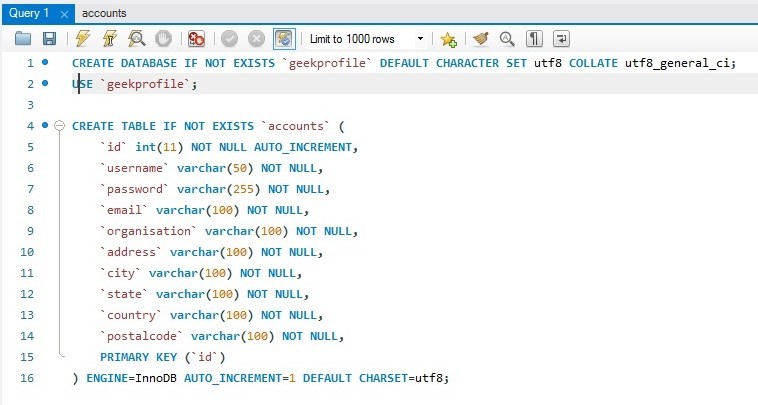
**Creating Project
**Step 1: Create an environment, and install Flask
**Step 2: Create an empty folder 'geeksprofile'.
**Step 3: Now open your code editor and open this 'geeksprofile' folder.
**Step 4: Create 'app.py' folder and write the code given below.
Python `
Store this code in 'app.py' file
from flask import Flask, render_template, request, redirect, url_for, session from flask_mysqldb import MySQL import MySQLdb.cursors import re
app = Flask(name)
app.secret_key = 'your secret key'
app.config['MYSQL_HOST'] = 'localhost' app.config['MYSQL_USER'] = 'root' app.config['MYSQL_PASSWORD'] = 'password' app.config['MYSQL_DB'] = 'geekprofile'
mysql = MySQL(app)
@app.route('/')
@app.route('/login', methods=['GET', 'POST'])
def login():
msg = ''
if request.method == 'POST' and 'username' in
request.form and 'password' in request.form:
username = request.form['username']
password = request.form['password']
cursor = mysql.connection.cursor(MySQLdb.cursors.DictCursor)
cursor.execute(
'SELECT * FROM accounts WHERE username = % s
AND password = % s', (username, password, ))
account = cursor.fetchone()
if account:
session['loggedin'] = True
session['id'] = account['id']
session['username'] = account['username']
msg = 'Logged in successfully !'
return render_template('index.html', msg=msg)
else:
msg = 'Incorrect username / password !'
return render_template('login.html', msg=msg)
@app.route('/logout') def logout():
session.pop('loggedin', None) session.pop('id', None) session.pop('username', None) return redirect(url_for('login'))
@app.route('/register', methods=['GET', 'POST']) def register(): msg = ''
if request.method == 'POST' and \
   'username' in request.form and \
   'password' in request.form and \
   'email' in request.form and \
   'address' in request.form and \
   'city' in request.form and \
   'country' in request.form and \
   'postalcode' in request.form and \
   'organisation' in request.form:

    username = request.form['username']
    password = request.form['password']
    email = request.form['email']
    organisation = request.form['organisation']
    address = request.form['address']
    city = request.form['city']
    state = request.form['state']
    country = request.form['country']
    postalcode = request.form['postalcode']

    cursor = mysql.connection.cursor(
        MySQLdb.cursors.DictCursor
    )

    # Check username
    cursor.execute(
        'SELECT * FROM accounts WHERE username = %s',
        (username,)
    )
    account = cursor.fetchone()

    # Check email
    cursor.execute(
        'SELECT * FROM accounts WHERE email = %s',
        (email,)
    )
    email_account = cursor.fetchone()

    if account:
        msg = 'Username already exists !'

    elif email_account:
        msg = 'Email already exists !'

    elif not re.match(
            r'[^@]+@[^@]+\.[^@]+',
            email):
        msg = 'Invalid email address !'

    elif not re.match(
            r'[A-Za-z0-9]+',
            username):
        msg = 'Username must contain only letters and numbers !'

    else:
        cursor.execute(
            '''INSERT INTO accounts
            VALUES (
                NULL,
                %s, %s, %s, %s,
                %s, %s, %s, %s, %s
            )''',
            (
                username,
                password,
                email,
                organisation,
                address,
                city,
                state,
                country,
                postalcode
            )
        )

        mysql.connection.commit()
        msg = 'You have successfully registered !'

elif request.method == 'POST':
    msg = 'Please fill out the form !'

return render_template(
    'register.html',
    msg=msg
)
@app.route("/index") def index(): if 'loggedin' in session: return render_template("index.html") return redirect(url_for('login'))
@app.route("/display") def display(): if 'loggedin' in session: cursor = mysql.connection.cursor(MySQLdb.cursors.DictCursor) cursor.execute('SELECT * FROM accounts WHERE id = % s', (session['id'], )) account = cursor.fetchone() return render_template("display.html", account=account) return redirect(url_for('login'))
@app.route("/update", methods=['GET', 'POST'])
def update():
msg = ''
if 'loggedin' in session:
if request.method == 'POST' and 'username' in request.form
and 'password' in request.form and 'email' in request.form and
'address' in request.form and 'city' in request.form and 'country'
in request.form and 'postalcode' in request.form and
'organisation' in request.form:
username = request.form['username']
password = request.form['password']
email = request.form['email']
organisation = request.form['organisation']
address = request.form['address']
city = request.form['city']
state = request.form['state']
country = request.form['country']
postalcode = request.form['postalcode']
cursor = mysql.connection.cursor(MySQLdb.cursors.DictCursor)
cursor.execute(
'SELECT * FROM accounts WHERE username = %s AND id != %s',
username, session['id']))
account = cursor.fetchone()
if account:
msg = 'Account already exists !'
elif not re.match(r'[^@]+@[^@]+.[^@]+', email):
msg = 'Invalid email address !'
elif not re.match(r'[A-Za-z0-9]+', username):
msg = 'name must contain only characters and numbers !'
else:
cursor.execute('UPDATE accounts SET username =% s,
password =% s, email =% s, organisation =% s,
address =% s, city =% s, state =% s,
country =% s, postalcode =% s WHERE id =% s', (
username, password, email, organisation,
address, city, state, country, postalcode,
(session['id'], ), ))
mysql.connection.commit()
msg = 'You have successfully updated !'
elif request.method == 'POST':
msg = 'Please fill out the form !'
return render_template("update.html", msg=msg)
return redirect(url_for('login'))
if name == "main": app.run(host="localhost", port=int("5000"))
`
**Step 5: Create the folder ****'templates'**. create the files 'index.html', 'display.html', 'update.html', 'login.html', and 'register.html' inside the 'templates' folder.
**Step 6: Open the ****'login.html'** file and write the code given below. In 'login.html', we have two fields i.e. username and password. When a user enters the correct username and password, it will route you to the index page otherwise 'Incorrect username/password' is displayed.
html `
Login`
**Step 7: Open ****'register.html'** file and write the code given below. In 'register.html', we have nine fields i.e. username, password, email, organisation, address, city, state, country, postal code. When user enters all the information, it stored the data in the database and 'Registration successful' is displayed.
html `
register`
**Step 8: Open ****'index.html'** file and write the code given below. When a user logs in successfully, this page is displayed, and 'Logged in successful!' is displayed.
html `
index<body bgcolor="#e6ffee">
<div class="one">
<div class="two">
<h1>Side Bar</h1>
<ul>
<li class="active"><a href="{{url_for('index')}}">Index</a></li>
<li><a href="{{url_for('display')}}">Display</a></li>
<li><a href="{{url_for('update')}}">Update</a></li>
<li><a href="{{url_for('logout')}}">Log out</a></li>
</ul>
</div>
<div class="content" align="center">
<div class="topbar">
<h2>Welcome!! You are in Index Page!! </h2>
</div></br></br>
<div class="contentbar">
<div class="msg">{{ msg }}</div>
</div>
        </div>
    </div>
</body>
`
**Step 9: Open ****'display.html'** file and write the code given below. Here, the user information stored in database are displayed.
html `
displayWelcome!! You are in Display Page!!
Your Details
{% block content %}
| Username: | {{ account['username'] }} |
`
**Step 10: Open 'update.html' file and write the code given below. The user can update his/her data which also updates the database.
html `
updateWelcome!! You are in Update Page!!
Fill Your Details to Update
</div>
</div>
</body>`
**Step 11: Create the folder ****'static'**. create the file 'style.css' inside the 'static' folder and paste the given CSS code.
css `
/Store this code in 'style.css' file inside the 'static' folder/
.logincontent{ margin: 0 auto; height: 500px; width: 400px; background-color: #e6ffee; border-radius: 10px; }
.registercontent{ margin: 0 auto; height: 720px; width: 400px; background-color: #e6ffee; border-radius: 10px; }
.logintop{ height: 60px; width: 400px; background-color: #009933; color: #ffffff; }
.registertop{ height: 60px; width: 400px; background-color: #009933; color: #ffffff; }
.textbox{ padding: 10px 40px; background-color: #009933; border-radius: 10px; }
::placeholder { color: #FFFFFF; opacity: 1; font-style: oblique; font-weight: bold; }
.btn { padding: 10px 40px; background-color: #009933; color: #FFFFFF; font-style: oblique; font-weight: bold; border-radius: 10px; }
.worddark{ color: #009933; font-style: oblique; font-weight: bold; }
.wordlight{ color: #FFFFFF; font-style: oblique; font-weight: bold; }
*{ margin: 0; padding: 0; box-sizing: border-box; list-style: none; text-decoration: none; font-family: 'Josefin Sans', sans-serif; }
.one{ display: flex; position: relative; }
.one .two{ width: 225px; height: 100%; background: #009933; padding: 30px 0px; position: fixed; }
.one .two h1{ color: #fff; text-transform: uppercase; text-align: center; margin-bottom: 30px; font-style: oblique; font-weight: bold; }
.one .two h2{ color: #fff; text-align: center; }
.one .two .active{ background: #0a8032; }
.one .two ul li{ text-align: center; padding: 15px; border-bottom: 0.1px solid white; border-top: 0.1px solid white; }
.one .two ul li a{ color: #ffffff; display: block; }
.one .two ul li a .side{ width: 25px; align:center; }
.one .content{ width: 100%; margin-left: 200px; }
.one .content .topbar{ text-align: center; padding: 20px; background: #00b33c; color: white; }
.one .content .contentbar{ margin: auto; }
.one .content .contentbar h1{ color: #11a844; text-align: center; font-style: oblique; font-weight: bold; }
`
**Step 12: The project structure will look like this.

**Run the Project
**Step1: Run the server.
**Step2: Browse the URL 'localhost:5000'.
**Step 3: The output web page will be displayed.
**Testing of the Application
**Step 1: If you are new user, go to sign up page and fill the details.
**Step 2: After registration, go to login page. Enter your username and password and sign in.
**Step 3: If your login is successful, you will be moved to index page and your name will be displayed.
**Step 4: You can view your profile details in display page and also you can update your details in update page.
**Output: **Login page:

**Register page:

**If login is successful, Index Page:  **Update Page:
  **Before updation, Display page:
  **After updation, Display page:
  **Database: Before update:

**Database: After update:
