Python Altair Scatter Plot (original) (raw)
Last Updated : 31 Jul, 2021
In this article, we will learn a Simple Scatter plot with Altair using python. Altair is one of the latest interactive data visualizations library in python. Altair is based on vega and _vegalite_- A grammar of interactive graphics. Here we will import the Altair library for using it. And then we will load the Seattle weather data from vega_dataset.
Step-by-step Approach:
- Import modules. Python3 `
import required modules
import altair as alt from vega_datasets import data
`
- Assign dataset and convert it into a data frame. Python3 `
assign dataset
seattle_weather = data.seattle_weather()
`
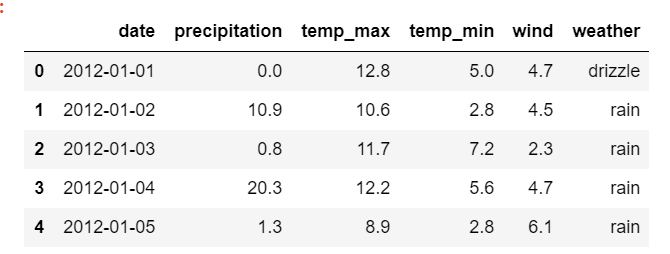
- Display dataset. Python3 `
display dataset
seattle_weather.head(5)
`
Output:
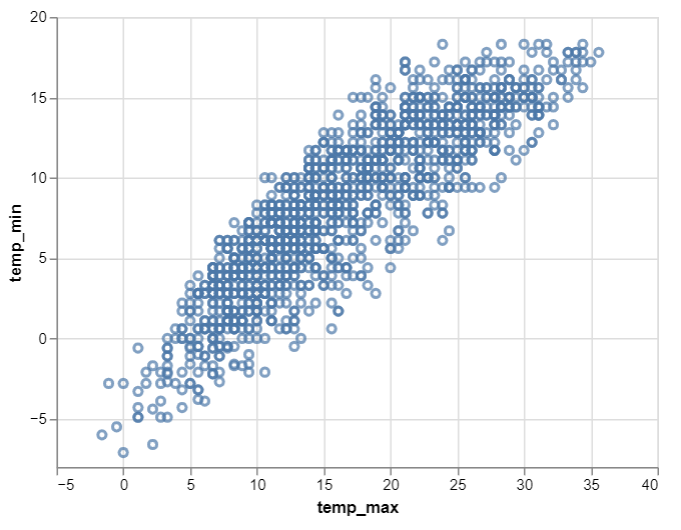
- Now let us make the scatter plot using Altair library. For this, we use Chart() function in Altair to load the data and then use the mark_point() function to make a scatter plot. We then use the aesthetics x and y-axis to encode() function. Hence, we get the simple scatter plot of two variable as shown below: Python3 `
depict scatter plot
alt.Chart(seattle_weather).mark_point().encode( x='temp_max', y='temp_min' )
`
Output:
Below is the complete program based on the above approach:
Python3 `
import required modules
import altair as alt from vega_datasets import data
assign dataset
seattle_weather = data.seattle_weather()
display dataset
seattle_weather.head(5)
depict scatter plot
alt.Chart(seattle_weather).mark_point().encode( x='temp_max', y='temp_min' )
`
Output: