Python Arrays (original) (raw)
Python provides multiple ways to work with linear data structures, which store elements sequentially. Although Python does not have a built-in array type like some other languages, similar functionality can be achieved using:
Lists
Lists are a flexible and commonly used data structure for storing elements in sequence. Unlike arrays in other languages, list:
- Can store mixed data types in one list
- Elements can be added or removed easily
- Provide functions like append(), remove(), sort(), etc. Python `
a = [1, "Hello", [3.14, "world"]] a.append(2) # Add an integer to the end print(a)
`
Output
[1, 'Hello', [3.14, 'world'], 2]
NumPy Arrays
NumPy arrays are a part of NumPy library, which is a tool for numerical computing. Designed for high-performance operations on large datasets and support multi-dimensional arrays and matrices, making them suitable for complex mathematical computations.
- **Multi-dimensional support: Can handle multiple dimensions, making them suitable for matrix operations and advanced mathematical tasks.
- **Broad broadcasting capabilities: Allow operations between arrays of different shapes and sizes using broadcasting.
- **Efficient storage and processing: Uses optimized memory and provides faster performance compared to lists for numerical operations. Python `
import numpy as np a = np.array([1, 2, 3, 4])
Element-wise operations
print(a * 2)
Multi-dimensional array
res = np.array([[1, 2], [3, 4]]) print(res * 2)
`
Output
[2 4 6 8] [[2 4] [6 8]]
**Note: Use NumPy arrays for complex, multi-dimensional computations. Use Python’s array module for simple, memory-efficient storage of uniform data.
Arrays
Array is a collection of elements stored at contiguous memory locations, used to hold multiple values of the same data type. Unlike Lists, which can store mixed types, arrays are homogeneous and require a typecode during initialization to define the data type.
Python `
import array as arr a = arr.array('i', [1, 2, 3])
accessing first array
print(a[0])
adding element to array
a.append(5) print(a)
`
Output
1 array('i', [1, 2, 3, 5])
**Explanation: parameter 'i' is the typecode, it tells Python to treat the elements as signed integers ([1, 2, 3]) of a specific byte size (usually 2 or 4 bytes).
The following table outlines standard typecodes, their mapped C types and minimum memory requirements:
| Typecode | C Type | Python Type | Minimum Size (Bytes) |
|---|---|---|---|
| 'b' | signed char | int | 1 |
| 'i' | signed int | int | 4 |
| 'f' | float | float | 4 |
| 'd' | double | float | 8 |
Create an Array
Array can be created by importing an array module. array(data_type, value_list) is used to create array with data type and value list specified in its arguments.
Python `
import array as arr a = arr.array('i', [1, 2, 3])
for i in range(0, 3): print(a[i], end=" ")
`
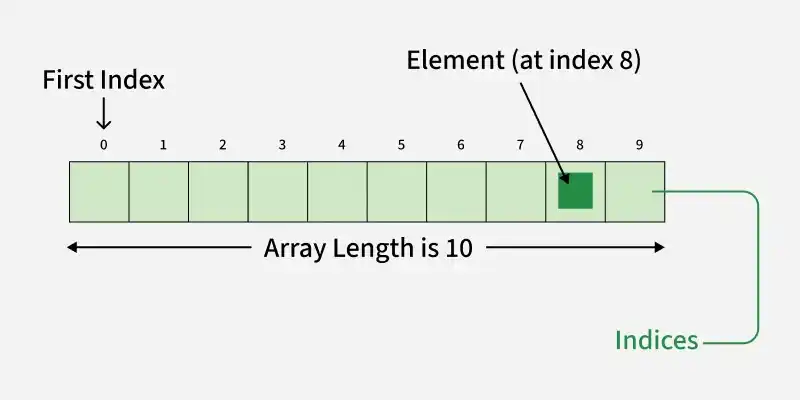
Python Array Index
Adding Elements
Elements can be added to an array using insert() to place a value at a specific index, or append() to add a value at the end.
Python `
import array as arr a = arr.array('i', [1, 2, 3]) print(*a)
a.insert(1, 4) # Insert 4 at index 1 print(*a)
`
**Note: We have used *a and *b for unpacking the array elements.
Accessing Items
Array elements are accessed using their index with square brackets [ ]. Each item has a position starting from 0 and the index must be an integer.
Python `
import array as arr a = arr.array('i', [1, 2, 3, 4, 5, 6])
print(a[0]) print(a[3])
b = arr.array('d', [2.5, 3.2, 3.3]) print(b[1]) print(b[2])
`
Removing Elements
Elements can be removed using remove(), which deletes the first occurrence of a value or pop(), which removes and returns an element (last by default or a specific index if provided).
Python `
import array a = array.array('i', [1, 2, 3, 1, 5])
remove first occurence of 1
a.remove(1) print(a)
remove item at index 2
a.pop(2) print(a)
`
Output
array('i', [2, 3, 1, 5]) array('i', [2, 3, 5])
Slicing
Slicing is used to access a specific range of elements from an array using index positions.
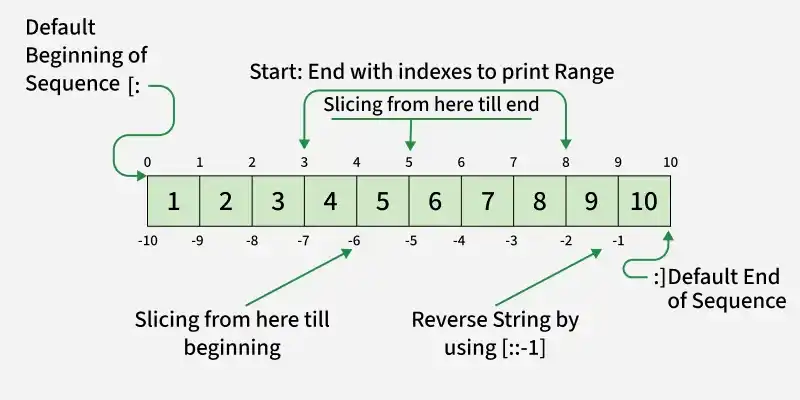
Python Index Slicing
- Elements from beginning to a range use [:Index]
- Elements from end use [:-Index]
- Elements from specific Index till the end use [Index:]
- Elements within a range, use [Start Index:End Index]
- Print complete List, use [:].
- For Reverse list, use [::-1]. Python `
import array as arr a = [1, 2, 3, 4, 5, 6, 7, 8, 9, 10] b = arr.array('i', a)
res = b[3:8] print(res)
res = b[5:] print(res)
res = b[:] print(res)
`
Output
array('i', [4, 5, 6, 7, 8]) array('i', [6, 7, 8, 9, 10]) array('i', [1, 2, 3, 4, 5, 6, 7, 8, 9, 10])
Searching Element
In order to search an element in the array we use index() method. This function returns the index of the first occurrence of value mentioned in arguments.
Python `
import array a = array.array('i', [1, 2, 3, 1, 2, 5])
index of 1st occurrence of 2
print(a.index(2))
index of 1st occurrence of 1
print(a.index(1))
`
Updating Elements
In order to update an element in the array we simply reassign a new value to the desired index we want to update.
Python `
import array a = array.array('i', [1, 2, 3, 1, 2, 5])
update item at index 2
a[2] = 6 print(a)
update item at index 4
a[4] = 8 print(a)
`
Output
array('i', [1, 2, 6, 1, 2, 5]) array('i', [1, 2, 6, 1, 8, 5])
Operations on Array
**1. Counting Elements: We can use count() method to count given item in array.
Python `
import array a = array.array('i', [1, 2, 3, 4, 2, 5, 2]) count = a.count(2) print(count)
`
**2. Reversing Elements: In order to reverse elements of an array use reverse method.
Python `
import array a = array.array('i', [1, 2, 3, 4, 5]) a.reverse() print(*a)
`
**3. Extend Element: extend() function is used to attach an item from iterable to the end of the array. This method is used to add an array of values to the end of a given or existing array.
Python `
import array as arr a = arr.array('i', [1, 2, 3,4,5]) a.extend([6,7,8,9,10]) print(a)
`
Output
array('i', [1, 2, 3, 4, 5, 6, 7, 8, 9, 10])