Python | Copy and Paste Images onto other Image using Pillow (original) (raw)
Last Updated : 18 Jan, 2022
In this article, we will learn how to copy an image over another image using pillow library. We will use image module from pillow and copy() and paste() methods to achieve this task.
We will need to create copies of both images so that it does not affect the original image with the help of copy() method and then paste the image on the other image with the help of paste() method.
Input images -
Image1:
[caption id="attachment_1166629" align="alignnone" width="225"]

Image2:

Example 1:
Python3 `
import image module from pillow
from PIL import Image
open the image
Image1 = Image.open('D:\cat.jpg')
make a copy the image so that the
original image does not get affected
Image1copy = Image1.copy() Image2 = Image.open('D:\core.jpg') Image2copy = Image2.copy()
paste image giving dimensions
Image1copy.paste(Image2copy, (0, 0))
save the image
Image1copy.save('D:\pasted2.png')
`
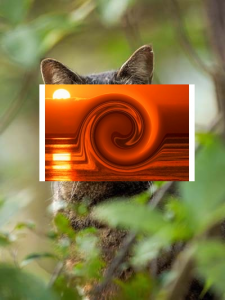
Output:
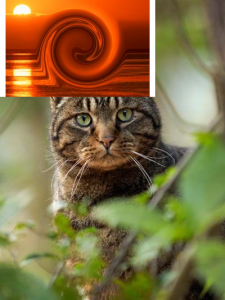
Example 2: Changing parameters to place the Image2 on face of the cat in the Image1.
Python3 `
import image module from pillow
from PIL import Image
open the image
Image1 = Image.open('D:\cat.jpg')
make a copy the image so that
the original image does not get affected
Image1copy = Image1.copy() Image2 = Image.open('D:\core.jpg') Image2copy = Image2.copy()
paste image giving dimensions
Image1copy.paste(Image2copy, (70, 150))
save the image
Image1copy.save('D:\pasted2.png')
`
Output: