Python | pack_forget() and grid_forget()) method in Tkinter (original) (raw)
Last Updated : 29 Nov, 2024
If we want to unmap any widget from the screen or toplevel then forget() method is used. There are two types of forget method pack_forget() ( similar to forget() ) and grid_forget() which are used with pack() and grid() method respectively.
pack_forget() method -
**Syntax: widget.pack_forget()
**widget can be any valid widget which is visible.
**Code #1:
Python `
Imports tkinter and ttk module
from tkinter import * from tkinter.ttk import *
toplevel window
root = Tk()
method to make widget invisible
or remove from toplevel
def forget(widget):
# This will remove the widget from toplevel
# basically widget do not get deleted
# it just becomes invisible and loses its position
# and can be retrieve
widget.forget()
method to make widget visible
def retrieve(widget): widget.pack(fill = BOTH, expand = True)
Button widgets
b1 = Button(root, text = "Btn 1") b1.pack(fill = BOTH, expand = True)
See, in command forget() method is passed
b2 = Button(root, text = "Btn 2", command = lambda : forget(b1)) b2.pack(fill = BOTH, expand = True)
In command retrieve() method is passed
b3 = Button(root, text = "Btn 3", command = lambda : retrieve(b1)) b3.pack(fill = BOTH, expand = True)
infinite loop, interrupted by keyboard or mouse
mainloop()
`
**Output:
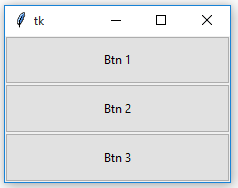
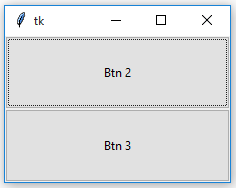
After forget
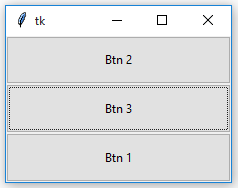
After retrieval
**Notice
the difference in the position of Button 1 before and after forget as well as after retrieval.
grid_forget() method -
**Syntax: widget.grid_forget()
**widget can be any valid widget which is visible.
**Note :
This method can be used only with grid() geometry methods.
**Code #2:
Python `
Imports tkinter and ttk module
from tkinter import * from tkinter.ttk import *
toplevel window
root = Tk()
method to make widget invisible
or remove from toplevel
def forget(widget):
# This will remove the widget from toplevel
# basically widget do not get deleted
# it just becomes invisible and loses its position
# and can be retrieve
widget.grid_forget()
method to make widget visible
def retrieve(widget): widget.grid(row = 0, column = 0, ipady = 10, pady = 10, padx = 5)
Button widgets
b1 = Button(root, text = "Btn 1") b1.grid(row = 0, column = 0, ipady = 10, pady = 10, padx = 5)
See, in command forget() method is passed
b2 = Button(root, text = "Btn 2", command = lambda : forget(b1)) b2.grid(row = 0, column = 1, ipady = 10, pady = 10, padx = 5)
In command retrieve() method is passed
b3 = Button(root, text = "Btn 3", command = lambda : retrieve(b1)) b3.grid(row = 0, column = 2, ipady = 10, pady = 10, padx = 5)
infinite loop, interrupted by keyboard or mouse
mainloop()
`
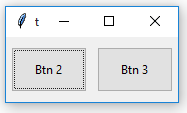
**Output:
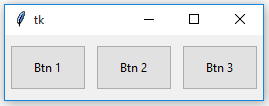
After Forget
After Retrieval
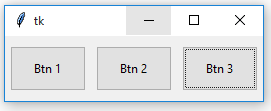
**Notice that the position of Button 1 remains same after **forget and **retrieval. With grid_forget() method, you can place it at any grid after retrieval but generally, the original grid is chosen.