Python | math.tan() function (original) (raw)
Last Updated : 20 Mar, 2019
In Python, math module contains a number of mathematical operations, which can be performed with ease using the module. **math.tan()** function returns the tangent of value passed as argument. The value passed in this function should be in radians.
Syntax: math.tan(x)**Parameter:**x : value to be passed to tan()Returns: Returns the tangent of value passed as argument
Code #1:
Python3 1== `
Python code to demonstrate the working of tan()
importing "math" for mathematical operations
import math
a = math.pi / 6
returning the value of tangent of pi / 6
print ("The value of tangent of pi / 6 is : ", end ="") print (math.tan(a))
`
Code #2:
Python3 1== `
Python program showing
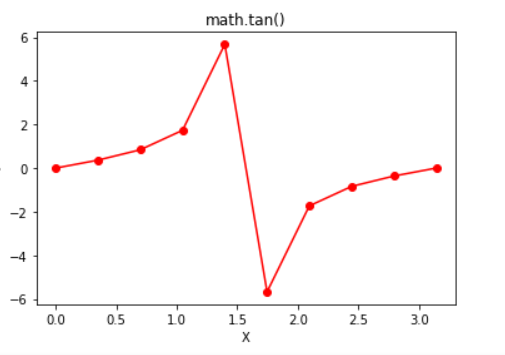
Graphical representation of
tan() function
import math import numpy as np import matplotlib.pyplot as plt
in_array = np.linspace(0, np.pi, 10)
out_array = []
for i in range(len(in_array)): out_array.append(math.tan(in_array[i])) i += 1
print("in_array : ", in_array) print("\nout_array : ", out_array)
red for numpy.sin()
plt.plot(in_array, out_array, color = 'red', marker = "o") plt.title("math.tan()") plt.xlabel("X") plt.ylabel("Y") plt.show()
`
Output:
in_array : [0. 0.34906585 0.6981317 1.04719755 1.3962634 1.74532925 2.0943951 2.44346095 2.7925268 3.14159265] out_array : [0.0, 0.36397023426620234, 0.8390996311772799, 1.7320508075688767, 5.671281819617707, -5.671281819617711, -1.7320508075688783, -0.8390996311772804, -0.36397023426620256, -1.2246467991473532e-16]