Python MySQL Delete Query (original) (raw)
Last Updated : 28 Jul, 2025
In MySQL, the **DELETE query is used to remove rows from a table based on a specific condition defined in the **WHERE clause. Without a **WHERE clause, the entire table will be emptied.
Syntax
DELETE FROM table_name WHERE condition;
- **table_name: The name of the table from which records are to be deleted.
- **condition: The condition that specifies which rows should be deleted.
Make sure you have created a database and an active MySQL server, if not then visit here to learn about it: Python MySQL CRETE Table
Deleting Data Based on a Condition
Here’s a program to connect to a MySQL database, create a table, insert data, and delete a row based on a specific condition (e.g., deleting a student by their roll number).
Python `
import mysql.connector
Connecting to the database
dataBase = mysql.connector.connect( host="localhost", user="user", passwd="your_password", database="geeks" )
Preparing a cursor object
cursorObject = dataBase.cursor()
Creating a student table
studentRecord = """ CREATE TABLE STUDENT ( NAME VARCHAR(20) NOT NULL, BRANCH VARCHAR(50), ROLL INT NOT NULL, SECTION VARCHAR(5), AGE INT ) """ cursorObject.execute(studentRecord)
Inserting data into the table
query = "INSERT INTO STUDENT (NAME, BRANCH, ROLL, SECTION, AGE) VALUES (%s, %s, %s, %s, %s)" attrValues = [ ("Rituraj Saha", "Information Technology", 1706256, "IT-3", 20), ("Ritam Barik", "Information Technology", 1706254, "IT-3", 21), ("Rishi Kumar", "Information Technology", 1706253, "IT-3", 21) ] for values in attrValues: cursorObject.execute(query, values)
Deleting a record based on a roll number
delete_query = "DELETE FROM STUDENT WHERE ROLL = %s" delete_value = (1706256,) cursorObject.execute(delete_query, delete_value)
Committing the changes
dataBase.commit()
Disconnecting from the database
dataBase.close()
`
**Explanation:
- We create a table **STUDENT in the geeks database and insert multiple student records.
- The **DELETE query removes the record where the **ROLL number matches 1706256.
- Changes are committed to the database with **dataBase.commit(), ensuring that the deletion is saved.
Deleting Data Using a Parameterized Query
We can also use a parameterized **DELETE query to remove records from the **STUDENT table.
**Syntax:
DELETE FROM TABLE_NAME WHERE ATTRIBUTE_NAME = ATTRIBUTE_VALUE
Below is a program to delete a query from the table in the database.
Python `
import mysql.connector
Connecting to the database
dataBase = mysql.connector.connect( host="localhost", user="user", passwd="your_password", database="geeks" )
Preparing a cursor object
cursorObject = dataBase.cursor()
Creating a student table
studentRecord = """ CREATE TABLE STUDENT ( NAME VARCHAR(20) NOT NULL, BRANCH VARCHAR(50), ROLL INT NOT NULL, SECTION VARCHAR(5), AGE INT ) """ cursorObject.execute(studentRecord)
Inserting data into the table
query = "INSERT INTO STUDENT (NAME, BRANCH, ROLL, SECTION, AGE) VALUES (%s, %s, %s, %s, %s)" attrValues = [ ("Rituraj Saha", "Information Technology", 1706256, "IT-3", 20), ("Ritam Barik", "Information Technology", 1706254, "IT-3", 21), ("Rishi Kumar", "Information Technology", 1706253, "IT-3", 21) ] for values in attrValues: cursorObject.execute(query, values)
Deleting a record based on roll number
delete_query = "DELETE FROM STUDENT WHERE ROLL = %s" delete_value = (1706256,) cursorObject.execute(delete_query, delete_value)
Committing the changes
dataBase.commit()
Disconnecting from the database
dataBase.close()
`
**Output: 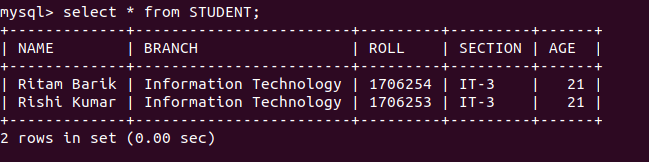 **Explanation:
- We used a parameterized query for deletion to avoid **SQL injection attacks.
- The record with **ROLL = 1706256 is deleted from the table.