OpenCV BGR color palette with trackbarsPython (original) (raw)
OpenCV BGR color palette with trackbars-Python
Last Updated : 11 Aug, 2025
Creating a color palette helps in exploring and visualizing colors interactively. Using **OpenCV in Python, we can add trackbars for Blue, Green and Red (BGR) channels. Adjusting these trackbars changes the values (0–255) in real time, making it easy to identify and use the corresponding RGB colors.
**Prerequisites:
Install them using pip if not already installed:
pip install opencv-python numpy
Approach
- Create a black window of size 512 x 512 with three color channels.
- Use **cv2.createTrackbar() to add three trackbars named Blue, Green, and Red.
- Each trackbar value ranges from 0 to 255.
- Continuously fetch the current positions of the trackbars using **cv2.getTrackbarPos().
- Update the window background color based on the trackbar positions.
- Exit when the ESC key is pressed.
Python implementation
Python `
import cv2 import numpy as np
def emptyFunction(): pass
def main(): image = np.zeros((512, 512, 3), np.uint8) windowName = "OpenCV Color Palette" cv2.namedWindow(windowName) cv2.createTrackbar('Blue', windowName, 0, 255, emptyFunction) cv2.createTrackbar('Green', windowName, 0, 255, emptyFunction) cv2.createTrackbar('Red', windowName, 0, 255, emptyFunction)
while True:
    cv2.imshow(windowName, image)
    if cv2.waitKey(1) == 27:
        break
    blue = cv2.getTrackbarPos('Blue', windowName)
    green = cv2.getTrackbarPos('Green', windowName)
    red = cv2.getTrackbarPos('Red', windowName)
    image[:] = [blue, green, red]
    print("BGR:", blue, green, red)

cv2.destroyAllWindows()
if name == "main": main()
`
**Output:
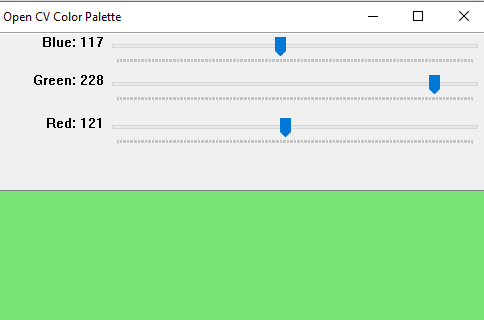
**Note: Above programs will not run on online IDE.
**Explanation:
- **np.zeros((512, 512, 3), np.uint8) creates a black image (512×512, 3 color channels).
- **cv2.namedWindow(windowName) opens a window to display the palette.
- **cv2.createTrackbar() adds Blue, Green, and Red trackbars (0–255).
- **cv2.getTrackbarPos() reads current values of the trackbars.
- **image[:] = [blue, green, red] updates image with the selected BGR color and displays via **cv2.imshow().
- **cv2.waitKey(1) == 27 exits on ESC key and **cv2.destroyAllWindows() closes the window.