Python OpenCV | cv2.rectangle() method (original) (raw)
Last Updated : 14 Aug, 2025
**cv2.rectangle() function in OpenCV is used to draw a rectangle shape on an image. By specifying starting and ending coordinates, color and thickness, you can highlight or mark specific areas in an image, which is helpful for tasks like annotation, object detection and image processing visualization.
Syntax
cv2.rectangle(image, start_point, end_point, color, thickness)
**Parameters:
- **image: input image where the rectangle will be drawn.
- **start_point: Tuple (x, y) for the top-left corner of the rectangle.
- **end_point: Tuple (x, y) for the bottom-right corner of the rectangle.
- **color: Rectangle border color in BGR format (e.g., (255, 0, 0) for blue).
- **thickness: Thickness of rectangle border in pixels. Use -1 to fill the rectangle with color.
**Return Value: returns the image with rectangle drawn.
Key Points to Remember
- Coordinates should be within the image dimensions to avoid errors.
- Using thickness -1 fills the rectangle, making it a solid block.
- The color is specified in BGR, not RGB (OpenCV default).
Examples
For the examples, we are using below image:

Example 1: Drawing a Blue Rectangle Border
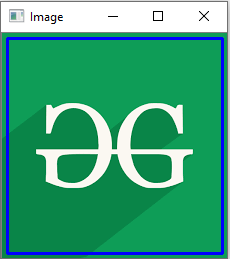
This code reads an image, draws a blue rectangle on it and displays the modified image in a window.
Python `
import cv2
image = cv2.imread('logo.png') cv2.rectangle(image, (5, 5), (220, 220), (255, 0, 0), 2)
cv2.imshow('Image', image) cv2.waitKey(0) # Waits indefinitely until a key is pressed. cv2.destroyAllWindows() # Closes all windows opened by program.
`
**Output
**Explanation:
- **cv2.rectangle(image, (5, 5), (220, 220), (255, 0, 0), 2): Draws a blue rectangle on the image from point (5, 5) to (220, 220) with a border thickness of 2 pixels.
- **cv2.imshow(): Opens a window named "Image" and displays image with rectangle.
Example 2: Drawing a Filled Black Rectangle on a Grayscale Image
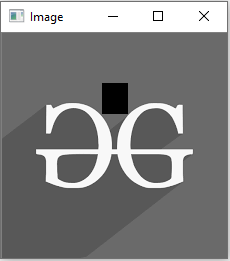
This example reads an image in grayscale and draws a filled black rectangle on it, then displays result in a window.
Python `
import cv2
image = cv2.imread(r'logo.png', 0) cv2.rectangle(image, (100, 50), (125, 80), 0, -1)
cv2.imshow('Image', image) cv2.waitKey(0) cv2.destroyAllWindows()
`
**Output
**Explanaton:
- **image = cv2.imread(r'logo.png', 0): Reads the image in grayscale mode (0 means single-channel).
- **cv2.rectangle(image, (100, 50), (125, 80), 0, -1): Draws a filled black rectangle from (100, 50) to (125, 80) on the image.
- **cv2.imshow('Image', image): Displays modified image in a window named "Image".
Common Use Cases
Let’s see some common situations where **cv2.rectangle() is helpful:
- Highlighting detected objects in images/videos.
- Creating bounding boxes for face or object detection.
- Annotating regions of interest.
- Visual debugging in computer vision pipelines.