Python | pack() method in Tkinter (original) (raw)
Last Updated : 22 Feb, 2022
The Pack geometry manager packs widgets relative to the earlier widget. Tkinter literally packs all the widgets one after the other in a window. We can use options like fill, expand, and side to control this geometry manager.
Compared to the grid manager, the pack manager is somewhat limited, but it’s much easier to use in a few, but quite common situations:
- Put a widget inside a frame (or any other container widget), and have it fill the entire frame
- Place a number of widgets on top of each other
- Place a number of widgets side by side
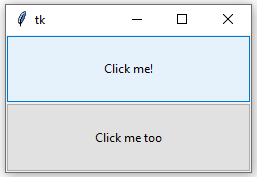
Code #1: Putting a widget inside frame and filling entire frame. We can do this with the help of expand and fill options.
Python3 `
Importing tkinter module
from tkinter import * from tkinter.ttk import *
creating Tk window
master = Tk()
creating a Fra, e which can expand according
to the size of the window
pane = Frame(master) pane.pack(fill = BOTH, expand = True)
button widgets which can also expand and fill
in the parent widget entirely
Button 1
b1 = Button(pane, text = "Click me !") b1.pack(fill = BOTH, expand = True)
Button 2
b2 = Button(pane, text = "Click me too") b2.pack(fill = BOTH, expand = True)
Execute Tkinter
master.mainloop()
`
Output:
Code #2: Placing widgets on top of each other and side by side. We can do this by side option.
Python3 `
Importing tkinter module
from tkinter import *
from tkinter.ttk import *
creating Tk window
master = Tk()
creating a Fra, e which can expand according
to the size of the window
pane = Frame(master) pane.pack(fill = BOTH, expand = True)
button widgets which can also expand and fill
in the parent widget entirely
Button 1
b1 = Button(pane, text = "Click me !", background = "red", fg = "white") b1.pack(side = TOP, expand = True, fill = BOTH)
Button 2
b2 = Button(pane, text = "Click me too", background = "blue", fg = "white") b2.pack(side = TOP, expand = True, fill = BOTH)
Button 3
b3 = Button(pane, text = "I'm also button", background = "green", fg = "white") b3.pack(side = TOP, expand = True, fill = BOTH)
Execute Tkinter
master.mainloop()
`
Output:

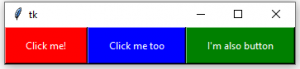
Code #3:
Python3 `
Importing tkinter module
from tkinter import *
from tkinter.ttk import *
creating Tk window
master = Tk()
creating a Fra, e which can expand according
to the size of the window
pane = Frame(master) pane.pack(fill = BOTH, expand = True)
button widgets which can also expand and fill
in the parent widget entirely
Button 1
b1 = Button(pane, text = "Click me !", background = "red", fg = "white") b1.pack(side = LEFT, expand = True, fill = BOTH)
Button 2
b2 = Button(pane, text = "Click me too", background = "blue", fg = "white") b2.pack(side = LEFT, expand = True, fill = BOTH)
Button 3
b3 = Button(pane, text = "I'm also button", background = "green", fg = "white") b3.pack(side = LEFT, expand = True, fill = BOTH)
Execute Tkinter
master.mainloop()
`
Output: