Python Packages (original) (raw)
Last Updated : 6 Apr, 2026
Python packages are a way to organize and structure code by grouping related modules into directories.
- A package is essentially a folder that contains an __init__.py file and one or more Python files (modules).
- Allows modules to be easily shared and distributed across different applications.
**Key Components of a Python Package
- **Module: A single Python file containing reusable code (e.g., math.py).
- **Package: A directory containing modules and a special __init__.py file.
- **Sub-Packages: Packages nested within other packages for deeper organization.
Creating and Accessing Packages
- **Create a Directory: create a folder that will act as the package root.
- **Add Modules: Inside the directory, add Python files (modules). Each module can contain related functions or classes.
- **Add __init__.py: add an __init__.py file to the directory. This file tells Python that the directory should be treated as a package.
- **Create Sub-packages (Optional): One can organize code further by creating subdirectories with their own __init__.py files.
- **Import Modules: Modules or functions inside the package can be imported using dot notation, for example:
from mypackage.module1 import greet
Example
In this example, we create a package called math_operations to organize mathematical functions. The package contains two sub-packages:
- **basic: addition and subtraction
- **advanced: multiplication and division
Each operation is stored in its own module, which makes the code modular, reusable and easier to maintain.
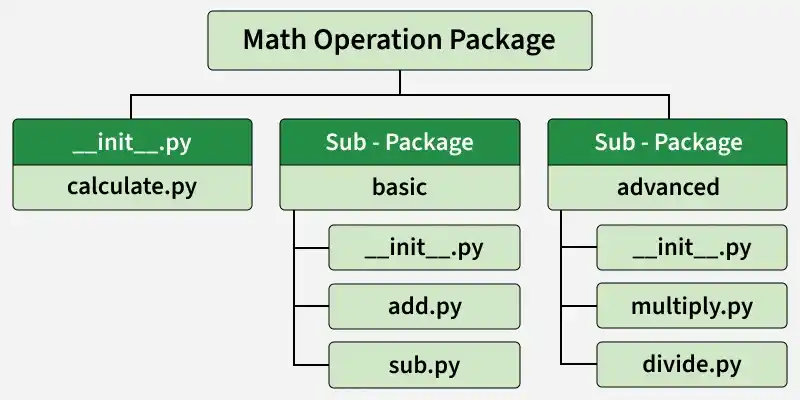
maths operation package
**math_operations/__init__.py - This file initializes the main package and exposes commonly used functions so they can be imported directly from the package.
Python `
from .calculate import calculate from .basic import add, subtract from .advanced import multiply, divide
`
**math_operations/calculate.py - This module contains a simple function that prints a message indicating that a calculation is being performed.
Python `
def calculate(): print("Performing calculation...")
`
**math_operations/basic/__init__.py - This file initializes the basic sub-package and makes the add and subtract functions available when the sub-package is imported.
Python `
from .add import add from .sub import subtract
`
**math_operations/basic/add.py - This module contains the function for performing addition.
Python `
def add(a, b): return a + b
`
**math_operations/basic/sub.py - This module contains the function for performing subtraction.
Python `
def subtract(a, b): return a - b
`
**math_operations/advanced/__init__.py - This file initializes the advanced sub-package and exposes the multiply and divide functions from their respective modules.
Python `
from .mul import multiply from .div import divide
`
**math_operations/advanced/mul.py - This module contains the function for performing multiplication.
Python `
def multiply(a, b): return a * b
`
**math_operations/advanced/div.py - This module contains the function for performing division.
Python `
def divide(a, b): return a / b
`
Using the Package
Now we can import functions from the package and use them in our program.
Python `
from math_operations import calculate, add, subtract, multiply, divide
Using the placeholder calculate function
calculate()
Perform basic operations
print("Addition:", add(5, 3)) print("Subtraction:", subtract(10, 4))
Perform advanced operations
print("Multiplication:", multiply(4, 2)) print("Division:", divide(10, 2))
`