Python | Pandas dataframe.filter() (original) (raw)
Last Updated : 28 Jul, 2025
Pandas **filter() function allows us to subset rows or columns in a DataFrame based on their labels. This method is useful when we need to select data based on label matching, whether it's by exact labels, partial string matches or regular expression patterns. It works with labels rather than the content of the DataFrame which makes it a quick and efficient way to focus on specific parts of our data.
**Lets see a basic example:
Here we are using NBA dataset which you can download it from here.
We will first load the NBA dataset to see how to use filter() function.
Python `
import pandas as pd
df = pd.read_csv("/content/nba.csv")
df
`
**Output:
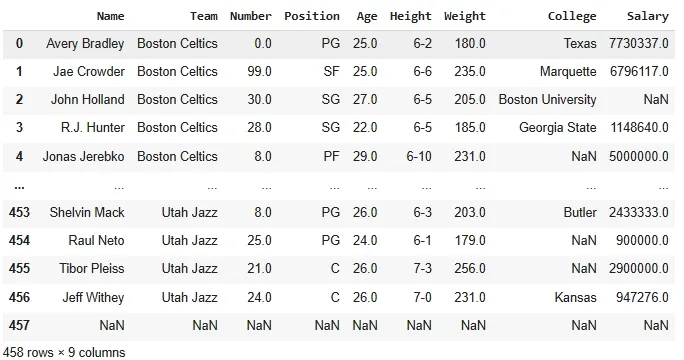
Nba Dataset
Now we use filter() to select the "**Name", "**Team" and "**Salary" columns by specifying the column labels in the items parameter.
Python `
df_filtered_columns = df.filter(items=['Name', 'Team', 'Salary']) print(df_filtered_columns)
`
**Output:
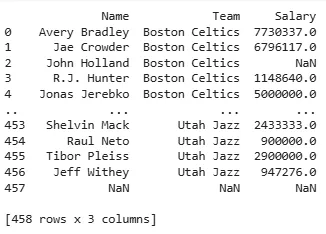
After using filter()
**Syntax:
DataFrame.filter(items=None, like=None, regex=None, axis=None)
**Parameters:
- **items: A list of labels to keep. Only the specified labels will be retained.
- **like: A string to match labels that contain this substring.
- **regex: A regular expression pattern to match labels.
- **axis: Specifies whether to filter rows (axis=0) or columns (axis=1). By default it operates on columns.
**Return: Return type is the same type as the input i.e a DataFrame or Series depending on the context.
Example 1: Filtering Columns by Substring
We can filter columns based on a substring in the column labels using the **like parameter.
Python `
df_filtered_like = df.filter(like='a', axis=1) print(df_filtered_like)
`
**Output:
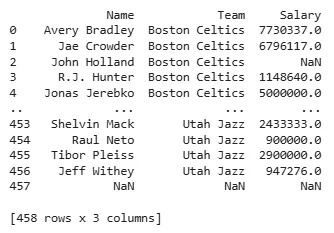
Filtering Columns by Substring
This filters columns whose names contain the letter '**a'. The **like parameter helps us to match columns based on a substring in their label names.
**Example 2: Filtering Columns Using Regular Expressions
Regular expressions allow for more complex column selection based on patterns in column labels.
Python `
df_filtered_regex = df.filter(regex='[sS]', axis=1) print(df_filtered_regex)
`
**Output:
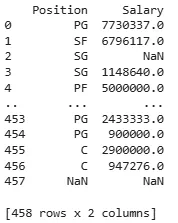
Filtering Columns Using Regular Expressions
Here, the regular expression [**sS] matches any column name that contains the letter '**S' or '**s' which allows us to filter columns based on pattern matching.
Example 3: Filtering Rows by Index Labels
We can filter rows based on their index labels using the axis=0 parameter.
Python `
df_filtered_rows = df.filter(items=[0, 1, 2], axis=0) print(df_filtered_rows)
`
**Output:
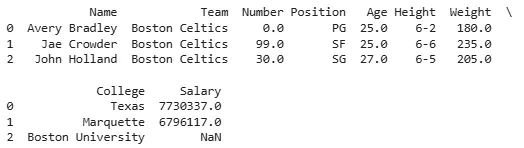
Filtering Rows by Index Labels
This example filters the rows by their index labels. We are selecting the rows with index labels 0, 1 and 2 by specifying them in the **items parameter with **axis=0.