Pandas dataframe.nunique() Method (original) (raw)
Last Updated : 11 Jul, 2025
Python is a great language for doing data analysis, primarily because of the fantastic ecosystem of data-centric Python packages. Pandasis one of those packages and makes importing and analyzing data much easier.
Pandas DataFrame.nunique Syntax
Pandas dataframe.nunique() function returns a Series with a number of distinct observations over the requested axis. If we set the value of the axis to 0, then it finds the total number of unique observations over the index axis. If we set the value of the axis to 1, then it finds the total number of unique observations over the column axis. It also provides the feature to exclude the NaN values from the count of unique numbers.
Syntax: DataFrame.nunique(axis=0, dropna=True)
Parameters:
- axis : {0 or ‘index’, 1 or ‘columns’}, default 0
- dropna : Don’t include NaN in the counts.
Returns : nunique : Series
Pandas DataFrame nunique() Method
Example 1: Use nunique() function to find the number of unique values over the column axis.
Python3 `
importing pandas as pd
import pandas as pd
Creating the first dataframe
df = pd.DataFrame({"A":[14, 4, 5, 4, 1], "B":[5, 2, 54, 3, 2], "C":[20, 20, 7, 3, 8], "D":[14, 3, 6, 2, 6]})
Print the dataframe
df
`
Output:
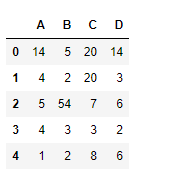
Let's use the dataframe.nunique() function to find the unique values across the column axis.
Python3 `
find unique values
df.nunique(axis=1)
`
Output:
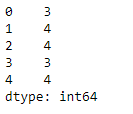
As we can see in the output, the function prints the total no. of unique values in each row.
Example 2: Use nunique() function to find the number of unique values over the index axis in a Dataframe. The Dataframe contains NaN values.
Python3 `
importing pandas as pd
import pandas as pd
Creating the first dataframe
df = pd.DataFrame({"A": ["Sandy", "alex", "brook", "kelly", np.nan], "B": [np.nan, "olivia", "olivia", "", "amanda"], "C": [20 + 5j, 20 + 5j, 7, None, 8], "D": [14.8, 3, None, 6, 6]})
apply the nunique() function
df.nunique(axis=0, dropna=True)
`
Output:
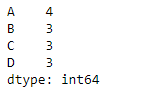
The function is treating the empty string as a unique value in column 2.