Python | Pandas Dataframe.plot.bar (original) (raw)
Last Updated : 06 Jan, 2019
Python is a great language for doing data analysis, primarily because of the fantastic ecosystem of data-centric python packages. Pandas is one of those packages and makes importing and analyzing data much easier. Pandas **DataFrame.plot.bar()** plots the graph vertically in form of rectangular bars.
Syntax : DataFrame.plot.bar(x=None, y=None, **kwds)Parameters: x : (label or position, optional) Allows plotting of one column versus another. If not specified, the index of the DataFrame is used.y : (label or position, optional) Allows plotting of one column versus another. If not specified, all numerical columns are used.**kwds : Additional keyword argumentsReturns: matplotlib.axes.Axes or np.ndarray of them
Example #1: Using DataFrame.plot.bar() to plot the graph vertically in form of rectangular bars
Python3 1== `
importing matplotlib
import matplotlib.pyplot
importing pandas as pd
import pandas as pd
importing numpy as np
import numpy as np
creating a dataframe
df = pd.DataFrame(np.random.rand(10, 3), columns =['a', 'b', 'c'])
print(df)
`
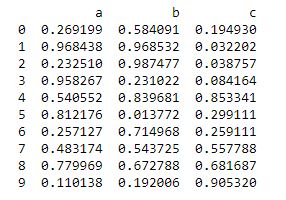 Now we will use a function
 DataFrame.plot.bar() to plot a graph vertically in form of rectangular bars
Python3 `
using a function df.plot.bar()
df.plot.bar()
`
Output: 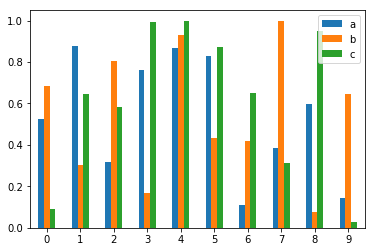 Example #2: Using
 DataFrame.plot.bar() to plot the graph vertically in form of rectangular bars.
Python3 1== `
importing matplotlib
import matplotlib.pyplot
importing pandas as pd
import pandas as pd
importing numpy as np
import numpy as np
creating a dataframe
df = pd.DataFrame(np.random.rand(10, 10), columns =['a', 'b', 'c', 'd', 'e', 'f', 'g', 'h', 'i', 'j'])
df
`
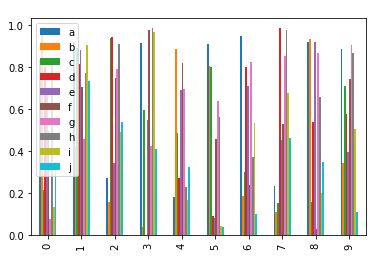
 Now we will use a function
 DataFrame.plot.bar() to plot a graph vertically in form of rectangular bars
Python3 `
using a function df.plot.bar()
df.plot.bar()
`
Output :