Python | Pandas dataframe.reindex() (original) (raw)
Last Updated : 22 Nov, 2018
Python is a great language for doing data analysis, primarily because of the fantastic ecosystem of data-centric python packages. Pandas is one of those packages and makes importing and analyzing data much easier. Pandas **dataframe.reindex()** function conform DataFrame to new index with optional filling logic, placing NA/NaN in locations having no value in the previous index. A new object is produced unless the new index is equivalent to the current one and copy=False
Syntax: DataFrame.reindex(labels=None, index=None, columns=None, axis=None, method=None, copy=True, level=None, fill_value=nan, limit=None, tolerance=None)Parameters : labels : New labels/index to conform the axis specified by ‘axis’ to.index, columns : New labels / index to conform to. Preferably an Index object to avoid duplicating dataaxis : Axis to target. Can be either the axis name (‘index’, ‘columns’) or number (0, 1).method : {None, ‘backfill’/’bfill’, ‘pad’/’ffill’, ‘nearest’}, optionalcopy : Return a new object, even if the passed indexes are the samelevel : Broadcast across a level, matching Index values on the passed MultiIndex levelfill_value : Fill existing missing (NaN) values, and any new element needed for successful DataFrame alignment, with this value before computation. If data in both corresponding DataFrame locations is missing the result will be missing.limit : Maximum number of consecutive elements to forward or backward filltolerance : Maximum distance between original and new labels for inexact matches. The values of the index at the matching locations most satisfy the equation abs(index[indexer] - target) <= tolerance.Returns : reindexed : DataFrame
Example #1: Use reindex() function to reindex the dataframe. By default values in the new index that do not have corresponding records in the dataframe are assigned NaN.Note : We can fill in the missing values by passing a value to the keyword fill_value.
Python3 `
importing pandas as pd
import pandas as pd
Creating the dataframe
df = pd.DataFrame({"A":[1, 5, 3, 4, 2], "B":[3, 2, 4, 3, 4], "C":[2, 2, 7, 3, 4], "D":[4, 3, 6, 12, 7]}, index =["first", "second", "third", "fourth", "fifth"])
Print the dataframe
df
`
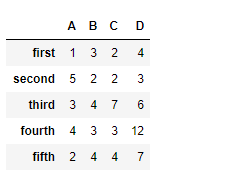 Let's use the
 dataframe.reindex() function to reindex the dataframe
Python3 1== `
reindexing with new index values
df.reindex(["first", "dues", "trois", "fourth", "fifth"])
`
Output : 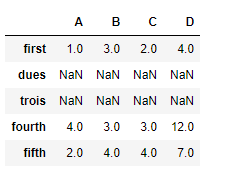 Notice the output, new indexes are populated with
 NaN values, we can fill in the missing values using the parameter, fill_value
Python3 1== `
filling the missing values by 100
df.reindex(["first", "dues", "trois", "fourth", "fifth"], fill_value = 100)
`
Output : 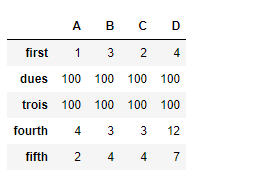 Example #2: Use
 reindex() function to reindex the column axis
Python3 `
importing pandas as pd
import pandas as pd
Creating the first dataframe
df1 = pd.DataFrame({"A":[1, 5, 3, 4, 2], "B":[3, 2, 4, 3, 4], "C":[2, 2, 7, 3, 4], "D":[4, 3, 6, 12, 7]})
reindexing the column axis with
old and new index values
df.reindex(columns =["A", "B", "D", "E"])
`
Output : 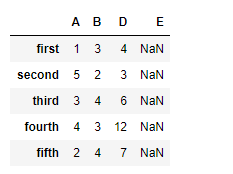 Notice, we have
 NaN values in the new columns after reindexing, we can take care of the missing values at the time of reindexing. By passing an argument fill_value to the function.
Python3 1== `
reindex the columns
fill the missing values by 25
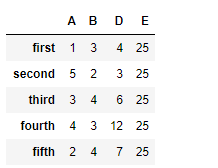
df.reindex(columns =["A", "B", "D", "E"], fill_value = 25)
`
Output :