Python | Pandas Series.div() (original) (raw)
Last Updated : 01 Oct, 2018
Python is a great language for doing data analysis, primarily because of the fantastic ecosystem of data-centric Python packages. Pandas is one of those packages and makes importing and analyzing data much easier. Python Series.div() is used to divide series or list like objects with same length by the caller series.
Syntax: Series.div(other, level=None, fill_value=None, axis=0)Parameters: other: other series or list type to be divided by the caller seriesfill_value: Value to be replaced by NaN in series/list before divisionlevel: integer value of level in case of multi indexReturn type: Caller series with divided values
To download the data set used in following example, click here.In the following examples, the data frame used contains data of some NBA players. The image of data frame before any operations is attached below.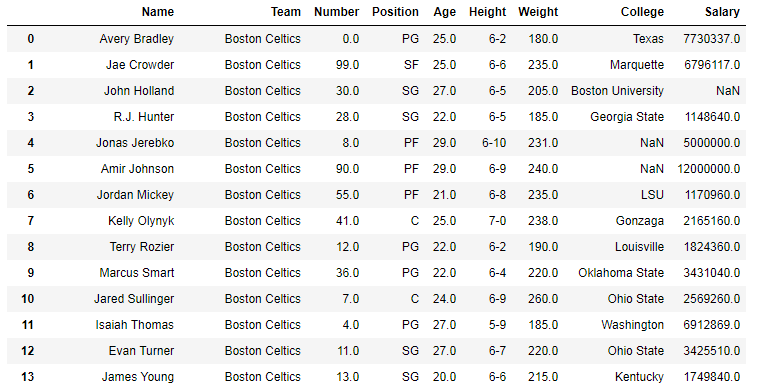 Example #1: Dividing Series by list In this example, the top 5 rows are stored in new variable using .head() method. After that a list of same length is created and the age column is divided by the list column using .div() method
Python3 `
importing pandas module
import pandas as pd
reading csv file from url
data = pd.read_csv("https://media.geeksforgeeks.org/wp-content/uploads/nba.csv")
creating short data of 5 rows
short_data = data.head()
creating list with 5 values
list =[1, 2, 3, 4, 5]
Dividing by list data
creating new column
short_data["Divided Age values"]= short_data["Age"].div(list)
display
short_data
`
**Output:**As shown in the output image, it can be compared that the Divided age value column is having the Divided values of (Age)/(list).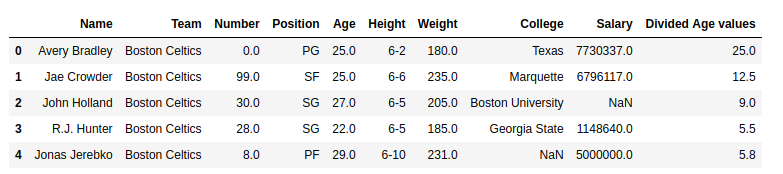 Example #2: Dividing series by series having null values In this example, the Salary column is divided by the Age column. Since the salary column contains null values too, by default it returns NaN no matter what is divided. In this example, 200000 is passed to replace null values with 200000.
Python3 `
importing pandas module
import pandas as pd
reading csv file from url
data = pd.read_csv("https://media.geeksforgeeks.org/wp-content/uploads/nba.csv")
passing age series to variable
age = data["Age"]
na replacement
na = 200000
Dividing values
storing to new column
data["Divided values"]= data["Salary"].div(other = age, fill_value = na)
display
data.head(10)
`
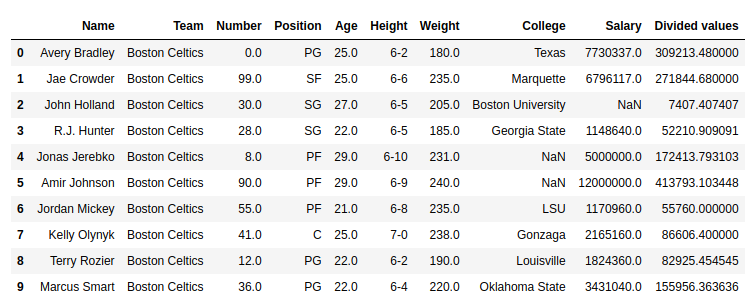
**Output:**As shown in the output image, the Divided values column has divided age column with 200000 in case of Null values.