Python | Pandas Series.str.pad() (original) (raw)
Last Updated : 17 Sep, 2018
Python is a great language for doing data analysis, primarily because of the fantastic ecosystem of data-centric python packages. Pandas is one of those packages and makes importing and analyzing data much easier. Pandas provide a method to add padding (whitespaces or other characters) to every string element in a series. .str has to be prefixed every time before calling this method to differentiate it from the Python's default function otherwise, it will throw error.
Syntax: Series.str.pad(width, side='left', fillchar=' ') Parameters: width: Minimum width of resulting string.
- If width is less than or equal to length of string, no padding is added.
- If width is more than the string length, the extra space is filled with whitespaces or passed character. side: string input ( 'left', 'right' or 'both'). Default is 'left'. Padding will be added equally on respective side.fillchar: Character to be padded. Default is ' '(White space). Return Type: Series with added spaces/characters on the passed side of string
To download the CSV used in code, click here.
In the following examples, the data frame used contains data of some NBA players. **str.pad() **method will be used to add padding to the text. The image of data frame before any operations is shown below: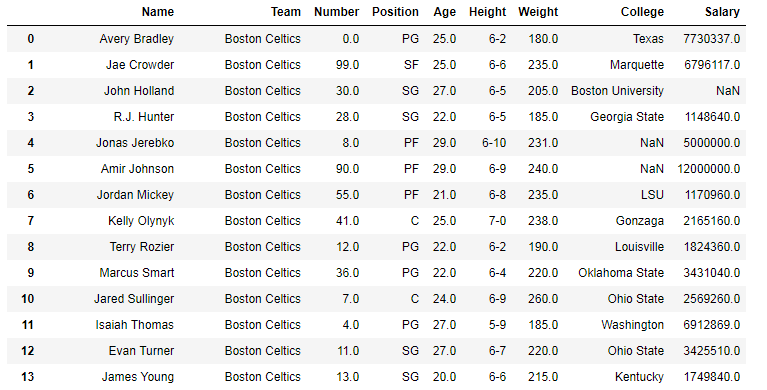 Example #1: Left padding In this example, a minimum length of string is set at 15 and whitespaces are added to left side of string in Team column using the
 str.pad() method. Since white spaces can't be seen, they are compared with custom input string and the result is checked if it's True or not for team name "Boston Celtics" only.
Python3 1== `
importing pandas module
import pandas as pd
making data frame from csv at url
data = pd.read_csv("https://media.geeksforgeeks.org/wp-content/upload/nba.csv")
removing null values to avoid errors
data.dropna(how ='all', inplace = True)
adding white spaces to left side
data["Team"]= data["Team"].str.pad(15, side ='left')
custom string
string =' Boston Celtics'
checking if same or not
data["Team"]== string
`
**Output:**As shown in the output image, the condition is True for team name Boston Celtics which means spaces were added successfully. Similarly the other strings are also padded according to their length. Example #2: Right padding In this example, a minimum length of string is set at 15 and '_' are added to right side of string in Team column using the str.pad() method. '_' is passed to fillchar parameters to add it instead of default whitespaces.
Python3 1== `
importing pandas module
import pandas as pd
making data frame
data = pd.read_csv("https://media.geeksforgeeks.org/wp-content/uploads/nba.csv")
removing null values to avoid errors
data.dropna(how ='all', inplace = True)
adding white spaces to left side
data["Team"]= data["Team"].str.pad(15, side ='right', fillchar ='_')
output display
data
`
**Output:**As shown in the output image, '_' has been added to right side of string depending upon length of the string. After padding, the length of each string is 15.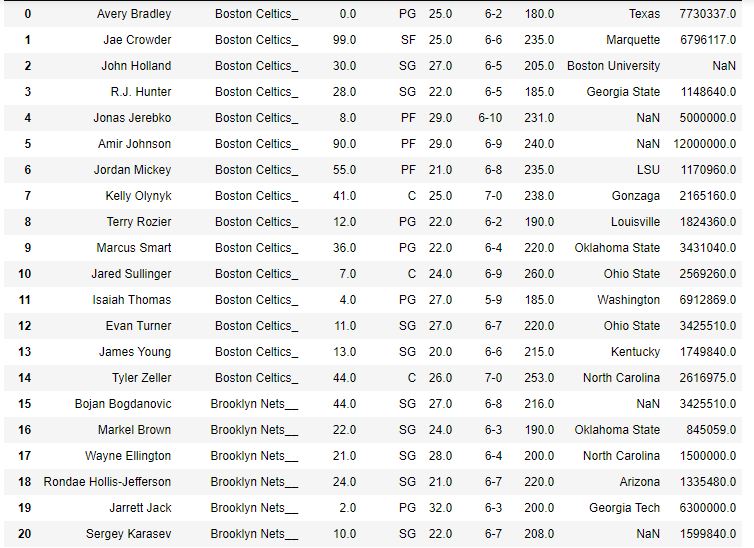 Example 3: Both side padding In this example, '+' has been added to both side of string using fillchar parameter in str.pad(). The width parameter is set to 20, so that the length of each string after padding becomes same.
Python3 1== `
importing pandas module
import pandas as pd
making data frame
data = pd.read_csv("https://media.geeksforgeeks.org/wp-content/uploads/nba.csv")
removing null values to avoid errors
data.dropna(how ='all', inplace = True)
adding white spaces to left side
data["Name"]= data["Name"].str.pad(20, side ='both', fillchar ='+')
output
data
`
**Output:**As shown in the output image, '+' was added to both side of the string. The number of '+' sign in each string may differ, but after padding the length of each string is 20.Note: As it can be seen in the image, if the string has odd number of places left (width - length), then the priority is given to right side. Hence, the one left character will be added to the right side. As in the first row of name column, Length of string was 13. So 20-13 = 7. Hence 3 '+' are added to left side and '4' to the right.