Python | PanedWindow Widget in Tkinter (original) (raw)
Last Updated : 7 Jun, 2019
Tkinter supports a variety of widgets to make GUI more and more attractive and functional. The PanedWindow widget is a geometry manager widget, which can contain one or more child widgets panes. The child widgets can be resized by the user, by moving separator lines sashes using the mouse.
Syntax: PanedWindow(master, **options)Parameters: master: parent widget or main Tk() objectoptions: which are passed in config method or directly in the constructor
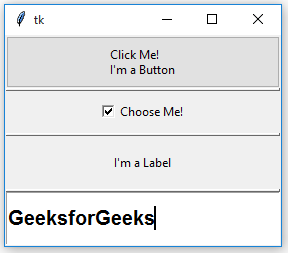
PanedWindow can be used to implement common 2-panes or 3-panes but multiple panes can be used.**Code #1:**PanedWindow with only two panes
Python3 1== `
Importing everything from tkinter module
from tkinter import * from tkinter import ttk
main tkinter window
root = Tk()
panedwindow object
pw = PanedWindow(orient ='vertical')
Button widget
top = ttk.Button(pw, text ="Click Me !\nI'm a Button") top.pack(side = TOP)
This will add button widget to the panedwindow
pw.add(top)
Checkbutton Widget
bot = Checkbutton(pw, text ="Choose Me !") bot.pack(side = TOP)
This will add Checkbutton to panedwindow
pw.add(bot)
expand is used so that widgets can expand
fill is used to let widgets adjust itself
according to the size of main window
pw.pack(fill = BOTH, expand = True)
This method is used to show sash
pw.configure(sashrelief = RAISED)
Infinite loop can be destroyed by
keyboard or mouse interrupt
mainloop()
`
Output: 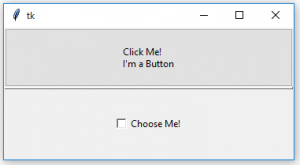 Code #2: PanedWindow with multiple panes
Python3 1== `
Importing everything from tkinter module
from tkinter import * from tkinter import ttk
main tkinter window
root = Tk()
panedwindow object
pw = PanedWindow(orient ='vertical')
Button widget
top = ttk.Button(pw, text ="Click Me !\nI'm a Button") top.pack(side = TOP)
This will add button widget to the panedwindow
pw.add(top)
Checkbutton Widget
bot = Checkbutton(pw, text ="Choose Me !") bot.pack(side = TOP)
This will add Checkbutton to panedwindow
pw.add(bot)
adding Label widget
label = Label(pw, text ="I'm a Label") label.pack(side = TOP)
pw.add(label)
Tkinter string variable
string = StringVar()
Entry widget with some styling in fonts
entry = Entry(pw, textvariable = string, font =('arial', 15, 'bold')) entry.pack()
Focus force is used to focus on particular
widget that means widget is already selected for operations
entry.focus_force()
pw.add(entry)
expand is used so that widgets can expand
fill is used to let widgets adjust itself
according to the size of main window
pw.pack(fill = BOTH, expand = True)
This method is used to show sash
pw.configure(sashrelief = RAISED)
Infinite loop can be destroyed by
keyboard or mouse interrupt
mainloop()
`
Output: