Python | place() method in Tkinter (original) (raw)
Last Updated : 22 Dec, 2022
The Place geometry manager is the simplest of the three general geometry managers provided in Tkinter. It allows you explicitly set the position and size of a window, either in absolute terms, or relative to another window. You can access the place manager through the place() method which is available for all standard widgets. It is usually not a good idea to use place() for ordinary window and dialog layouts; its simply too much work to get things working as they should. Use the pack() or grid() managers for such purposes. Syntax:
widget.place(relx = 0.5, rely = 0.5, anchor = CENTER)
Note : place() method can be used with grid() method as well as with pack() method. Code #1:
Python3 `
Importing tkinter module
from tkinter import * from tkinter.ttk import *
creating Tk window
master = Tk()
setting geometry of tk window
master.geometry("200x200")
button widget
b1 = Button(master, text = "Click me !") b1.place(relx = 1, x =-2, y = 2, anchor = NE)
label widget
l = Label(master, text = "I'm a Label") l.place(anchor = NW)
button widget
b2 = Button(master, text = "GFG") b2.place(relx = 0.5, rely = 0.5, anchor = CENTER)
infinite loop which is required to
run tkinter program infinitely
until an interrupt occurs
mainloop()
`
Output: 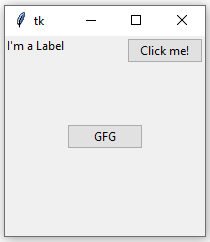 When we use pack() or grid() managers, then it is very easy to put two different widgets separate to each other but putting one of them inside other is a bit difficult. But this can easily be achieved by place() method. In place() method, we can use in_ option to put one widget inside other. Code #2:
Python3 `
Importing tkinter module
from tkinter import * from tkinter.ttk import *
creating Tk window
master = Tk()
setting geometry of tk window
master.geometry("200x200")
button widget
b2 = Button(master, text = "GFG") b2.pack(fill = X, expand = True, ipady = 10)
button widget
b1 = Button(master, text = "Click me !")
This is where b1 is placed inside b2 with in_ option
b1.place(in_= b2, relx = 0.5, rely = 0.5, anchor = CENTER)
label widget
l = Label(master, text = "I'm a Label") l.place(anchor = NW)
infinite loop which is required to
run tkinter program infinitely
until an interrupt occurs
mainloop()
`
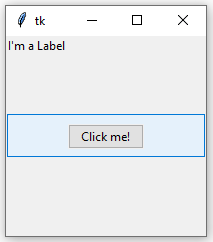
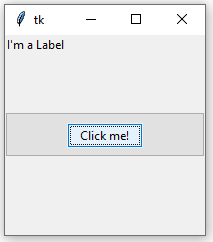
Output: In below images notice that one button is placed inside the other.