Python Program to Reverse a Single Line of a Text File (original) (raw)
Last Updated : 12 Jan, 2026
Given a text file that contains multiple lines, the task is to reverse the words of only one line chosen by the user. All other lines in the file should remain unchanged. The line is selected using a 0-based index, which means:
- **0: first line
- **1: second line
- **2: third line, and so on.
**For Example:
**Input: Hello Geeks User choice = 0
for geeks!
**Output: Geeks Hello
for geeks!
**Explanation: selected line (Hello Geeks) is reversed word by word to become Geeks Hello.
Now, let's explore different methods to reverse a single line of a text file in python.
Below is the sample file (gfg.txt) used in this article:
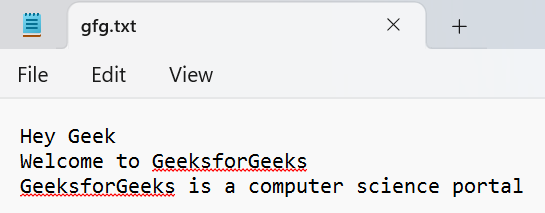
gfg.txt
Using readlines() and Indexing
This method loads the whole file into a list using readlines(), changes only the line at the selected index, and then writes everything back to the file.
Python `
with open('gfg.txt', 'r') as f: lines = f.readlines()
choice = 0
line = lines[choice].split()
lines[choice] = " ".join(line[::-1]) + "\n"
with open('gfg.txt', 'w') as f: f.writelines(lines)
`
**Output
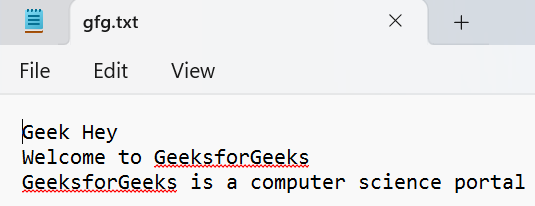
Output in a text file
**Explanation:
- readlines() stores each line of the file as a list item and lines[choice] selects the line chosen by the user.
- split() breaks that line into individual words and line[::-1] reverses the word order.
- " ".join(...) joins the reversed words back into a single line and writelines(lines) writes the updated list back to the file.
Using File Iteration with a Counter
This method reads the file line-by-line and uses enumerate() to check the line number so only the chosen line is reversed.
Python `
choice = 0 with open('gfg.txt', 'r') as f: nl = [] for idx, line in enumerate(f): if idx == choice: words = line.split() nl.append(" ".join(words[::-1])) else: nl.append(line.rstrip("\n"))
with open('gfg.txt', 'w') as f: f.write("\n".join(nl))
`
**Output
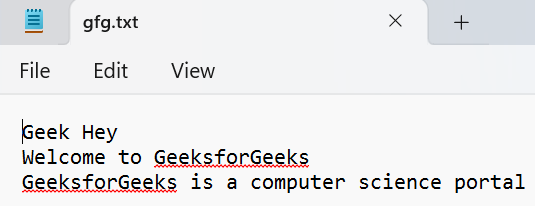
File Iteration with Counter
**Explanation:
- enumerate(f) gives both the line number and the line text and idx == choice checks if the current line is the one to reverse.
- line.split() converts the selected line into words and words[::-1] reverses the word order.
- " ".join(...) forms the reversed line, nl.append(...) stores either the modified or original line and "\n".join(nl) joins all lines back together for writing to the file.
Using fileinput Module
This method uses Python’s fileinput module to update a file line-by-line without loading the entire file into memory.
Python `
import fileinput
choice = 0
for idx, line in enumerate(fileinput.input("gfg.txt", inplace=True)): if idx == choice: print(" ".join(line.split()[::-1])) else: print(line, end="")
`