Reverse the Content of a File and Store it in Another File Python (original) (raw)
Last Updated : 16 Jan, 2026
Given a text file. The task is to reverse as well as stores the content from an input file to an output file. This reversing can be performed in three ways.
- **Full reversing: Reverse all characters in the file completely.
- **Line-wise Reversing: Reverse the order of lines in the file.
- **Word to word reversing: Reverse the order of words in each line.
**Example: Full Reversing
**Input:
Hello Geeks
for geeks!**Output:
!skeeg rof
skeeG olleH
**Example 2: Line-wise Reversing
**Input:
Hello Geeks
for geeks!**Output:
for geeks!
Hello Geeks
**Example 3: Word to word reversing
**Input:
Hello Geeks
for geeks!**Output:
Geeks Hello
geeks! for
Sample Input File:
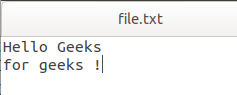
file.txt
Full Reversing Using String Slicing
This method reads the entire file as a single string and reverses it using Python slicing. It is simple and fast but not suitable for very large files due to memory usage.
Python `
with open("file.txt", "r") as infile: data = infile.read()
with open("output1.txt", "w") as outfile: outfile.write(data[::-1])
`
**Output
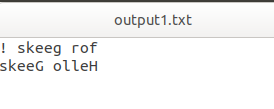
output1.txt
**Explanation:
- **read(): Reads the entire file as a string
- **data[::-1]: Reverses all characters
- **write(): Writes reversed content to output file
Reversing Order of Lines Using readlines()
This approach reverses the order of lines instead of characters. It reads all lines into a list and reverses the list.
Python `
with open("file.txt", "r") as infile: lines = infile.readlines()
with open("output2.txt", "w") as outfile: outfile.writelines(lines[::-1])
`
**Output
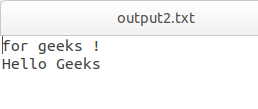
output2.txt
**Explanation:
- **readlines(): Reads file into a list of lines
- **lines[::-1]: Reverses line order
- **writelines(): Writes reversed lines
Word-to-Word Reversing
This method reverses words in each line while keeping line order intact. Useful when sentence structure must be preserved.
Python `
with open("file.txt", "r") as infile, open("output3.txt", "w") as outfile: for line in infile: outfile.write(" ".join(line.split()[::-1]) + "\n")
`