Python Tkinter Toplevel Widget (original) (raw)
Last Updated : 12 Jul, 2025
Tkinter is a GUI toolkit used in python to make user-friendly GUIs.Tkinter is the most commonly used and the most basic GUI framework available in Python. Tkinter uses an object-oriented approach to make GUIs.
Note: For more information, refer to Python GUI – tkinter
Toplevel widget
A Toplevel widget is used to create a window on top of all other windows. The Toplevel widget is used to provide some extra information to the user and also when our program deals with more than one application. These windows are directly organized and managed by the Window Manager and do not need to have any parent window associated with them every time.
Syntax:
toplevel = Toplevel(root, bg, fg, bd, height, width, font, ..)
Optional parameters
- root = root window(optional)
- bg = background colour
- fg = foreground colour
- bd = border
- height = height of the widget.
- width = width of the widget.
- font = Font type of the text.
- cursor = cursor that appears on the widget which can be an arrow, a dot etc.
Common methods
- iconify turns the windows into icon.
- deiconify turns back the icon into window.
- state returns the current state of window.
- withdraw removes the window from the screen.
- title defines title for window.
- frame returns a window identifier which is system specific.
Example 1:
Python3 `
from tkinter import *
root = Tk() root.geometry("200x300") root.title("main")
l = Label(root, text = "This is root window")
top = Toplevel() top.geometry("180x100") top.title("toplevel") l2 = Label(top, text = "This is toplevel window")
l.pack() l2.pack()
top.mainloop()
`
Output
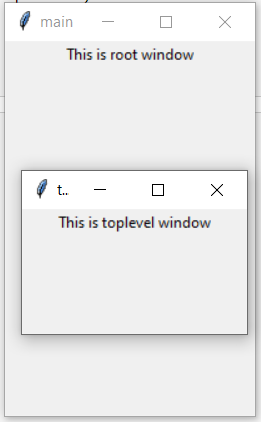
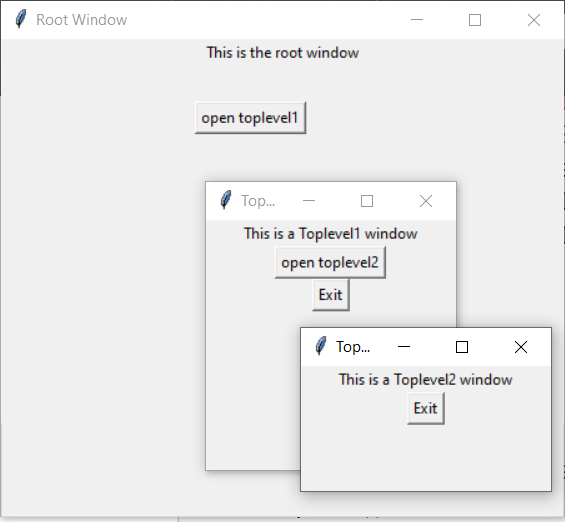
Example 2: Creating Multiple toplevels over one another
Python3 `
from tkinter import *
Create the root window
with specified size and title
root = Tk()
root.title("Root Window")
root.geometry("450x300")
Create label for root window
label1 = Label(root, text = "This is the root window")
define a function for 2nd toplevel
window which is not associated with
any parent window
def open_Toplevel2():
# Create widget
top2 = Toplevel()

# define title for window
top2.title("Toplevel2")

# specify size
top2.geometry("200x100")

# Create label
label = Label(top2,
              text = "This is a Toplevel2 window")

# Create exit button.
button = Button(top2, text = "Exit",
                command = top2.destroy)

label.pack()
button.pack()

# Display until closed manually.
top2.mainloop()
define a function for 1st toplevel
which is associated with root window.
def open_Toplevel1():
# Create widget
top1 = Toplevel(root)

# Define title for window
top1.title("Toplevel1")

# specify size
top1.geometry("200x200")

# Create label
label = Label(top1,
              text = "This is a Toplevel1 window")

# Create Exit button
button1 = Button(top1, text = "Exit",
                 command = top1.destroy)

# create button to open toplevel2
button2 = Button(top1, text = "open toplevel2",
                 command = open_Toplevel2)

label.pack()
button2.pack()
button1.pack()

# Display until closed manually
top1.mainloop()
Create button to open toplevel1
button = Button(root, text = "open toplevel1", command = open_Toplevel1) label1.pack()
position the button
button.place(x = 155, y = 50)
Display until closed manually
root.mainloop()
`
Output