:first-child{margin-top:0!important}.markdown-body>:last-child{margin-bottom:0!important}.markdown-body a:not([href]){color:inherit;text-decoration:none}.markdown-body .absent{color:var(--color-danger-fg)}.markdown-body .anchor{float:left;margin-left:-20px;padding-right:4px;line-height:1}.markdown-body .anchor:focus{outline:none}.markdown-body p,.markdown-body blockquote,.markdown-body ul,.markdown-body ol,.markdown-body dl,.markdown-body table,.markdown-body pre,.markdown-body details{margin-top:0;margin-bottom:16px}.markdown-body hr{height:.25em;background-color:var(--color-border-default);border:0;margin:24px 0;padding:0}.markdown-body blockquote{color:var(--color-fg-muted);border-left:.25em solid var(--color-border-default);padding:0 1em}.markdown-body blockquote>:first-child{margin-top:0}.markdown-body blockquote>:last-child{margin-bottom:0}.markdown-body h1,.markdown-body h2,.markdown-body h3,.markdown-body h4,.markdown-body h5,.markdown-body h6{font-weight:var(--base-text-weight-semibold,600);margin-top:24px;margin-bottom:16px;line-height:1.25}.markdown-body h1 .octicon-link,.markdown-body h2 .octicon-link,.markdown-body h3 .octicon-link,.markdown-body h4 .octicon-link,.markdown-body h5 .octicon-link,.markdown-body h6 .octicon-link{color:var(--color-fg-default);vertical-align:middle;visibility:hidden}.markdown-body h1:hover .anchor,.markdown-body h2:hover .anchor,.markdown-body h3:hover .anchor,.markdown-body h4:hover .anchor,.markdown-body h5:hover .anchor,.markdown-body h6:hover .anchor{text-decoration:none}.markdown-body h1:hover .anchor .octicon-link,.markdown-body h2:hover .anchor .octicon-link,.markdown-body h3:hover .anchor .octicon-link,.markdown-body h4:hover .anchor .octicon-link,.markdown-body h5:hover .anchor .octicon-link,.markdown-body h6:hover .anchor .octicon-link{visibility:visible}.markdown-body h1 tt,.markdown-body h1 code,.markdown-body h2 tt,.markdown-body h2 code,.markdown-body h3 tt,.markdown-body h3 code,.markdown-body h4 tt,.markdown-body h4 code,.markdown-body h5 tt,.markdown-body h5 code,.markdown-body h6 tt,.markdown-body h6 code{font-size:inherit;padding:0 .2em}.markdown-body h1{border-bottom:1px solid var(--color-border-muted);padding-bottom:.3em;font-size:2em}.markdown-body h2{border-bottom:1px solid var(--color-border-muted);padding-bottom:.3em;font-size:1.5em}.markdown-body h3{font-size:1.25em}.markdown-body h4{font-size:1em}.markdown-body h5{font-size:.875em}.markdown-body h6{color:var(--color-fg-muted);font-size:.85em}.markdown-body summary h1,.markdown-body summary h2,.markdown-body summary h3,.markdown-body summary h4,.markdown-body summary h5,.markdown-body summary h6{display:inline-block}.markdown-body summary h1 .anchor,.markdown-body summary h2 .anchor,.markdown-body summary h3 .anchor,.markdown-body summary h4 .anchor,.markdown-body summary h5 .anchor,.markdown-body summary h6 .anchor{margin-left:-40px}.markdown-body summary h1,.markdown-body summary h2{border-bottom:0;padding-bottom:0}.markdown-body ul,.markdown-body ol{padding-left:2em}.markdown-body ul.no-list,.markdown-body ol.no-list{padding:0;list-style-type:none}.markdown-body ol[type=a]{list-style-type:lower-alpha}.markdown-body ol[type=A]{list-style-type:upper-alpha}.markdown-body ol[type=i]{list-style-type:lower-roman}.markdown-body ol[type=I]{list-style-type:upper-roman}.markdown-body ol[type="1"]{list-style-type:decimal}.markdown-body div>ol:not([type]){list-style-type:decimal}.markdown-body ul ul,.markdown-body ul ol,.markdown-body ol ol,.markdown-body ol ul{margin-top:0;margin-bottom:0}.markdown-body li>p{margin-top:16px}.markdown-body li+li{margin-top:.25em}.markdown-body dl{padding:0}.markdown-body dl dt{font-size:1em;font-style:italic;font-weight:var(--base-text-weight-semibold,600);margin-top:16px;padding:0}.markdown-body dl dd{margin-bottom:16px;padding:0 16px}.markdown-body table{width:100%;width:-webkit-max-content;width:-webkit-max-content;width:max-content;max-width:100%;display:block;overflow:auto}.markdown-body table th{font-weight:var(--base-text-weight-semibold,600)}.markdown-body table th,.markdown-body table td{border:1px solid var(--color-border-default);padding:6px 13px}.markdown-body table td>:last-child{margin-bottom:0}.markdown-body table tr{background-color:var(--color-canvas-default);border-top:1px solid var(--color-border-muted)}.markdown-body table tr:nth-child(2n){background-color:var(--color-canvas-subtle)}.markdown-body table img{background-color:transparent}.markdown-body img{max-width:100%;box-sizing:content-box;background-color:var(--color-canvas-default)}.markdown-body img[align=right]{padding-left:20px}.markdown-body img[align=left]{padding-right:20px}.markdown-body .emoji{max-width:none;vertical-align:text-top;background-color:transparent}.markdown-body span.frame{display:block;overflow:hidden}.markdown-body span.frame>span{float:left;width:auto;border:1px solid var(--color-border-default);margin:13px 0 0;padding:7px;display:block;overflow:hidden}.markdown-body span.frame span img{float:left;display:block}.markdown-body span.frame span span{clear:both;color:var(--color-fg-default);padding:5px 0 0;display:block}.markdown-body span.align-center{clear:both;display:block;overflow:hidden}.markdown-body span.align-center>span{text-align:center;margin:13px auto 0;display:block;overflow:hidden}.markdown-body span.align-center span img{text-align:center;margin:0 auto}.markdown-body span.align-right{clear:both;display:block;overflow:hidden}.markdown-body span.align-right>span{text-align:right;margin:13px 0 0;display:block;overflow:hidden}.markdown-body span.align-right span img{text-align:right;margin:0}.markdown-body span.float-left{float:left;margin-right:13px;display:block;overflow:hidden}.markdown-body span.float-left span{margin:13px 0 0}.markdown-body span.float-right{float:right;margin-left:13px;display:block;overflow:hidden}.markdown-body span.float-right>span{text-align:right;margin:13px auto 0;display:block;overflow:hidden}.markdown-body code,.markdown-body tt{white-space:break-spaces;background-color:var(--color-neutral-muted);border-radius:6px;margin:0;padding:.2em .4em;font-size:85%}.markdown-body code br,.markdown-body tt br{display:none}.markdown-body del code{-webkit-text-decoration:inherit;-webkit-text-decoration:inherit;text-decoration:inherit}.markdown-body samp{font-size:85%}.markdown-body pre{word-wrap:normal}.markdown-body pre code{font-size:100%}.markdown-body pre>code{word-break:normal;white-space:pre;background:0 0;border:0;margin:0;padding:0}.markdown-body .highlight{margin-bottom:16px}.markdown-body .highlight pre{word-break:normal;margin-bottom:0}.markdown-body .highlight pre,.markdown-body pre{background-color:var(--color-canvas-subtle);border-radius:6px;padding:16px;font-size:85%;line-height:1.45;overflow:auto}.markdown-body pre code,.markdown-body pre tt{max-width:auto;line-height:inherit;word-wrap:normal;background-color:transparent;border:0;margin:0;padding:0;display:inline;overflow:visible}.markdown-body .csv-data td,.markdown-body .csv-data th{text-align:left;white-space:nowrap;padding:5px;font-size:12px;line-height:1;overflow:hidden}.markdown-body .csv-data .blob-num{text-align:right;background:var(--color-canvas-default);border:0;padding:10px 8px 9px}.markdown-body .csv-data tr{border-top:0}.markdown-body .csv-data th{font-weight:var(--base-text-weight-semibold,600);background:var(--color-canvas-subtle);border-top:0}.markdown-body [data-footnote-ref]:before{content:"["}.markdown-body [data-footnote-ref]:after{content:"]"}.markdown-body .footnotes{color:var(--color-fg-muted);border-top:1px solid var(--color-border-default);font-size:12px}.markdown-body .footnotes ol{padding-left:16px}.markdown-body .footnotes ol ul{margin-top:16px;padding-left:16px;display:inline-block}.markdown-body .footnotes li{position:relative}.markdown-body .footnotes li:target:before{pointer-events:none;content:"";border:2px solid var(--color-accent-emphasis);border-radius:6px;position:absolute;top:-8px;bottom:-8px;left:-24px;right:-8px}.markdown-body .footnotes li:target{color:var(--color-fg-default)}.markdown-body .footnotes .data-footnote-backref g-emoji{font-family:monospace}.markdown-body{background-color:var(--color-canvas-default);color:var(--color-fg-default)}.markdown-body a{color:var(--color-accent-fg);text-decoration:none}.markdown-body a:hover{text-decoration:underline}.markdown-body img[align=center]{margin:0 auto}.markdown-body iframe{background-color:#fff;border:0;margin-bottom:16px}.markdown-body svg.octicon{fill:currentColor}.markdown-body .anchor>.octicon{display:inline}.markdown-body figcaption{text-align:center;padding-top:2px}.markdown-body .highlight .token.keyword,.gfm-highlight .token.keyword{color:var(--color-prettylights-syntax-keyword)}.markdown-body .highlight .token.tag .token.class-name,.markdown-body .highlight .token.tag .token.script .token.punctuation,.gfm-highlight .token.tag .token.class-name,.gfm-highlight .token.tag .token.script .token.punctuation{color:var(--color-prettylights-syntax-storage-modifier-import)}.markdown-body .highlight .token.operator,.markdown-body .highlight .token.number,.markdown-body .highlight .token.boolean,.markdown-body .highlight .token.tag .token.punctuation,.markdown-body .highlight .token.tag .token.script .token.script-punctuation,.markdown-body .highlight .token.tag .token.attr-name,.gfm-highlight .token.operator,.gfm-highlight .token.number,.gfm-highlight .token.boolean,.gfm-highlight .token.tag .token.punctuation,.gfm-highlight .token.tag .token.script .token.script-punctuation,.gfm-highlight .token.tag .token.attr-name{color:var(--color-prettylights-syntax-constant)}.markdown-body .highlight .token.function,.gfm-highlight .token.function{color:var(--color-prettylights-syntax-entity)}.markdown-body .highlight .token.string,.gfm-highlight .token.string{color:var(--color-prettylights-syntax-string)}.markdown-body .highlight .token.comment,.gfm-highlight .token.comment{color:var(--color-prettylights-syntax-comment)}.markdown-body .highlight .token.class-name,.gfm-highlight .token.class-name{color:var(--color-prettylights-syntax-variable)}.markdown-body .highlight .token.regex,.gfm-highlight .token.regex{color:var(--color-prettylights-syntax-string)}.markdown-body .highlight .token.regex .regex-delimiter,.gfm-highlight .token.regex .regex-delimiter{color:var(--color-prettylights-syntax-constant)}.markdown-body .highlight .token.tag .token.tag,.markdown-body .highlight .token.property,.gfm-highlight .token.tag .token.tag,.gfm-highlight .token.property{color:var(--color-prettylights-syntax-entity-tag)}.markdown-body .highlight .token.deleted,.gfm-highlight .token.deleted{color:var(--color-prettylights-syntax-markup-deleted-text);background-color:var(--color-prettylights-syntax-markup-deleted-bg)}.markdown-body .highlight .token.inserted,.gfm-highlight .token.inserted{color:var(--color-prettylights-syntax-markup-inserted-text);background-color:var(--color-prettylights-syntax-markup-inserted-bg)}

RadioButton in Tkinter | Python (original) (raw)

Last Updated : 11 Jul, 2025

The Radiobutton is a standard Tkinter widget used to implement one-of-many selections. Radiobuttons can contain text or images, and you can associate a Python function or method with each button. When the button is pressed, Tkinter automatically calls that function or method.
Syntax:

button = Radiobutton(master, text="Name on Button", variable = "shared variable", value = "values of each button", options = values, ...)
shared variable = A Tkinter variable shared among all Radio buttons
value = each radiobutton should have different value otherwise more than 1 radiobutton will get selected.

Code #1:
Radio buttons, but not in the form of buttons, in form of button box. In order to display button box, indicatoron/indicator option should be set to 0.

Python3 `

Importing Tkinter module

from tkinter import *

from tkinter.ttk import *

Creating master Tkinter window

master = Tk() master.geometry("175x175")

Tkinter string variable

able to store any string value

v = StringVar(master, "1")

Dictionary to create multiple buttons

values = {"RadioButton 1" : "1", "RadioButton 2" : "2", "RadioButton 3" : "3", "RadioButton 4" : "4", "RadioButton 5" : "5"}

Loop is used to create multiple Radiobuttons

rather than creating each button separately

for (text, value) in values.items(): Radiobutton(master, text = text, variable = v, value = value, indicator = 0, background = "light blue").pack(fill = X, ipady = 5)

Infinite loop can be terminated by

keyboard or mouse interrupt

or by any predefined function (destroy())

mainloop()

`

Output:
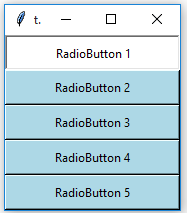
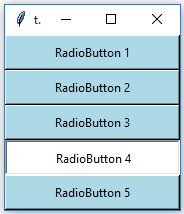
The background of these button boxes is light blue. Button boxes having a white backgrounds as well as sunken are selected ones.
Code #2: Changing button boxes into standard radio buttons. For this remove indicatoron option.

Python3 `

Importing Tkinter module

from tkinter import * from tkinter.ttk import *

Creating master Tkinter window

master = Tk() master.geometry("175x175")

Tkinter string variable

able to store any string value

v = StringVar(master, "1")

Dictionary to create multiple buttons

values = {"RadioButton 1" : "1", "RadioButton 2" : "2", "RadioButton 3" : "3", "RadioButton 4" : "4", "RadioButton 5" : "5"}

Loop is used to create multiple Radiobuttons

rather than creating each button separately

for (text, value) in values.items(): Radiobutton(master, text = text, variable = v, value = value).pack(side = TOP, ipady = 5)

Infinite loop can be terminated by

keyboard or mouse interrupt

or by any predefined function (destroy())

mainloop()

`

Output:
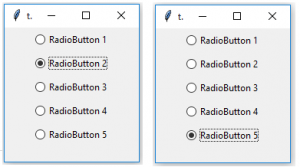
These Radiobuttons are created using tkinter.ttk that is why background option is not available but we can use style class to do styling.

Code #3: Adding Style to Radio Button using style class.

Python3 `

Importing Tkinter module

from tkinter import * from tkinter.ttk import *

Creating master Tkinter window

master = Tk() master.geometry('175x175')

Tkinter string variable

able to store any string value

v = StringVar(master, "1")

Style class to add style to Radiobutton

it can be used to style any ttk widget

style = Style(master) style.configure("TRadiobutton", background = "light green", foreground = "red", font = ("arial", 10, "bold"))

Dictionary to create multiple buttons

values = {"RadioButton 1" : "1", "RadioButton 2" : "2", "RadioButton 3" : "3", "RadioButton 4" : "4", "RadioButton 5" : "5"}

Loop is used to create multiple Radiobuttons

rather than creating each button separately

for (text, value) in values.items(): Radiobutton(master, text = text, variable = v, value = value).pack(side = TOP, ipady = 5)

Infinite loop can be terminated by

keyboard or mouse interrupt

or by any predefined function (destroy())

mainloop()

`

Output:
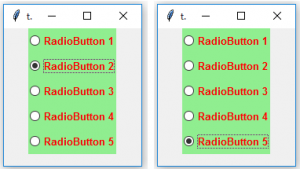
You may observe that font style is changed as well as background and foreground colors are also changed. Here, TRadiobutton is used in style class, it automatically applies styling to all the available Radiobuttons.