Read, Write and Parse JSON using Python (original) (raw)
JSON is a lightweight data format for data interchange that can be easily read and written by humans and easily parsed and generated by machines. It is a complete language-independent text format. To work with JSON data, Python has a built-in package called JSON.
**Example:
s = '{"id":1, "name": "Emily", "language": ["C++", "Python"]}'
JSON Syntax
The syntax of JSON is a subset of **JavaScript's object notation and includes the following structural rules:
- **Name/Value Pairs: Data is represented as key-value pairs. The key (or name) is a string followed by a colon (:), and each pair is separated by a comma (,).
- **Curly Braces {}: Enclose JSON objects containing key-value pairs.
- **Square Brackets []: Enclose arrays of values or objects.
Keys/Name must be strings with double quotes and values must be data types amongst the following:
- String
- Number
- Object (JSON object)
- array
- Boolean
- Null
**Example JSON file
{
"employee": [
{
"id": "1",
"name": "Amit",
"department": "Sales"
},
{
"id": "4",
"name": "Sunil",
"department": "HR"
}
]
}
Parsing JSON in Python
To convert a JSON string into a Python dictionary, use the json.loads() method from Python’s built-in json module.
Python `
import json emp = '{"id": "9", "name": "Nitin", "dept": "Finance"}' emp_dict = json.loads(emp)
print(emp_dict) print(emp_dict['name'])
`
Output
{'id': '9', 'name': 'Nitin', 'dept': 'Finance'} Nitin
Reading JSON from File
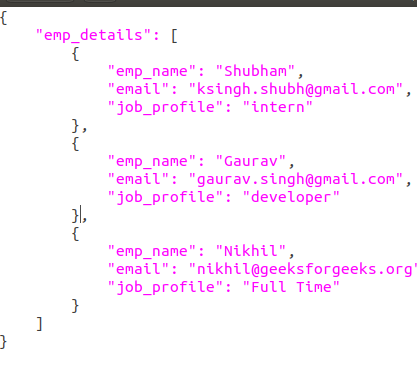
If you have JSON data stored in a .json file (for example, downloaded from an API or stored locally), Python's json module makes it easy to read and convert it into a Python dictionary using the json.load() function.
Assume the file data.json contains:
**Example:
Python `
import json f = open('data.json',) data = json.load(f)
for i in data['emp_details']: print(i) f.close()
`
**Output:

Convert Python Dictionary to JSON String
Python dictionaries can be easily converted to JSON strings using json.dumps(). This is useful when you want to send data over the network or store it in a text-based format.
Python `
import json
emp = { "id": "4", "name": "Sunil", "department": "HR" }
json_obj = json.dumps(emp, indent=4) print(json_obj)
`
Output
{ "id": "4", "name": "Sunil", "department": "HR" }
Python to JSON Data Type Conversion
Here's how Python's native types are converted to JSON equivalents:
| Python | JSON Equivalent |
|---|---|
| dict | object |
| list, tuple | array |
| str | string |
| int, float | number |
| True | true |
| False | false |
| None | null |
Writing JSON to a file in Python
Use json.dump() to write a Python dictionary to a JSON file. This is helpful for saving configuration, logs, user data or processed results.
Python `
import json
data = { "name": "Sathiyajith", "rollno": 56, "cgpa": 8.6, "phonenumber": "9976770500" }
with open("sample.json", "w") as outfile: json.dump(data, outfile)
`
**Output

Python Pretty Print JSON
When JSON is returned as a single line, it’s hard to read. You can pretty print JSON with indentation and sorted keys using the **json.dumps() function.
**Example:
Python `
import json
emp = '{"id":"9", "name": "Nitin", "department":"Finance"}' emp_d = json.loads(emp)
print(json.dumps(emp_d, indent=4, sort_keys=True))
`
Output
{ "department": "Finance", "id": "9", "name": "Nitin" }