Reading and Writing lists to a file in Python (original) (raw)
Reading and writing files is an important functionality in every programming language. Almost every application involves writing and reading operations to and from a file. To enable the reading and writing of files programming languages provide File I/O libraries with inbuilt methods that allow the creation, updation as well and reading of data from the files. Python is no exception. Python too offers inbuilt methods to perform file operations. The io module in Python is used for file handling.
Reading and Writing Lists to a File in Python
The **open(file path, mode) is used to open the required file in the desired mode. The open() method supports various modes of which three are of main concern:
- **r: read (default)Python
- **w: write
- **a: append
**write(): Insert the string str1 in a single line in the text file.
**read(): used to read data from the file opened using the _open() method.
Writing List to Files in Python
There are various methods for writing files in Python. Here, we will discuss some commonly used techniques.
- Using write()
- Using writelines()
- Using String Join Along with "with open" syntax
Writing List to Files in Python using write()
The file is opened with the _open() method in w+ mode within the _with block, the _w+ argument will create a new text file in write mode with the help of write(). The _with block ensures that once the entire block is executed the file is closed automatically.
Python `
assign list
l = ['Geeks','for','Geeks!']
open file
with open('gfg.txt', 'w+') as f:
# write elements of list
for items in l:
    f.write('%s\n' %items)

print("File written successfully")
close the file
f.close()
`
**Output:
File written successfully
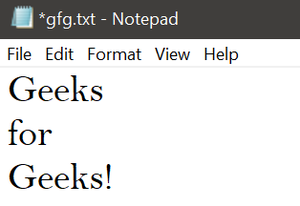
Here is the text file _gfg.txt created:
Writing List to Files in Python using writelines()
The file is opened with the _open() method in w mode within the _with block, the argument will write text to an existing text file with the help of **readlines****()**. The _with block ensures that once the entire block is executed the file is closed automatically.
Python `
L = ["Geeks\n", "for\n", "Geeks\n"]
writing to file
file1 = open('test1/myfile.txt', 'w') file1.writelines(L) file1.close()
`
**Output:

Below is the text file _gfg.txt:

Writing List to Files in Python using String Join Along with "with open" syntax
This Python code writes a list (`my_list`) to a file named "output.txt". It uses the "with open" syntax for automatic file handling. The list elements are joined into a string with newline characters, and this string is written to the file. A confirmation message is printed.
Python `
Sample list of data
my_list = ["item1", "item2", "item3", "item4"]
Specify the file path
file_path = "main.txt"
Using "with open" syntax to automatically close the file
with open(file_path, 'w') as file: # Join the list elements into a single string with a newline character data_to_write = '\n'.join(my_list)
# Write the data to the file
file.write(data_to_write)
print(f"The list has been written to {file_path}.")
`
**Output

Reading files in Python
There are various method to reading file in Python , here we used some generally used method for reading files in Python.
- using read()
- using readlines()
Read a file to a list in Python using read()
The file is opened using the open() method in reading _r mode. The data read from the file is printed to the output screen using read() function. The file opened is closed using the _close() method.
Python `
open file in read mode
f = open('gfg.txt', 'r')
display content of the file
print(f.read())
close the file
f.close()
`
**Output :

Read a file to a list in Python using readlines()
The file is opened using the open() method in reading _r mode. The data read from the file is printed to the output screen using readlines() function. The file opened is closed using the _close() method.
Python `
open file in read mode
f = open('gfg.txt', 'r')
display content of the file
for x in f.readlines(): print(x, end='')
close the file
f.close()
`
**Output:

Using the JSON Module for Reading and Writing Lists and Dictionaries
Python's json module can be very handy when you need to read or write more complex data structures, such as lists or dictionaries, to a file. This method not only preserves the structure of the data but also ensures that the data can be easily shared and parsed by other applications or in different programming environments.
Writing Data to a File Using json.dump()
To write a list or dictionary to a file, you can use the json.dump() function. This function serializes your data structure into JSON format and writes it directly to a file. Here is an example:
Python `
import json
Data to be written
config_data = { 'name': 'John', 'role': 'developer', 'languages': ['Python', 'JavaScript'] }
Specifying the file name
config_filename = 'config.json'
Writing the dictionary to a file in JSON format
with open(config_filename, 'w') as config_file: json.dump(config_data, config_file)
print(f"Data successfully written to {config_filename}")
`
**Output:
Data successfully written to config.json
Reading Data from a File Using json.load()
To read the JSON data back into Python as a dictionary or list, you can use the json.load() function. This function reads from a file and deserializes the JSON data into the original data structure (in this case, a dictionary).
Python `
Reading the data back
with open(config_filename, 'r') as config_file: data_loaded = json.load(config_file)
print("Data loaded from file:") print(data_loaded)
`
**Output:
Data loaded from file: {'name': 'John', 'role': 'developer', 'languages': ['Python', 'JavaScript']}
This method is particularly useful for configurations, saving application states, or any scenarios where data interchange is necessary.