Reshaping a Tensor in Pytorch (original) (raw)
In this article, we will discuss how to reshape a Tensor in Pytorch. Reshaping allows us to change the shape with the same data and number of elements as self but with the specified shape, which means it returns the same data as the specified array, but with different specified dimension sizes.
Creating Tensor for demonstration:
Python code to create a 1D Tensor and display it.
Python3 `
import torch module
import torch
create an 1 D etnsor with 8 elements
a = torch.tensor([1,2,3,4,5,6,7,8])
display tensor shape
print(a.shape)
display tensor
a
`
Output:
torch.Size([8]) tensor([1, 2, 3, 4, 5, 6, 7, 8])
Method 1 : Using reshape() Method
This method is used to reshape the given tensor into a given shape( Change the dimensions)
Syntax: tensor.reshape([row,column])
where,
- tensor is the input tensor
- row represents the number of rows in the reshaped tensor
- column represents the number of columns in the reshaped tensor
Example 1: Python program to reshape a 1 D tensor to a two-dimensional tensor.
Python3 `
import torch module
import torch
create an 1 D etnsor with 8 elements
a = torch.tensor([1, 2, 3, 4, 5, 6, 7, 8])
display tensor shape
print(a.shape)
display actual tensor
print(a)
reshape tensor into 4 rows and 2 columns
print(a.reshape([4, 2]))
display shape of reshaped tensor
print(a.shape)
`
Output:
torch.Size([8]) tensor([1, 2, 3, 4, 5, 6, 7, 8]) tensor([[1, 2], [3, 4], [5, 6], [7, 8]]) torch.Size([8])
Example 2: Python code to reshape tensors into 4 rows and 2 columns
Python3 `
import torch module
import torch
create an 1 D etnsor with 8 elements
a = torch.tensor([1, 2, 3, 4, 5, 6, 7, 8])
display tensor shape
print(a.shape)
display actual tensor
print(a)
reshape tensor into 4 rows and 2 columns
print(a.reshape([4, 2]))
display shape
print(a.shape)
`
Output:
torch.Size([8]) tensor([1, 2, 3, 4, 5, 6, 7, 8]) tensor([[1, 2], [3, 4], [5, 6], [7, 8]]) torch.Size([8])
Example 3: Python code to reshape tensor into 8 rows and 1 column.
Python3 `
import torch module
import torch
create an 1 D etnsor with 8 elements
a = torch.tensor([1, 2, 3, 4, 5, 6, 7, 8])
display tensor shape
print(a.shape)
display actual tensor
print(a)
reshape tensor into 8 rows and 1 column
print(a.reshape([8, 1]))
display shape
print(a.shape)
`
Output:
torch.Size([8]) tensor([1, 2, 3, 4, 5, 6, 7, 8]) tensor([[1], [2], [3], [4], [5], [6], [7], [8]]) torch.Size([8])
Method 2 : Using flatten() method
flatten() is used to flatten an N-Dimensional tensor to a 1D Tensor.
Syntax: torch.flatten(tensor)
Where, tensor is the input tensor
Example 1: Python code to create a tensor with 2 D elements and flatten this vector
Python3 `
import torch module
import torch
create an 2 D tensor with 8 elements each
a = torch.tensor([[1,2,3,4,5,6,7,8], [1,2,3,4,5,6,7,8]])
display actual tensor
print(a)
flatten a tensor with flatten() function
print(torch.flatten(a))
`
Output:
tensor([[1, 2, 3, 4, 5, 6, 7, 8], [1, 2, 3, 4, 5, 6, 7, 8]]) tensor([1, 2, 3, 4, 5, 6, 7, 8, 1, 2, 3, 4, 5, 6, 7, 8])
Example 2: Python code to create a tensor with 3 D elements and flatten this vector
Python3 `
import torch module
import torch
create an 3 D tensor with 8 elements each
a = torch.tensor([[[1,2,3,4,5,6,7,8], [1,2,3,4,5,6,7,8]], [[1,2,3,4,5,6,7,8], [1,2,3,4,5,6,7,8]]])
display actual tensor
print(a)
flatten a tensor with flatten() function
print(torch.flatten(a))
`
Output:
tensor([[[1, 2, 3, 4, 5, 6, 7, 8],
[1, 2, 3, 4, 5, 6, 7, 8]],
[[1, 2, 3, 4, 5, 6, 7, 8],
[1, 2, 3, 4, 5, 6, 7, 8]]])
tensor([1, 2, 3, 4, 5, 6, 7, 8, 1, 2, 3, 4, 5, 6, 7, 8, 1, 2, 3, 4, 5, 6, 7, 8,
1, 2, 3, 4, 5, 6, 7, 8])
Method 3: Using view() method
view() is used to change the tensor in two-dimensional format IE rows and columns. We have to specify the number of rows and the number of columns to be viewed.
Syntax: tensor.view(no_of_rows,no_of_columns)
where,
- tensor is an input one dimensional tensor
- no_of_rows is the total number of the rows that the tensor is viewed
- no_of_columns is the total number of the columns that the tensor is viewed.
Example 1: Python program to create a tensor with 12 elements and view with 3 rows and 4 columns and vice versa.
Python3 `
importing torch module
import torch
create one dimensional tensor 12 elements
a=torch.FloatTensor([24, 56, 10, 20, 30, 40, 50, 1, 2, 3, 4, 5])
view tensor in 4 rows and 3 columns
print(a.view(4, 3))
view tensor in 3 rows and 4 columns
print(a.view(3, 4))
`
Output:
tensor([[24., 56., 10.], [20., 30., 40.], [50., 1., 2.], [ 3., 4., 5.]]) tensor([[24., 56., 10., 20.], [30., 40., 50., 1.], [ 2., 3., 4., 5.]])
Example 2: Python code to change the view of a tensor into 10 rows and one column and vice versa.
Python3 `
importing torch module
import torch
create one dimensional tensor 10 elements
a = torch.FloatTensor([24, 56, 10, 20, 30, 40, 50, 1, 2, 3])
view tensor in 10 rows and 1 column
print(a.view(10, 1))
view tensor in 1 row and 10 columns
print(a.view(1, 10))
`
Output:
tensor([[24.], [56.], [10.], [20.], [30.], [40.], [50.], [ 1.], [ 2.], [ 3.]]) tensor([[24., 56., 10., 20., 30., 40., 50., 1., 2., 3.]])
Method 4: Using resize() method
This is used to resize the dimensions of the given tensor.
Syntax: tensor.resize_(no_of_tensors,no_of_rows,no_of_columns)
where:
- tensor is the input tensor
- no_of_tensors represents the total number of tensors to be generated
- no_of_rows represents the total number of rows in the new resized tensor
- no_of_columns represents the total number of columns in the new resized tensor
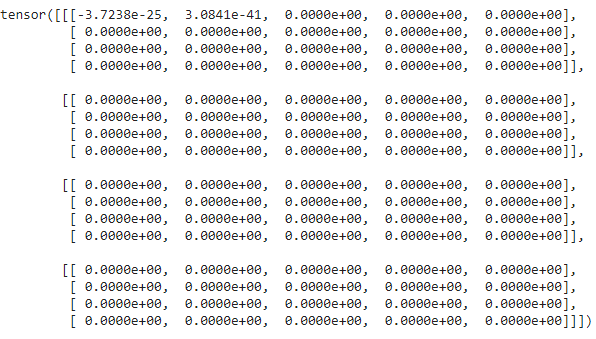
Example 1: Python code to create an empty one D tensor and create 4 new tensors with 4 rows and 5 columns
Python3 `
importing torch module
import torch
create one dimensional tensor
a = torch.Tensor()
resize the tensor to 4 tensors.
each tensor with 4 rows and 5 columns
print(a.resize_(4, 4, 5))
`
Output:
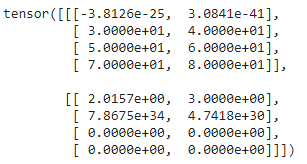
Example 2: Create a 1 D tensor with elements and resize to 3 tensors with 2 rows and 2 columns
Python3 `
importing torch module
import torch
create one dimensional
a = torch.Tensor()
resize the tensor to 2 tensors.
each tensor with 4 rows and 2 columns
print(a.resize_(2, 4, 2))
`
Output:
Method 5: Using unsqueeze() method
This is used to reshape a tensor by adding new dimensions at given positions.
Syntax: tensor.unsqueeze(position)
where, position is the dimension index which will start from 0.
Example 1: Python code to create 2 D tensors and add a dimension in 0 the dimension.
Python3 `
importing torch module
import torch
create two dimensional tensor
a = torch.Tensor([[2,3], [1,2]])
display shape
print(a.shape)
add dimension at 0 position
added = a.unsqueeze(0)
print(added.shape)
`
Output:
torch.Size([2, 2]) torch.Size([1, 2, 2])
Example 2: Python code to create 1 D tensor and add dimensions
Python3 `
importing torch module
import torch
create one dimensional tensor
a = torch.Tensor([1, 2, 3, 4, 5])
display shape
print(a.shape)
add dimension at 0 position
added = a.unsqueeze(0)
print(added.shape)
add dimension at 1 position
added = a.unsqueeze(1)
print(added.shape)
`
Output:
torch.Size([5]) torch.Size([1, 5]) torch.Size([5, 1])