Right and Left Hand Detection Using Python (original) (raw)
Last Updated : 23 Jul, 2025
In this article, we are going to see how to Detect Hands using Python.
We will use mediapipe and OpenCV libraries in python to detect the Right Hand and Left Hand. We will be using the Hands model from mediapipe solutions to detect hands, it is a palm detection model that operates on the full image and returns an oriented hand bounding box.
Required Libraries
- Mediapipe is Google’s open-source framework, used for media processing. It is cross-platform or we can say it is platform friendly. It can run on Android, iOS, and the web that’s what Cross-platform means, to run everywhere.
- OpenCVis a Python library that is designed to solve computer vision problems. OpenCV supports a wide variety of programming languages such as C++, Python, Java etc. Support for multiple platforms including Windows, Linux, and MacOS.
Installing required libraries
pip install mediapipe
pip install opencv-python
Stepwise Implementation
Step 1: Import all required libraries
Python3 `
Importing Libraries
import cv2 import mediapipe as mp
Used to convert protobuf message
to a dictionary.
from google.protobuf.json_format import MessageToDict
`
Step 2: Initializing Hands model
Python3 `
Initializing the Model
mpHands = mp.solutions.hands hands = mpHands.Hands( static_image_mode=False, model_complexity=1, min_detection_confidence=0.75, min_tracking_confidence=0.75, max_num_hands=2)
`
Let us look into the parameters for the Hands Model:
Hands( static_image_mode=False, model_complexity=1 min_detection_confidence=0.75, min_tracking_confidence=0.75, max_num_hands=2 )
Where:
- static_image_mode: It is used to specify whether the input image must be static images or as a video stream. The default value is False.
- model_complexity: Complexity of the hand landmark model: 0 or 1. Landmark accuracy, as well as inference latency, generally go up with the model complexity. Default to 1.
- min_detection_confidence: It is used to specify the minimum confidence value with which the detection from the person-detection model needs to be considered as successful. Can specify a value in [0.0,1.0]. The default value is 0.5.
- min_tracking_confidence: It is used to specify the minimum confidence value with which the detection from the landmark-tracking model must be considered as successful. Can specify a value in [0.0,1.0]. The default value is 0.5.
- max_num_hands: Maximum number of hands to detect. Default it is 2.
Step 3: Hands model process the image and detect hands
Capture the frames continuously from the camera using OpenCV and then Flip the image around y-axis i.e cv2.flip(image, flip code) and Convert BGR image to an RGB image and make predictions using initialized hands model.
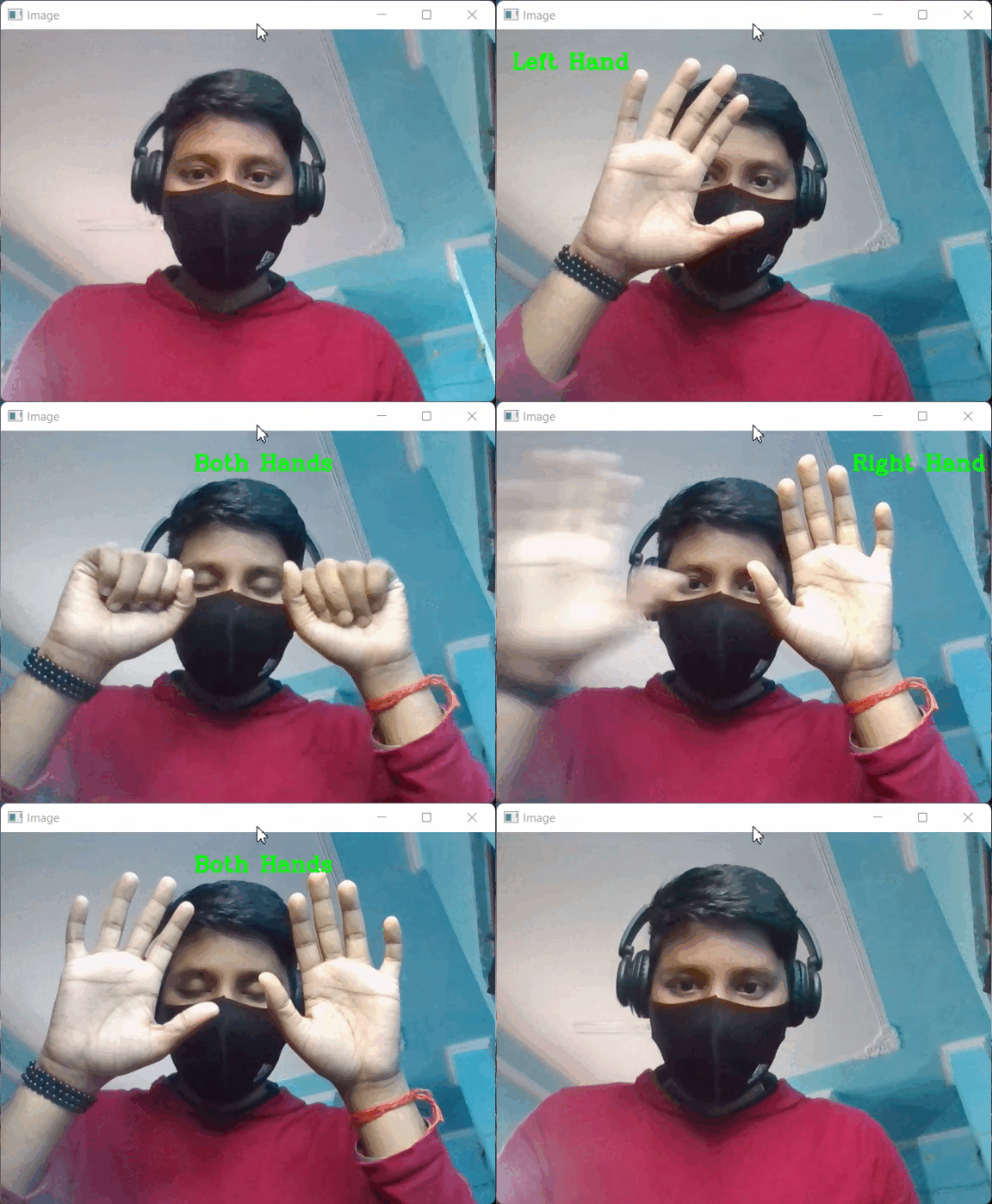
Prediction made by the model is saved in the results variable from which we can access landmarks using results.multi_hand_landmarks, results.multi_handedness respectively and If hands are present in the frame, check for both hands, if yes then put text "Both Hands" on the image else for a single hand, store MessageToDict() function on label variable. If the label is "Left" put text "Left Hand" on the image and if label is "Right" put text "Right Hand" on the image.
Python3 `
Start capturing video from webcam
cap = cv2.VideoCapture(0)
while True:
# Read video frame by frame
success, img = cap.read()

# Flip the image(frame)
img = cv2.flip(img, 1)

# Convert BGR image to RGB image
imgRGB = cv2.cvtColor(img, cv2.COLOR_BGR2RGB)

# Process the RGB image
results = hands.process(imgRGB)

# If hands are present in image(frame)
if results.multi_hand_landmarks:

    # Both Hands are present in image(frame)
    if len(results.multi_handedness) == 2:
            # Display 'Both Hands' on the image
        cv2.putText(img, 'Both Hands', (250, 50),
                    cv2.FONT_HERSHEY_COMPLEX, 0.9,
                    (0, 255, 0), 2)

    # If any hand present
    else:
        for i in results.multi_handedness:

            # Return whether it is Right or Left Hand
            label = MessageToDict(i)[
                'classification'][0]['label']

            if label == 'Left':

                # Display 'Left Hand' on left side of window
                cv2.putText(img, label+' Hand', (20, 50),
                            cv2.FONT_HERSHEY_COMPLEX, 0.9,
                            (0, 255, 0), 2)

            if label == 'Right':

                # Display 'Left Hand' on left side of window
                cv2.putText(img, label+' Hand', (460, 50),
                            cv2.FONT_HERSHEY_COMPLEX,
                            0.9, (0, 255, 0), 2)

# Display Video and when 'q' is entered, destroy the window
cv2.imshow('Image', img)
if cv2.waitKey(1) & 0xff == ord('q'):
    break
`
Below is the complete implementation:
Python3 `
Importing Libraries
import cv2 import mediapipe as mp
Used to convert protobuf message to a dictionary.
from google.protobuf.json_format import MessageToDict
Initializing the Model
mpHands = mp.solutions.hands hands = mpHands.Hands( static_image_mode=False, model_complexity=1, min_detection_confidence=0.75, min_tracking_confidence=0.75, max_num_hands=2)
Start capturing video from webcam
cap = cv2.VideoCapture(0)
while True: # Read video frame by frame success, img = cap.read()
# Flip the image(frame)
img = cv2.flip(img, 1)

# Convert BGR image to RGB image
imgRGB = cv2.cvtColor(img, cv2.COLOR_BGR2RGB)

# Process the RGB image
results = hands.process(imgRGB)

# If hands are present in image(frame)
if results.multi_hand_landmarks:

    # Both Hands are present in image(frame)
    if len(results.multi_handedness) == 2:
            # Display 'Both Hands' on the image
        cv2.putText(img, 'Both Hands', (250, 50),
                    cv2.FONT_HERSHEY_COMPLEX,
                    0.9, (0, 255, 0), 2)

    # If any hand present
    else:
        for i in results.multi_handedness:

            # Return whether it is Right or Left Hand
            label = MessageToDict(i)
            ['classification'][0]['label']

            if label == 'Left':

                # Display 'Left Hand' on
                # left side of window
                cv2.putText(img, label+' Hand',
                            (20, 50),
                            cv2.FONT_HERSHEY_COMPLEX,
                            0.9, (0, 255, 0), 2)

            if label == 'Right':

                # Display 'Left Hand'
                # on left side of window
                cv2.putText(img, label+' Hand', (460, 50),
                            cv2.FONT_HERSHEY_COMPLEX,
                            0.9, (0, 255, 0), 2)

# Display Video and when 'q'
# is entered, destroy the window
cv2.imshow('Image', img)
if cv2.waitKey(1) & 0xff == ord('q'):
    break
`
Output:
OUTPUT