scipy stats.mode() function | Python (original) (raw)
Last Updated : 11 Feb, 2019
**scipy.stats.mode(array, axis=0)** function calculates the mode of the array elements along the specified axis of the array (list in python).Its formula - 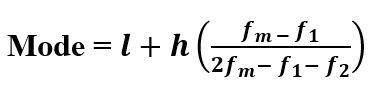
where, l : Lower Boundary of modal class h : Size of modal class fm : Frequency corresponding to modal class f1 : Frequency preceding to modal class f2 : Frequency proceeding to modal class
Parameters : array : Input array or object having the elements to calculate the mode. axis : Axis along which the mode is to be computed. By default axis = 0 Returns : Modal values of the array elements based on the set parameters.
Code #1:
Python3 `
Arithmetic mode
from scipy import stats import numpy as np
arr1 = np.array([[1, 3, 27, 13, 21, 9], [8, 12, 8, 4, 7, 10]])
print("Arithmetic mode is : \n", stats.mode(arr1))
`
Output :
Arithmetic mode is : ModeResult(mode=array([[1, 3, 8, 4, 7, 9]]), count=array([[1, 1, 1, 1, 1, 1]]))
Code #2: With multi-dimensional data
Python3 `
Arithmetic mode
from scipy import stats import numpy as np
arr1 = [[1, 3, 27], [3, 4, 6], [7, 6, 3], [3, 6, 8]]
print("Arithmetic mode is : \n", stats.mode(arr1))
print("\nArithmetic mode is : \n", stats.mode(arr1, axis = None))
print("\nArithmetic mode is : \n", stats.mode(arr1, axis = 0))
print("\nArithmetic mode is : \n", stats.mode(arr1, axis = 1))
`
Output :
Arithmetic mode is : ModeResult(mode=array([[3, 6, 3]]), count=array([[2, 2, 1]]))
Arithmetic mode is : ModeResult(mode=array([3]), count=array([4]))
Arithmetic mode is : ModeResult(mode=array([[3, 6, 3]]), count=array([[2, 2, 1]]))
Arithmetic mode is : ModeResult(mode=array([[1], [3], [3], [3]]), count=array([[1], [1], [1], [1]]))