Sentiment Analysis with an Recurrent Neural Networks (RNN) (original) (raw)
Last Updated : 09 Oct, 2025
Recurrent Neural Networks (RNNs) are used in sequence tasks such as sentiment analysis due to their ability to capture context from sequential data. In this article we will be apply RNNs to analyze the sentiment of customer reviews from Swiggy food delivery platform. The goal is to classify reviews as positive or negative for providing insights into customer experiences.
We will conduct a Sentiment Analysis using the TensorFlow framework:
1. Importing Libraries and Dataset
Here we will be importing numpy, pandas, Regular Expression (RegEx), scikit learn and tenserflow.
Python `
import pandas as pd
import numpy as np
import re
from sklearn.model_selection import train_test_split
from tensorflow.keras.preprocessing.text import Tokenizer
from tensorflow.keras.preprocessing.sequence import pad_sequences
from tensorflow.keras.models import Sequential
from tensorflow.keras.layers import SimpleRNN, Dense, Embedding
`
**2. Loading Dataset
We will be using swiggy dataset of customer reviews.
You can download dataset from here.
- **pd.read_csv() : Reads the CSV file into a Pandas DataFrame
- **data.columns : Accesses the column names of the DataFrame
- **tolist() : Converts the column names from an Index object to a regular Python list Python `
data = pd.read_csv('swiggy.csv') print("Columns in the dataset:") print(data.columns.tolist())
`
**Output:
Columns in the dataset:
['ID', 'Area', 'City', 'Restaurant Price', 'Avg Rating', 'Total Rating', 'Food Item', 'Food Type', 'Delivery Time', 'Review']
**3. Text Cleaning and Sentiment Labeling
We will clean the review text, create a sentiment label based on ratings and remove any missing values.
- **data["Review"] = data["Review"].str.lower() : Converts all text in the "Review" column to lowercase
- **data["Review"] = data["Review"].replace(r'[^a-z0-9\s]', '', regex=True) : Removes all characters except letters, numbers and spaces from the "Review" column
- **data['sentiment'] = data['Avg Rating'].apply(lambda x: 1 if x > 3.5 else 0) : Creates a new "sentiment" column with 1 for ratings above 3.5 and 0 otherwise
- **data = data.dropna() : Removes rows that contain any missing values Python `
data["Review"] = data["Review"].str.lower() data["Review"] = data["Review"].replace(r'[^a-z0-9\s]', '', regex=True)
data['sentiment'] = data['Avg Rating'].apply(lambda x: 1 if x > 3.5 else 0) data = data.dropna()
`
**4. Tokenization and Padding
We will prepare the text data by tokenizing and padding it and extract the target sentiment labels. Tokenizer converts words into integer sequences and padding ensures all input sequences have the same length (max_length).
- **max_features = 5000 : Sets the maximum number of words to keep in the tokenizer
- **max_length = 200 : Defines the fixed length for each input sequence after padding
- **Tokenizer(num_words=max_features) : Initializes the tokenizer to keep the top 5000 words only
- **tokenizer.fit_on_texts(data["Review"]) : Builds the word index based on the reviews in the dataset
- **tokenizer.texts_to_sequences(data["Review"]) : Converts each review into a sequence of word indexes
- **pad_sequences(..., maxlen=max_length) : Pads or truncates each sequence to the same length (200)
- **y = data['sentiment'].values : Extracts the sentiment labels as a NumPy array for model training Python `
max_features = 5000 max_length = 200
tokenizer = Tokenizer(num_words=max_features) tokenizer.fit_on_texts(data["Review"]) X = pad_sequences(tokenizer.texts_to_sequences( data["Review"]), maxlen=max_length) y = data['sentiment'].values
`
**5. Splitting the Data
We will split the data into training, validation and test sets while maintaining the class distribution.
- **train_test_split(X, y, test_size=0.2, random_state=42, stratify=y) : Splits data into 80% training and 20% test sets, preserving sentiment class balance
- **train_test_split(X_train, y_train, test_size=0.1, random_state=42, stratify=y_train) : Further splits training data into 90% training and 10% validation sets, keeping class distribution consistent Python `
X_train, X_test, y_train, y_test = train_test_split( X, y, test_size=0.2, random_state=42, stratify=y ) X_train, X_val, y_train, y_val = train_test_split( X_train, y_train, test_size=0.1, random_state=42, stratify=y_train )
`
**6. Building RNN Model
We will build and compile a simple RNN model for binary sentiment classification.
- **Sequential([...]) : Creates a sequential neural network model
- **Embedding(input_dim=max_features, output_dim=16, input_length=max_length) : Maps input words to 16-dimensional vectors
- **SimpleRNN(64, activation='tanh', return_sequences=False) : Adds a recurrent layer with 64 units using tanh activation
- **Dense(1, activation='sigmoid') : Adds an output layer with one neuron using sigmoid activation for binary output
- **model.compile(loss='binary_crossentropy', optimizer='adam', metrics=['accuracy']) : Configures the model with binary crossentropy loss, Adam optimizer and accuracy metric Python `
model = Sequential([ Embedding(input_dim=max_features, output_dim=16, input_length=max_length), SimpleRNN(64, activation='tanh', return_sequences=False), Dense(1, activation='sigmoid') ])
model.compile( loss='binary_crossentropy', optimizer='adam', metrics=['accuracy'] )
`
7. **Training and Evaluating Model
We will train the model on training data, validate it during training, then evaluate its performance on test data.
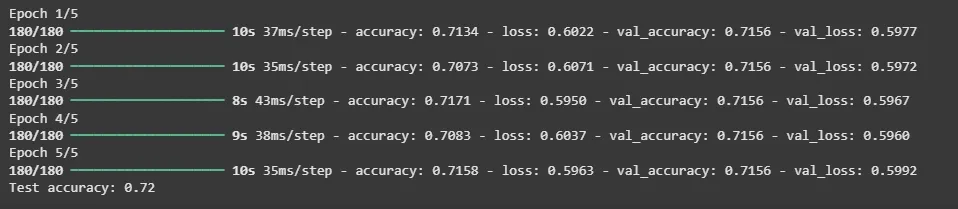
- **model.fit(...) : Trains the model for 5 epochs with batch size 32, validating on the validation set
- **model.evaluate(X_test, y_test, verbose=0) : Evaluates the trained model on test data without extra output
- **print(f"Test accuracy: {score[1]:.2f}") : Prints the test accuracy rounded to two decimal places Python `
history = model.fit( X_train, y_train, epochs=5, batch_size=32, validation_data=(X_val, y_val), verbose=1 )
score = model.evaluate(X_test, y_test, verbose=0) print(f"Test accuracy: {score[1]:.2f}")
`
**Output:
Training and Evaluating Model
Our model achieved a accuracy of 72%which is great for a RNN model. We can further fine tune it to achieve more accuracy.
**8. Predicting Sentiment
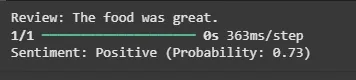
We will create a function to preprocess a single review, predict its sentiment and display the result.
- **review_text.lower() : Converts the input review text to lowercase
- **re.sub(r'[^a-z0-9\s]', '', text) : Removes all characters except letters, numbers and spaces
- **tokenizer.texts_to_sequences([text]) : Converts the cleaned review into a sequence of word indexes
- **pad_sequences(seq, maxlen=max_length) : Pads the sequence to the fixed length
- **model.predict(padded)[0][0] : Predicts the sentiment probability for the review
- Returns "Positive" if prediction is 0.5 or above, otherwise "Negative" including the probability score Python `
def predict_sentiment(review_text): text = review_text.lower() text = re.sub(r'[^a-z0-9\s]', '', text)
seq = tokenizer.texts_to_sequences([text])
padded = pad_sequences(seq, maxlen=max_length)

prediction = model.predict(padded)[0][0]
return f"{'Positive' if prediction >= 0.5 else 'Negative'} (Probability: {prediction:.2f})"
sample_review = "The food was great." print(f"Review: {sample_review}") print(f"Sentiment: {predict_sentiment(sample_review)}")
`
**Output:
Predicting Sentiment
In summary the model processes textual reviews through RNN to predict sentiment from raw data. This helps in actionable insights by understanding customer sentiment.
You can download the source code from here.
What criterion is used to create the sentiment label in this project?
- Reviews containing the word “good” are labeled positive
- Reviews with more than 50 words are positive
- Avg Rating > 3.5 is labeled as positive (1), otherwise negative (0)
- Reviews with rating exactly equal to 3 are labeled positive
Explanation:
The article creates a binary sentiment column where **ratings above 3.5 are labeled **1, otherwise **0.
What is the role of the Embedding layer in the RNN model?
- Removes punctuation from the reviews
- Converts padded sequences back into text
- Reduces vocabulary size by filtering words
- Maps integer word indices to dense vector representations
How is the input text prepared before feeding into the RNN?
- Only stopwords are removed
- Text is cleaned, tokenized into indices, and padded to fixed length
- Text is converted into one-hot vectors
- Text is converted into TF-IDF values
Explanation:
The pipeline cleans text, converts it to word index sequences and pads them so every input has the same length.

Quiz Completed Successfully
Your Score : 2/3
Accuracy : 0%
Login to View Explanation
1/3
1/3 < Previous Next >