How to Send Email with Django (original) (raw)
Django, a high-level Python web framework, provides built-in functionality to send emails effortlessly. Whether you're notifying users about account activations, sending password reset links, or dispatching newsletters, Django’s robust email handling system offers a straightforward way to manage email communication. This tutorial will guide you through the process of setting up and sending emails in Django, covering configuration, templates, and practical examples, ensuring that you can integrate email functionality into your Django applications with ease.
**Django to send emails with SMTP
Consider a project named geeksforgeeks having an app named geeks. Refer this to create Django projects and apps. Now let's demonstrate this in geeksforgeeks project. In your "geeks" app's **settings.py file, add the following code:
Python `
EMAIL_BACKEND = 'django.core.mail.backends.smtp.EmailBackend' EMAIL_HOST = 'smtp.gmail.com' EMAIL_USE_TLS = True EMAIL_PORT = 587 EMAIL_HOST_USER = #sender's email-id EMAIL_HOST_PASSWORD = #password associated with above email-id (not the regular password)
`
 By default, Google does not allow third party apps to use mail services using our email address and actual password. So, we have to create an app password which will be only utilized by our Django mail application. In order to generate an app password for your google account, follow these steps:
**Step 1
Sign in to your google account and click on Manage account.
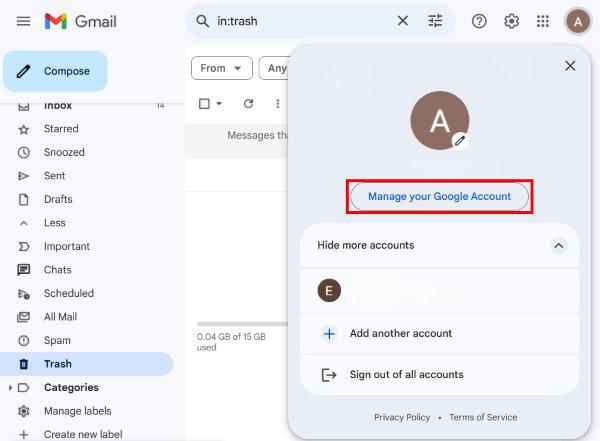
Step 1
**Step 2
Enable two factor authentication by typing "2 step verification" on the search bar.

Step 2
**Step 3
After enabling 2FA, type "App passwords" on the search bar.
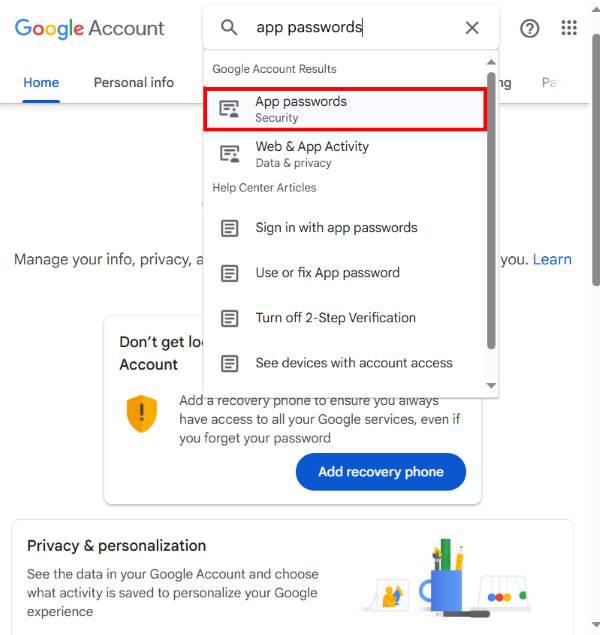
Step 3
**Step 4
Enter a project name and your unique password will be provided to use it in your project. Note that the password is only shown once, and it is valid until it is manually removed from the app passwords tab. Hence copy the password when it is shown and use it as EMAIL_HOST_PASSWORD in the Django settings.py file.
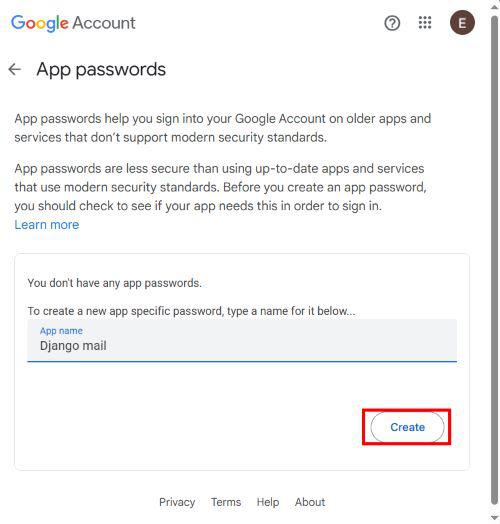
Step 4 (i)
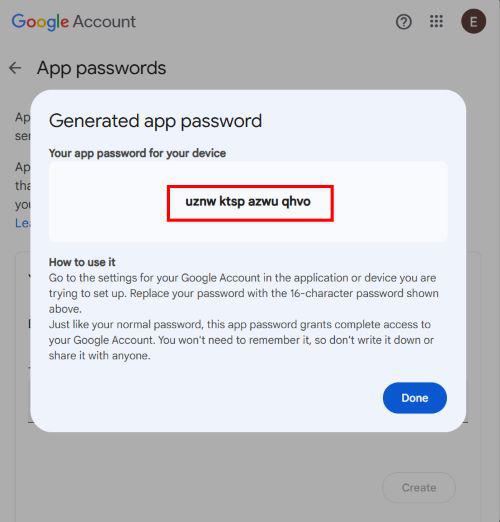
Step 4 (ii)
The views.py file for this application contains the following code:
Python `
from django.shortcuts import render from django.http import HttpResponse from django.core.mail import send_mail from django.conf import settings
def send_mail_page(request): context = {}
if request.method == 'POST':
    address = request.POST.get('address')
    subject = request.POST.get('subject')
    message = request.POST.get('message')

    if address and subject and message:
        try:
            send_mail(subject, message, settings.EMAIL_HOST_USER, [address])
            context['result'] = 'Email sent successfully'
        except Exception as e:
            context['result'] = f'Error sending email: {e}'
    else:
        context['result'] = 'All fields are required'

return render(request, "index.html", context)
`
Now we will understand what exactly is happening. Here the send_mail() is an inbuilt Django function which takes 4 important arguments,
- subject refers to the email subject.
- message refers to the email message, the body of the email.
- email_from refers to the sender's details. This takes the EMAIL_HOST_USER from settings.py file, where you added those lines of code earlier.
- recipient_list is the list of recipients to whom the mail has to be sent.
The return value of this function is either 0 or 1 depending upon the number of messages sent.
Other optional arguments of the send_mail() function includes,
- fail_silently: It is a boolean value used to raise an smtplib.SMTPException if an error occurs.
- auth_user: The optional username to use to authenticate to the SMTP server. If this isn’t provided, Django will use the value of the EMAIL_HOST_USER setting.
- auth_password: The optional password to use to authenticate to the SMTP server. If this isn’t provided, Django will use the value of the EMAIL_HOST_PASSWORD setting.
- connection: The optional email backend used to send the mail. If unspecified, an instance of the default backend will be used.
- html_message: It is used to send HTML pages in the mail body rather than sending plain text.
The index.html looks like:
HTML `
{% load static %}
Mail AppDjango Mail App
    <form method="post">
        {% csrf_token %}
        <label for="address">To:</label>
        <input id="address" type="email" name="address"/>

        <label for="subject">Subject:</label>
        <input id="subject" name="subject"/>

        <label for="message">Message:</label><br>
        <textarea id="message" name="message"></textarea>

        <input type="submit">
    </form>
    <p>{{ result }}</p>
</div>
`
And the styles.css looks like:
CSS `
h1{ margin: 10px auto 20px auto; color: green; display: block; } input{ width: 300px; height: 25px; display: block; margin-bottom: 20px; } div{ display: flex; flex-direction: column; align-items: center; } textarea{ resize:none; width: 302px; height: 100px; margin-bottom: 10px; } input[type="submit"]{ width:150px; height: 30px; background-color: green; color:white; border: none; margin: 0 auto; }
`
Add the following in urls.py:
Python `
from django.contrib import admin from django.urls import path from mailsender import views
urlpatterns = [ path('admin/', admin.site.urls), path('', views.send_mail_page) ]
`