Spatial Filters Averaging filter and Median filter in Image Processing (original) (raw)
Last Updated : 15 Jun, 2026
Spatial filtering is an image processing technique that modifies pixel values using information from neighboring pixels. It is commonly used to reduce noise, smooth images and improve overall image quality.
- Operates on local pixel neighborhoods.
- Uses a kernel or filter mask.
- Helps reduce noise and smooth images.
- Common examples include Averaging and Median filters.
Working of Spatial Filtering
Spatial filtering processes an image by applying a filter kernel to a small neighborhood of pixels. The following steps illustrate the process
**1. Select a Neighborhood: Consider the following 3 × 3 pixel neighborhood. Here, 20 is the center pixel.
12 15 18
14 20 22
16 19 24
**2. Apply the Filter Kernel: A filter kernel examines the center pixel and its neighboring pixels. Depending on the filter type, it performs a calculation such as computing the average or median value.
**3. Replace the Center Pixel: The calculated value replaces the original center pixel value (20).
**4. Repeat Across the Image: The kernel moves across the image and repeats the same process for every pixel, producing a new filtered image.
Image Smoothing Using Spatial Filters
1. Averaging Filter (Mean Filter)
- Replaces the center pixel with the average of neighboring pixels.
- Produces a smoother image.
- Reduces random noise but may blur edges.
**Implementation
- The image is loaded using OpenCV.
- A 5 × 5 averaging kernel is applied using cv2.blur().
- Each pixel is replaced by the average of its neighboring pixels.
- The resulting image appears smoother with reduced noise and detail. Python `

import cv2 import matplotlib.pyplot as plt
image = cv2.imread('image path') image = cv2.cvtColor(image, cv2.COLOR_BGR2RGB)
filtered_image = cv2.blur(image, (5, 5))
plt.figure(figsize=(10, 5))
plt.subplot(1, 2, 1) plt.imshow(image) plt.title("Original Image") plt.axis('off')
plt.subplot(1, 2, 2) plt.imshow(filtered_image) plt.title("Averaging Filter") plt.axis('off')
plt.show()
`
**Output:
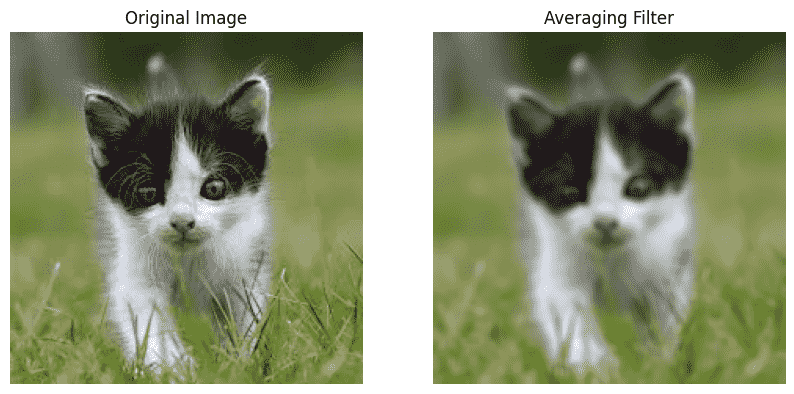
Average Filter
2. Median Filter
- Replaces the center pixel with the median value of neighboring pixels.
- Removes noise while preserving edges.
- Particularly effective for salt and pepper noise.
**Implementation
- The image is loaded using OpenCV.
- A median filter with a kernel size of 5 × 5 is applied using cv2.medianBlur().
- Each pixel is replaced by the median value of its neighboring pixels.
- The filter reduces noise while preserving important edges and details. C++ `
import cv2 import matplotlib.pyplot as plt
image = cv2.imread('image path') image = cv2.cvtColor(image, cv2.COLOR_BGR2RGB)
filtered_image = cv2.medianBlur(image, 5)
plt.figure(figsize=(10, 5))
plt.subplot(1, 2, 1) plt.imshow(image) plt.title("Original Image") plt.axis('off')
plt.subplot(1, 2, 2) plt.imshow(filtered_image) plt.title("Median Filter") plt.axis('off')
plt.show()
`
**Output:
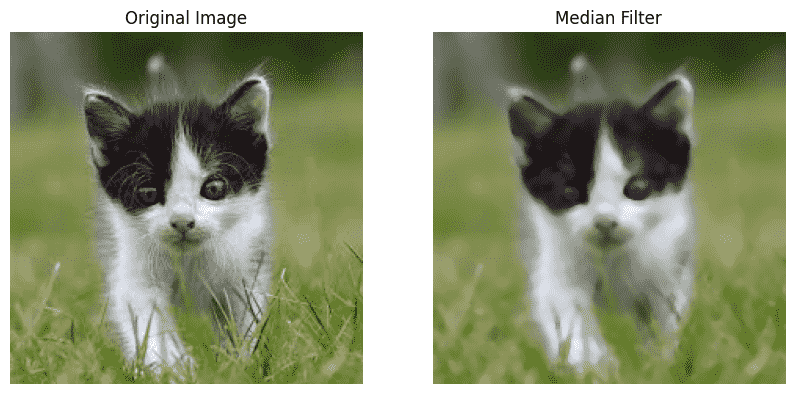
Median Filter
You can download full code from here
| Feature | Averaging Filter | Median Filter |
|---|---|---|
| Filter Type | Linear filter that uses arithmetic averaging. | Non linear filter that uses median values. |
| Operation | Replaces the center pixel with the average of neighboring pixels. | Replaces the center pixel with the median of neighboring pixels. |
| Image Quality | Produces a smoother image with some loss of detail. | Reduces noise while maintaining image details. |
| Processing Speed | Computationally simpler and generally faster. | Slightly more computationally intensive and slower. |
Applications
- Reduce noise and improve overall image quality.
- Enhance medical images for better visualization and diagnosis.
- Improve satellite and aerial images for analysis and monitoring.
- Prepare images for computer vision tasks such as segmentation and feature extraction.
- Improve the accuracy of object detection and recognition systems.
Advantages
- Simple and easy to implement.
- Effective for reducing noise and smoothing images.
- Improves overall image quality and visual appearance.
- Useful as a preprocessing step for many computer vision and image analysis tasks.
Limitations
- Averaging filters may blur edges and fine image details.
- Median filters require more computation than averaging filters.
- Large filter sizes can remove important image information along with noise.
- Excessive smoothing may reduce image sharpness and clarity.