sys.path in Python (original) (raw)
Last Updated : 21 Aug, 2024
Sys is a built-in Python module that contains parameters specific to the system i.e. it contains variables and methods that interact with the interpreter and are also governed by it.
**sys.path
sys.path is a built-in variable within the sys module. It contains a list of directories that the interpreter will search in for the required module.
When a module(a module is a python file) is imported within a Python file, the interpreter first searches for the specified module among its built-in modules. If not found it looks through the list of directories(a directory is a folder that contains related modules) defined by **sys.path.
**Initializing sys.path
There are three ways to specify a path :
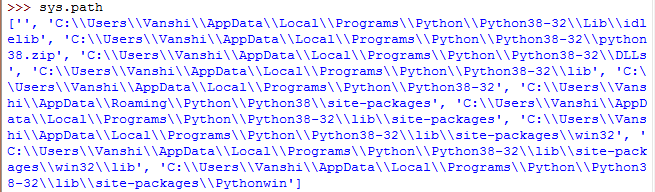
- **DEFAULT- By default, the interpreter looks for a module within the current directory. To make the interpreter search in some other directory you just simply have to change the current directory. The following example depicts a default path taken by the interpreter: Python `
importing module
import sys
printing all directories for
interpreter to search
sys.path
`
**Output:
- **THROUGH ENVIRONMENT VARIABLES- An environment variable that contains the path an interpreter can take while looking for modules can be employed. Once set, it hints interpreter with directories to locate a module. The following example shows how this can be done.
PYTHONPATH=C:\Users\Vanshi\Desktop
Python `
importing module
import sys
printing all directories
sys.path
`
**Output:

- **APPENDING PATH- append() is a built-in function of sys module that can be used with path variable to add a specific path for interpreter to search. The following example shows how this can be done. Python `
importing module
import sys
appending a path
sys.path.append('C:/Users/Vanshi/Desktop')
printing all paths
sys.path
`
**Output:

Note that the first string returned by path is always empty this is to indicate the interpreter to check in the current directory.