Tkinter | Adding style to the input text using ttk.Entry widget (original) (raw)
Last Updated : 11 Jul, 2025
Tkinter is a GUI (Graphical User Interface) module which is widely used to create GUI applications. It comes along with the Python itself.Entry widgets are used to get the entry from the user. It can be created as follows-
entry = ttk.Entry(master, option = value, ...)
Code #1: Creating Entry widget and taking input from user (taking only String data).
Python3 1== `
importing tkinter
from tkinter import * from tkinter import ttk from tkinter.messagebox import askyesno
creating root
root = Tk()
specifying geometry
root.geometry('200x100')
This is used to take input from user
and show it in Entry Widget.
Whatever data that we get from keyboard
will be treated as string.
input_text = StringVar()
entry1 = ttk.Entry(root, textvariable = input_text, justify = CENTER)
focus_force is used to take focus
as soon as application starts
entry1.focus_force() entry1.pack(side = TOP, ipadx = 30, ipady = 6)
save = ttk.Button(root, text = 'Save', command = lambda : askyesno( 'Confirm', 'Do you want to save?')) save.pack(side = TOP, pady = 10)
root.mainloop()
`
Output: 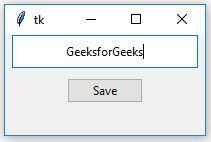
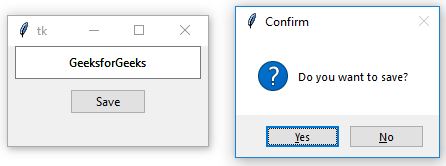 In above output, as soon as you run the code a Tkinter window will appear and Entry widget is already focussed that means we don't have to give focus to the Entry area. When we press Button a confirmation message will appear, saying whether you want to save the text or not (it will not save the text, it is only used to show the functioning of Button).Code #2: Adding Style to the entered text in Entry widget.
Python3 1== `
importing tkinter
from tkinter import * from tkinter import ttk from tkinter.messagebox import askyesno
creating root
root = Tk() root.geometry('200x100')
input_text = StringVar()
This class is used to add styling
to any widget which are available
style = ttk.Style() style.configure('TEntry', foreground = 'green')
entry1 = ttk.Entry(root, textvariable = input_text, justify = CENTER,
font = ('courier', 15, 'bold'))
entry1.focus_force()
entry1.pack(side = TOP, ipadx = 30, ipady = 10)
save = ttk.Button(root, text = 'Save', command = lambda : askyesno( 'Confirm', 'Do you want to save?')) save.pack(side = TOP, pady = 10)
root.mainloop()
`
Output:  In the above output, you may notice that the color of the font is changed, font family is changed, size of the text is bigger than normal as well as text is written in bold. This is because we are adding style to the input text.