turtle.dot() function in Python (original) (raw)
Last Updated : 18 Aug, 2025
The **turtle.dot() function is used to draw a circular dot with a specified diameter (size) and an optional color. If the size is not provided, Python automatically chooses a default size based on the current pen size (max(pensize+4, 2*pensize)).
**Syntax :
turtle.dot(size=None, *color)
**Parameters:
| **Arguments | **Description |
|---|---|
| size | an integer >= 1 (if given) |
| color | a colorstring or a numeric color tuple |
Examples
**Example 1: Drawing a single dot
Python `
import turtle
t = turtle.Turtle() t.speed(1)
t.forward(100) t.dot(60, "yellow") # dot of diameter 60 with yellow color
turtle.done()
`
**Output
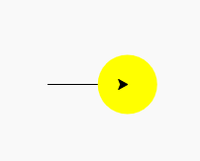
**Explanation:
- The turtle moves forward 100 units.
- t.dot(60, "yellow") places a filled yellow circle of size 60 at that point.
**Example 2: Creating a layered dot pattern
Python `
import turtle
turtle.delay(500) turtle.ht()
turtle.dot(200, "red") turtle.dot(180, "orange") turtle.dot(160, "yellow") turtle.dot(140, "green") turtle.dot(120, "blue") turtle.dot(100, "indigo") turtle.dot(80, "violet") turtle.dot(60, "white")
turtle.write("GFG", align="center", font=("Verdana", 12, "bold"))
turtle.done()
`
**Output

**Explanation:
- **dot(size, color) draws multiple dots of different sizes and colors, centered at the same point.
- Dots overlap to form concentric circles.
- **turtle.write() adds text "GFG" at the center of the pattern.