turtle.ycor() function in Python (original) (raw)
Last Updated : 19 Aug, 2025
turtle.ycor() function returns the current y-coordinate of the turtle’s position on the canvas. The turtle’s position is represented on a 2D plane, where the origin (0, 0) is at the center of the screen. On this plane, the positive y-axis extends upward, while the negative y-axis extends downward.
**Syntax :
turtle.ycor()
- **Parameters: This function does not take any parameters.
- **Returns: A floating-point number representing the current y-coordinate of the turtle’s position.
**Example:
Python `
import turtle
print(turtle.ycor()) turtle.forward(100)
print(turtle.ycor()) turtle.right(45) turtle.forward(100)
print(turtle.ycor()) turtle.right(90) turtle.forward(100)
print(turtle.ycor()) turtle.right(45) turtle.forward(100)
print(turtle.ycor())
`
**Output:
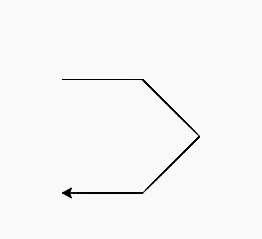
0.0
0.0
-70.7106781187
-141.421356237
-141.421356237
**Explanation:
- Starts at (0, 0) → ycor = 0. Moves forward 100 east → (100, 0) → ycor = 0.
- Turns 45° southeast, forward 100 → y decreases to ≈ -70.71.
- Turns 90° southwest, forward 100 → y decreases further to ≈ -141.42.
- Turns 45° west, forward 100 → y stays ≈ -141.42.