Working with csv files in Python (original) (raw)
A **CSV (Comma Separated Values) file is a plain text file where each line represents a data record, and fields within each record are separated by commas. It's commonly used for spreadsheets and databases due to its simplicity and readability.
Below are some operations that we perform while working with Python CSV files in Python
Reading a CSV file
Reading from a CSV file is done using the reader object. The CSV file is opened as a text file with Python’s built-in open() function, which returns a file object. In this example, we first open the CSV file in READ mode, file object is converted to csv.reader object and further operation takes place. Code and detailed explanation is given below.
Python `
import csv filename = "aapl.csv" # File name fields = [] # Column names rows = [] # Data rows
with open(filename, 'r') as csvfile: csvreader = csv.reader(csvfile) # Reader object
fields = next(csvreader)  # Read header
for row in csvreader:     # Read rows
    rows.append(row)

print("Total no. of rows: %d" % csvreader.line_num)  # Row count
print('Field names are: ' + ', '.join(fields))
print('\nFirst 5 rows are:\n') for row in rows[:5]: for col in row: print("%10s" % col, end=" ") print('\n')
`
Output
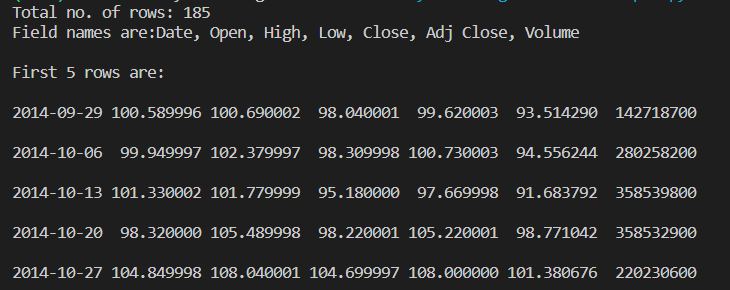
The above example uses a CSV file aapl.csv which can be downloaded from here .
**Explanation:
- **with open(...) opens the CSV file in read mode safely using a context manager.
- **csv.reader(csvfile) turns the file into a CSV reader object.
- **next(csvreader) extracts the first row as column headers.
- Loop through csvreader to append each row (as a list) to rows.
- Print total rows, headers and first 5 data rows in a formatted view.
Reading CSV Files Into a Dictionary With csv
We can read a CSV file into a dictionary using the csv module in Python and the csv.DictReader class. Here's an example:
Suppose, we have a employees.csv file and content inside it will be:
name,department,birthday_month
John Smith,HR,July
Alice Johnson,IT,October
Bob Williams,Finance,January
**Example: This reads each row as a dictionary (headers as keys), then appends it to list .
Python `
import csv with open('employees.csv', mode='r') as file: csv_reader = csv.DictReader(file) # Create DictReader
data_list = []  # List to store dictionaries
for row in csv_reader:
    data_list.append(row)
for data in data_list: print(data)
`
Output:
{'name': 'John Smith', 'department': 'HR', 'birthday_month': 'July'}
{'name': 'Alice Johnson', 'department': 'IT', 'birthday_month': 'October'}
{'name': 'Bob Williams', 'department': 'Finance', 'birthday_month': 'January'}
**Explanation:
- **with open(...) opens the file using a context manager.
- **csv.DictReader(file) reads each row as a dictionary using headers as keys.
- **data_list.append(row) stores each dictionary in a list.
Writing to a CSV file
To write to a CSV file, we first open the CSV file in WRITE mode. The file object is converted to csv.writer object and further operations takes place. Code and detailed explanation is given below.
Python `
import csv
Define header and data rows
fields = ['Name', 'Branch', 'Year', 'CGPA'] rows = [ ['Nikhil', 'COE', '2', '9.0'], ['Sanchit', 'COE', '2', '9.1'], ['Aditya', 'IT', '2', '9.3'], ['Sagar', 'SE', '1', '9.5'], ['Prateek', 'MCE', '3', '7.8'], ['Sahil', 'EP', '2', '9.1'] ]
filename = "university_records.csv" with open(filename, 'w') as csvfile: csvwriter = csv.writer(csvfile) # Create writer object csvwriter.writerow(fields) # Write header csvwriter.writerows(rows) # Write multiple rows
`
**Explanation:
- **fields defines the column headers and rows contains the data as a list of lists.
- with **open(..., 'w') opens the file in write mode using a context manager.
- **csv.writer(csvfile) creates a writer object for writing to the CSV.
- **writerow(fields) writes the header row to the file.
- **writerows(rows) writes all data rows to the CSV at once.
Writing a dictionary to a CSV file
To write a dictionary to a CSV file, the file object (csvfile) is converted to a DictWriter object. Detailed example with explanation and code is given below.
Python `
importing the csv module
import csv
my data rows as dictionary objects
mydict = [{'branch': 'COE', 'cgpa': '9.0', 'name': 'Nikhil', 'year': '2'}, {'branch': 'COE', 'cgpa': '9.1', 'name': 'Sanchit', 'year': '2'}, {'branch': 'IT', 'cgpa': '9.3', 'name': 'Aditya', 'year': '2'}, {'branch': 'SE', 'cgpa': '9.5', 'name': 'Sagar', 'year': '1'}, {'branch': 'MCE', 'cgpa': '7.8', 'name': 'Prateek', 'year': '3'}, {'branch': 'EP', 'cgpa': '9.1', 'name': 'Sahil', 'year': '2'}]
field names
fields = ['name', 'branch', 'year', 'cgpa']
name of csv file
filename = "university_records.csv"
writing to csv file
with open(filename, 'w') as csvfile: # creating a csv dict writer object writer = csv.DictWriter(csvfile, fieldnames=fields)
# writing headers (field names)
writer.writeheader()

# writing data rows
writer.writerows(mydict)
`
**Output

csv file
Consider that a CSV file looks like this in plain text:

university record
**Explanation:
- **with open(...) opens file safely using a context manager.
- **csv.DictWriter(...) maps dictionary keys to CSV columns.
- **writeheader() writes column headers.
- **writerows(mydict) writes all dictionaries as CSV rows.
Reading CSV Files With Pandas
We can read a Python CSV files with Pandas using **pandas.read_csv() function. Here's an example:
Suppose, we have a employees.csv file and content inside it will be:
name,department,birthday_month
John Smith,HR,July
Alice Johnson,IT,October
Bob Williams,Finance,January
In this example, pd.read_csv() reads the CSV file into a Pandas DataFrame. The resulting DataFrame can be used for various data manipulation and analysis tasks.
Python `
import pandas as pd
Read the CSV file into a DataFrame
df = pd.read_csv('employees.csv')
Display the DataFrame
print(df)
`
Output:
name department birthday_month
0 John Smith HR July
1 Alice Johnson IT October
2 Bob Williams Finance January
We can access specific columns, filter data, and perform various operations using pandas DataFrame functionality. For example, if we want to access the "name" column, we can use df['name'].
Python `
Access the 'name' column
names = df['name'] print(names)
`
Output :
0 John Smith
1 Alice Johnson
2 Bob Williams
Name: name, dtype: object
Writing CSV Files with Pandas
We can use Pandas to write CSV files. It can done by using **pd.DataFrame() function. In this example, the Pandas library is used to convert a list of dictionaries (mydict) into a DataFrame, representing tabular data. The DataFrame is then written to a Python CSV file named "output.csv" using the to_csv method, creating a structured and readable data file for further analysis or sharing.
Python `
import pandas as pd
mydict = [ {'branch': 'COE', 'cgpa': '9.0', 'name': 'Nikhil', 'year': '2'}, {'branch': 'COE', 'cgpa': '9.1', 'name': 'Sanchit', 'year': '2'}, {'branch': 'IT', 'cgpa': '9.3', 'name': 'Aditya', 'year': '2'}, {'branch': 'SE', 'cgpa': '9.5', 'name': 'Sagar', 'year': '1'}, {'branch': 'MCE', 'cgpa': '7.8', 'name': 'Prateek', 'year': '3'}, {'branch': 'EP', 'cgpa': '9.1', 'name': 'Sahil', 'year': '2'} ]
Create a DataFrame from the list of dictionaries
df = pd.DataFrame(mydict)
Write the DataFrame to a CSV file
df.to_csv('output.csv', index=False)
`
Output CSV File:
branch,cgpa,name,year
COE,9.0,Nikhil,2
COE,9.1,Sanchit,2
IT,9.3,Aditya,2
SE,9.5,Sagar,1
MCE,7.8,Prateek,3
EP,9.1,Sahil,2
Storing Emails in CSV files
We start by importing the csv module and use it to store names and emails as comma-separated values. Using the open() function, we create a CSV file, and then write each row using a writer object, with separate columns for names and emails.
Python `
importing the csv module
import csv
field names
fields = ['Name', 'Email']
data rows of csv file
rows = [ ['Nikhil', 'nikhil.gfg@gmail.com'], ['Sanchit', 'sanchit.gfg@gmail.com'], ['Aditya', 'aditya.gfg@gmail.com'], ['Sagar', 'sagar.gfg@gmail.com'], ['Prateek', 'prateek.gfg@gmail.com'], ['Sahil', 'sahil.gfg@gmail.com']]
name of csv file
filename = "email_records.csv"
writing to csv file
with open(filename, 'w') as csvfile: # creating a csv writer object csvwriter = csv.writer(csvfile)
# writing the fields
csvwriter.writerow(fields)

# writing the data rows
csvwriter.writerows(rows)
`