Append one dataframe to the end of another dataframe in R (original) (raw)
Last Updated : 7 Apr, 2021
In this article, we are going to append the data frame to another data frame using "$" operator in R Programming Language.
Approach
- Create vectors
- Create one dataframe (dataframe1) by passing these vectors
- Create another dataframe (dataframe2)by passing these vectors
- Finally, append the dataframe2 to dataframe1 using" $" operator.
- Display resultant dataframe
$ operator is used to add dataframe as a column.
Syntax: dataframe_one$column_name=dataframe_two
Parameters:
- column_name is the name of the new column
- dataframe_two is the dataframe 2 that is appended
- dataframe_one is the first dataframe.
Let us break the problem down into smaller clusters and make it is to understand, Let us first create two dataframes independently.
R `
creating vectors for dataframe 1
names=c("bobby","sravan","ojaswi") age=c(20,22,16)
creating vectors for dataframe 2
address=c("kakumanu","kakumanu","hyderabad") marks=c(89,98,90)
pass these vectors to data frame1 a
a=data.frame(names,age)
pass these vectors to data frame2 b
b=data.frame(address,marks) print(a) print(b)
`
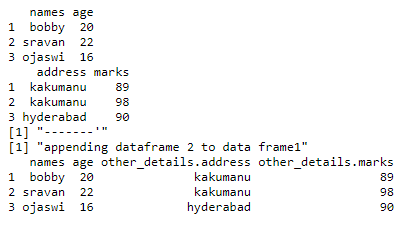
Output:

After, two dataframes have been created let us append one into another.
R `
creating vectors for dataframe 1
names=c("bobby","sravan","ojaswi") age=c(20,22,16)
creating vectors for dataframe 2
address=c("kakumanu","kakumanu","hyderabad") marks=c(89,98,90)
pass these vectors to data frame1 a
a=data.frame(names,age)
pass these vectors to data frame2 b
b=data.frame(address,marks)
print(a) print(b) print("-------'") print("appending dataframe 2 to data frame1")
appending using $ operator
a$other_details=b print(a)
`
Output: