filter() Method in R (original) (raw)
Last Updated : 21 Jul, 2025
The filter method in R is used to select specific rows from a data frame that meet certain conditions. It helps us work with only the data we need, making analysis easier and faster. We use it when we want to find rows that match some rules or values.
**Syntax:
filter(data_frame, condition)
**Parameters:
- **data_frame: The input data frame or tibble.
- **condition: The logical condition used to filter rows.
Implementation of filter Method
Then we follow these steps to apply the filter method in R.
1. Install then load the dplyr package
We first install and then load the dplyr package to use the filter method.
- **install.packages: This function is used to install external R packages.
- **library: This is used to load an installed package so we can use its functions.
- **dplyr: A package in R that helps in data manipulation and filtering. R `
install.packages("dplyr") library(dplyr)
`
2. Creating a sample dataset
We create a simple data frame of employees using basic R functions.
- **data.frame: Creates a table-like structure where we can store related data in columns.
- **c: Combines multiple values into a single vector or list.
- **print: Displays the data or output in the console. R `
employees <- data.frame( ID = 1:10, Name = c("John", "Jane", "Bill", "Anna", "Tom", "Sue", "Mike", "Sara", "Alex", "Nina"), Department = c("HR", "Finance", "IT", "Finance", "IT", "HR", "IT", "Finance", "HR", "Finance"), Salary = c(50000, 60000, 70000, 65000, 72000, 48000, 75000, 67000, 52000, 69000) )
print(employees)
`
**Output:
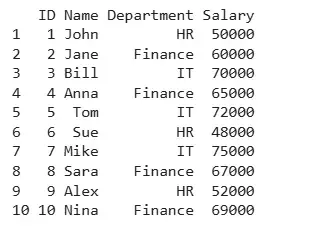
Output
3. Filtering rows with one condition
We filter employees whose department is IT.
- **filter: Selects only the rows that match the condition we give.
- **==: Checks if two values are equal. R `
it <- filter(employees, Department == "IT") print(it)
`
**Output:
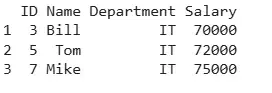
Department
4. Filtering rows with multiple conditions
We filter employees from Finance who have a salary more than 65000.
- ****&**: Means both conditions must be true.
- **>: Checks if a value is greater than the given number. R `
high_paid_finance_employees <- filter(employees, Department == "Finance" & Salary > 65000) print(high_paid_finance_employees)
`
**Output:
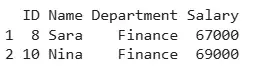
Output
5. Filtering with or and in
We filter employees who are in either HR or IT andalso use %in% for filtering multiple values.
- ****|**: Means either one of the conditions must be true.
- ****%in%**: Checks if a value exists in a list of values.
- ****%>%**: Passes the output of one function to the next function. R `
hr_it_employees <- employees %>% filter(Department == "HR" | Department == "IT") print(hr_it_employees)
hr_finance_employees <- employees %>% filter(Department %in% c("HR", "Finance")) print(hr_finance_employees)
`
**Output:
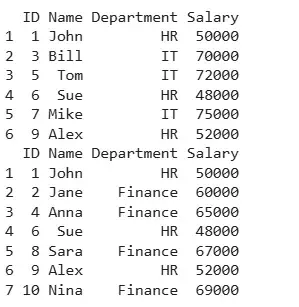
Output
This method helps us quickly find the rows we need and makes our data easier to work with in R.