How to change the order of levels of a factor in R? (original) (raw)
Last Updated : 23 May, 2021
In R programming language, factors are used to represent categorical data by uniquely identifying the elements from the given vector. It will return the levels of the unique elements when factor function is applied. In this article we are going to discuss how to change the levels of the factor.
We can get the levels of the vector using factor() function itself
Syntax: factor(vector)
Parameters:
- vector: vector with categorical data
- levels(): specifies the levels
Returns: vector elements with levels
If we want to change the order of the levels, we can specify the levels parameter in the factor() function
Syntax:
factor(vector,levels=c(elements))
levels parameter can accept the vector elements and within this, the order of levels can be passed as a vector.
Given below are various implementations for this approach:
Example:
R `
Create a vector with elements
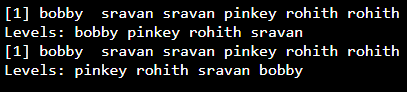
data =c("bobby", "sravan", "sravan", "pinkey", "rohith","rohith")
#apply factor to vector to get
unique data
data=factor(data)
print(data)
#change the order of the levels
from the resultant data
ordered_data=factor(data,levels=c( 'pinkey','rohith','sravan','bobby'))
print(ordered_data)
`
Output:
Example 2:
R `
Create a vector with elements
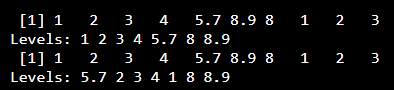
data =c(1,2,3,4,5.7,8.9,8.0,1,2,3)
apply factor to vector to get
unique data
data=factor(data) print(data)
change the order of the levels
from the resultant data
ordered_data=factor(data,levels=c( 5.7,2,3,4,1,8,8.9)) print(ordered_data)
`
Output: