Looping over Objects in R Programming (original) (raw)
Last Updated : 12 Jul, 2025
One of the biggest issues with the “for” loop is its memory consumption and its slowness in executing a repetitive task. When it comes to dealing with a large data set and iterating over it, a for loop is not advised.
In this article we will discuss How to loop over a list in R Programming Language provides many alternatives to be applied to vectors for looping operations that are pretty useful when working interactively on a command line.
function and its variants:
apply()lapply()sapply()tapply()mapply()
Let us see what each of these functions does.
apply(): This function applies a given function over the margins of a given array.
| Looping Function | Operation |
|---|---|
| **apply() | Applies a function over the margins of an array or matrix |
| **lapply() | Apply a function over a list or a vector |
| **sapply() | Same as lapply() but with simplified results |
| **tapply() | Apply a function over a ragged array |
| **mapply() | Multivariate version of lapply() |
apply(): This function applies a given function over the margins of a given array.
apply(array, margins, function, ...) array = list of elements margins = dimension of the array along which the function needs to be applied function = the operation which you want to perform
R `
R program to illustrate
apply() function
Creating a matrix
A = matrix(1:9, 3, 3) print(A)
Applying apply() over row of matrix
Here margin 1 is for row
r = apply(A, 1, sum) print(r)
Applying apply() over column of matrix
Here margin 2 is for column
c = apply(A, 2, sum) print(c)
`
**Output:
[, 1] [, 2] [, 3]
[1, ] 1 4 7
[2, ] 2 5 8
[3, ] 3 6 9
[1] 12 15 18
[1] 6 15 24
lapply(): This function is used to apply a function over a list. It always returns a list of the same length as the input list.
lapply(list, function, ...)
list = Created list
function = the operation which you want to perform
R `
R program to illustrate
lapply() function
Creating a matrix
A = matrix(1:9, 3, 3)
Creating another matrix
B = matrix(10:18, 3, 3)
Creating a list
myList = list(A, B)
applying lapply()
determinant = lapply(myList, det) print(determinant)
`
**Output:
[[1]]
[1] 0
[[2]]
[1] 5.329071e-15
sapply(): This function is used to simplify the result of lapply(), if possible. Unlike lapply(), the result is not always a list. The output varies in the following ways:-
sapply(list, function, ...)
list = Created list
function = the operation which you want to perform
R `
R program to illustrate
sapply() function
Creating a list
A = list(a = 1:5, b = 6:10)
applying sapply()
means = sapply(A, mean) print(means)
`
**Output:
a b
3 8
A vector is returned since the output had a list with elements of length 1.
- If output is a list containing elements having length 1, then a vector is returned.
- If output is a list where all the elements are vectors of same length(>1), then a matrix is returned.
- If output contains elements which cannot be simplified or elements of different types, a list is returned.
tapply(): This function is used to apply a function over subset of vectors given by a combination of factors.
tapply(vector, factor, function, ...)
vector = Created vector
factor = Created factor
function = the operation which you want to perform
R `
R program to illustrate
tapply() function
Creating a factor
Id = c(1, 1, 1, 1, 2, 2, 2, 3, 3)
Creating a vector
val = c(1, 2, 3, 4, 5, 6, 7, 8, 9)
applying tapply()
result = tapply(val, Id, sum) print(result)
`
**Output:
1 2 3
10 18 17
How does the above code work?
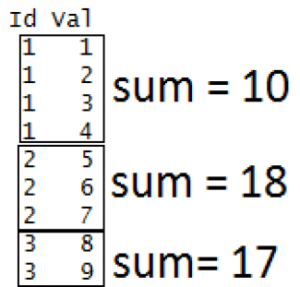
mapply(): It's a multivariate version of lapply(). This function can be applied over several list simultaneously.
mapply(function, list1, list2, ...)
function = the operation which you want to perform
list1, list2= Created lists.
R `
R program to illustrate
mapply() function
Creating a list
A = list(c(1, 2, 3, 4))
Creating another list
B = list(c(2, 5, 1, 6))
Applying mapply()
result = mapply(sum, A, B) print(result)
`
**Output:
[1] 24
**Loop Through List & Display All Sub-Elements on Same Line
R `
my_list <- c(1, 2, 3, 4, 5)
for (element in my_list) { cat(element, " ") }
`
**Output:
1 2 3 4 5
**Loop Through List & Display All Sub-Elements on Different Lines
R `
my_list <- c(1, 2, 3, 4, 5)
for (element in my_list) { cat(element, "\n") }
`
**Output:
1
2
3
4
5
**Loop Through List and Only Display Specific Values
R `
my_list <- c(1, 2, 3, 4, 5)
for (element in my_list) { if (element %% 2 == 0) { # Display only even values cat(element, "\n") } }
`
**Output:
2
4
First we creates a list my_list with values from 1 to 5. It then iterates through each element using a for loop, and if the element is even (determined by element %% 2 == 0), it is printed on a new line using cat. The output displays only the even values (2 and 4) from the list.