R If Else Conditions (original) (raw)
Last Updated : 18 Feb, 2026
In R programming, conditional statements allow a program to make decisions and execute different actions based on certain conditions. The if-else construct is a key conditional statement used to control the flow of code. Using these statements, you can handle different situations dynamically.
- **if Statement: Executes a block of code only when the condition is TRUE.
- **else Statement: Executes a block of code when the if condition is FALSE.
Syntax
if (condition) {
# code to execute if condition is TRUE
} else {
# code to execute if condition is FALSE
}
How if-else Statements Work in R
if-else statements control the flow of a program by executing different code blocks based on a condition.
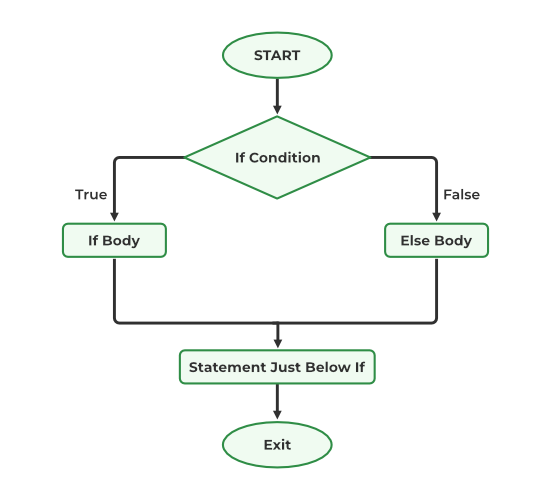
if-else statement in R
- **Start of Control: Program execution reaches the if statement.
- **Condition Evaluation: The logical condition inside if is tested.
- **If TRUE: The code inside the if block is executed.
- **If FALSE: The code inside the else block is executed (if present).
- **Flow Exit: After executing the respective block, the program continues with the next statements outside the if-else.
**Example 1: Basic if-else
Here we implement a basic if-else statement in R to check whether a number is greater than or less than 10.
R `
x <- 5
Check value is less than or greater than 10
if(x > 10) { print(paste(x, "is greater than 10")) } else { print(paste(x, "is less than 10")) }
`
**Output
[1] "5 is less than 10"
Here x is initialized to 5, the condition x > 10 is false, so the program executes the else block and prints: "5 is less than 10."
**Example 2: Checking Equality
Here we use an if-else statement in R to check whether a number is equal to 10 or not.
R `
x <- 5
Check if value is equal to 10
if(x == 10) { print(paste(x, "is equal to 10")) } else { print(paste(x, "is not equal to 10")) }
`
**Output:
[1] "5 is not equal to 10"
Here x is 5, the condition x == 10 is false, so the else block runs and prints: "5 is not equal to 10."
Nested if-else Statements in R
The if-else statements in R can be nested to form a group of statements that evaluate conditions one by one, starting from the outer condition to the inner ones. An if-else statement placed within another if-else statement in R is called a nested statement.
- Nested if-else statements allow sequential evaluation of multiple conditions.
- Execution stops at the first TRUE condition in the hierarchy.
**Syntax
if(condition1) {
# execute if condition1 is TRUE
if(condition2) {
# execute if both condition1 and condition2 are TRUE
}
} else {
# execute if condition1 is FALSE
}
Example 1: Nested if-else
Here nested if-else in R evaluates multiple conditions to find the range of x
R `
x <- 15 if (x < 10) { print("x is less than 10") } else {
if (x < 20) { print("x is between 10 and 20") } else { print("x is greater than or equal to 20") } }
`
**Output:
[1] "x is between 10 and 20"
- Outer if checks x < 10, which is FALSE.
- Flow enters the else block and evaluates the nested if (x < 20), which is TRUE.
- The program prints "x is between 10 and 20".
Example 2: Nested if-else for Eligibility
In this R code we uses nested if-else statements to assess whether a student qualifies for a scholarship based on grades and income
R `
grades <- 85 income <- 25000
if (grades >= 80) { if (income <= 30000) { print("Congratulations, you are eligible for a scholarship!") } else { print("Sorry, your income is too high to qualify for a scholarship.") } } else { print("Sorry, your grades are too low to qualify for a scholarship.") }
`
**Output:
[1] "Congratulations, you are eligible for a scholarship!"
- Define grades and income to represent a student’s scores and financial status.
- Use a nested if-else to check scholarship eligibility based on grades and income.
- Outer if checks if grades ≥ 80; inner if checks if income ≤ 30,000.
Conditions and If Statements
Here we will show the use of logical conditions in if statements. Adjust the values and conditions as needed for our specific requirements.
| Operator | Meaning | Example |
|---|---|---|
| == | Equal | x == y |
| != | Not equal | x != y |
| > | Greater than | a > b |
| < | Less than | x < y |
| >= | Greater than or equal to | x >= y |
| <= | Less than or equal to | x <= y |