RVectors (original) (raw)
R-Vectors
Last Updated : 12 Jul, 2025
R Vectors are the same as the arrays in R language which are used to hold multiple data values of the same type. One major key point is that in R Programming Language the indexing of the vector will start from '1' and not from '0'. We can create numeric vectors and character vectors as well.
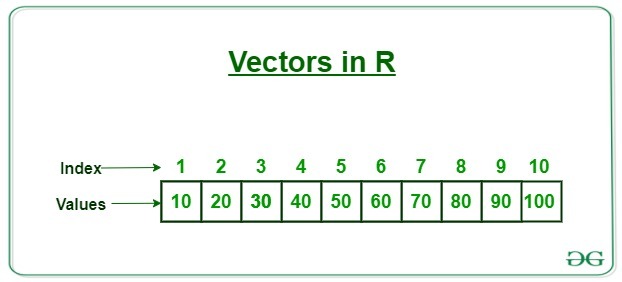
R - Vector
**1. Creating a vector in R
A vector is a basic data structure that represents a one-dimensional array. to create a array we use the "c" function which the most common method use in R Programming Language. We can also use **seq() function or use **colons ":" also as shown in the example.
R `
X<- c(61, 4, 21, 67, 89, 2) cat('using c function', X, '\n')
Y<- seq(1, 10, length.out = 5) cat('using seq() function', Y, '\n')
Z<- 2:7 cat('using colon', Z)
`
**Output:
using c function 61 4 21 67 89 2
using seq() function 1 3.25 5.5 7.75 10
using colon 2 3 4 5 6 7
2. Types of R vectors
Vectors are of different types which are used in R. Following are some of the types of vectors:
**2.1 Numeric vectors
Numeric vectors are those which contain numeric values such as integer, float, etc. The L suffix in R is used to specify that a number is an integer and not a numeric (floating-point) value.
R `
v1 <- c(4, 5, 6, 7) typeof(v1)
v2 <- c(1L, 4L, 2L, 5L) typeof(v2)
`
**Output:
[1] "double"
[1] "integer"
**2.2 Character vectors
Character vectors in R contain alphanumeric values and special characters. In R, when a vector contains elements of mixed types (like characters and numbers), R automatically coerces the entire vector to a single type. Since characters are more general than numbers in R, the vector is coerced to a character vector.
R `
v1 <- c('geeks', '2', 'hello', 57) typeof(v1)
`
**Output:
[1] "character"
**2.3 Logical vectors
Logical vectors in R contain Boolean values such as TRUE, FALSE and NA for Null values. In R, NA is a special value used to represent missing or undefined data. When used in a logical vector, NA is treated as a logical value because it is specifically designed to work with logical vectors and other types of data.
R `
v1 <- c(TRUE, FALSE, TRUE, NA) typeof(v1)
`
**Output:
[1] "logical"
3. Length of R vector
In R, the length of a vector is determined by the number of elements it contains. we can use the length() function to retrieve the length of a vector.
R `
x <- c(1, 2, 3, 4, 5) length(x)
y <- c("apple", "banana", "cherry") length(y)
z <- c(TRUE, FALSE, TRUE, TRUE) length(z)
`
**Output:
> length(x)
[1] 5> length(y)
[1] 3> length(z)
[1] 4
4. Accessing R vector elements
Accessing elements in a vector is the process of performing operation on an individual element of a vector. There are many ways through which we can access the elements of the vector. The most common is using the '[]', symbol.
**Note: Vectors in R are 1 based indexing unlike the normal C, python, etc format.
R `
X <- c(2, 5, 18, 1, 12) cat('Using Subscript operator', X[2], '\n')
Y <- c(4, 8, 2, 1, 17) cat('Using combine() function', Y[c(4, 1)], '\n')
`
**Output:
Using Subscript operator 5
Using combine() function 1 4
5. Modifying a R vector
Modification of a Vector is the process of applying some operation on an individual element of a vector to change its value in the vector. There are different ways through which we can modify a vector:
R `
X <- c(2, 7, 9, 7, 8, 2)
X[3] <- 1 X[2] <- 9 cat('subscript operator', X, '\n')
X[1:5] <- 0 cat('Logical indexing', X, '\n')
X <- X[c(3, 2, 1)] cat('combine() function', X)
`
**Output:
subscript operator 2 9 1 7 8 2
Logical indexing 0 0 0 0 0 2
combine() function 0 0 0
6. Deleting a R vector
Deletion of a Vector is the process of deleting all of the elements of the vector. This can be done by assigning it to a NULL value.
R `
M <- c(8, 10, 2, 5)
M <- NULL
print(cat('Output vector', M, "\f"))
`
**Output:
Output vector NULL
7. Sorting elements of a R Vector
**sort() function is used with the help of which we can sort the values in ascending or descending order.
R `
X <- c(8, 2, 7, 1, 11, 2)
A <- sort(X) cat('ascending order', A, '\n')
B <- sort(X, decreasing = TRUE) cat('descending order', B)
`
**Output:
ascending order 1 2 2 7 8 11
descending order 11 8 7 2 2 1